




Skip to content
View in the app

A better way to browse. Learn more.

Unraid

A full-screen app on your home screen with push notifications, badges and more.

To install this app on iOS and iPadOS
  1. Tap the Share icon in Safari
  2. Scroll the menu and tap Add to Home Screen.
  3. Tap Add in the top-right corner.
To install this app on Android
  1. Tap the 3-dot menu (⋮) in the top-right corner of the browser.
  2. Tap Add to Home screen or Install app.
  3. Confirm by tapping Install.

dimispice

Members
  • Joined

  • Last visited

  1. Thanks so much for the prompt response. I had a quick look around regarding and agree, not much info. Anyway, found a way forward in relation to the issue that got me here in the first (rclone)
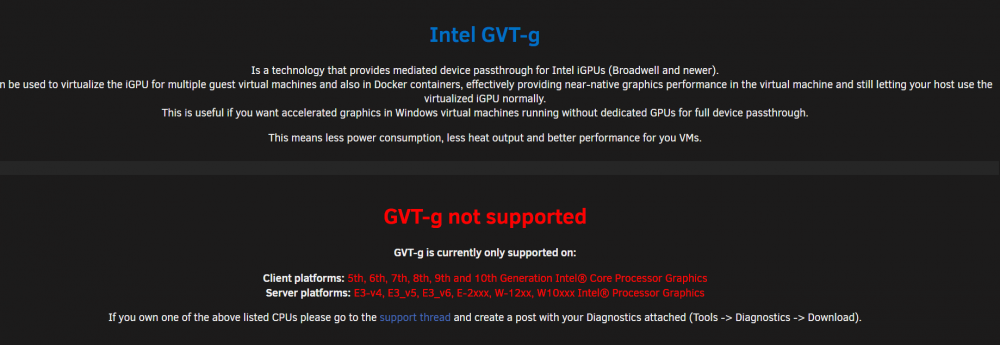
  2. Hello New to unraid. Enjoying it so far, although challenging at times. This is one of those... Have an Intel Xeon E2146G on supermicro motherboard. MB has IPMI. Have checked that onboard graphics have been enabled. Trying to get rsync going via Spaceinvader's guides, but no luck with accessing unraid gui so far Have installed Intel GVT-g but receiving "GVT-g not supported" even though it seems that my CPU is supported. As per plugin guidance, have attached diagnostic logs Any assistance greatly appreciate Cheers dimiserver-diagnostics-20220422-0134.zip

Account

Navigation

Search

Search

Configure browser push notifications

Chrome (Android)
  1. Tap the lock icon next to the address bar.
  2. Tap Permissions → Notifications.
  3. Adjust your preference.
Chrome (Desktop)
  1. Click the padlock icon in the address bar.
  2. Select Site settings.
  3. Find Notifications and adjust your preference.