Tredaptive
Members
-
Joined
-
Last visited
-
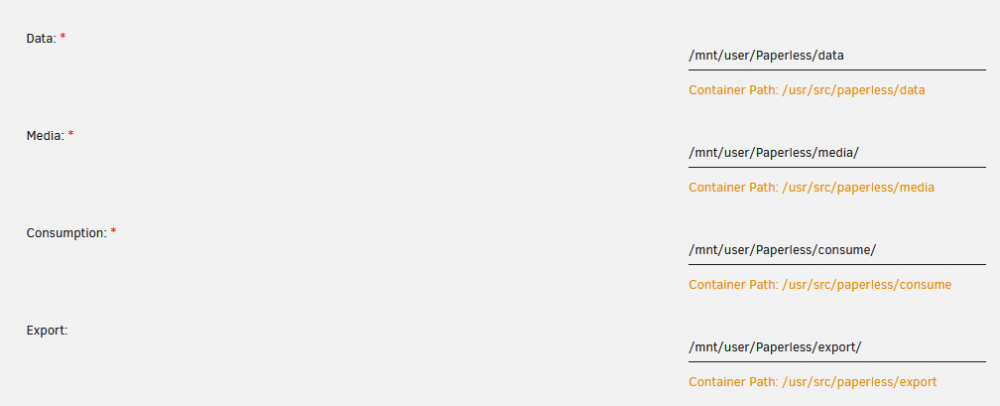
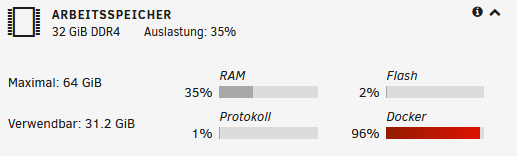
Hello guys, i hope someone can help me with my problem, i am relatively new to docker containers. I could not find anything online that helps me find a solution to my problem. Paperless-ngx always fills my docker.image instead of saving it to the array. Currently it is 96% filled and I don't know why. All files are max 1.2Gb in total. I have already enlarged the docker.image to 40Gb! in the docker settings. Here you can see the memory usage is ok, but the docker usage is nearly at the max. This is the template settings i'm using for the storage(do i have them wrong?) Update: I think I found part of the problem. I removed and reinstalled everything again and uploaded individual files as a test. Default allocation of the docker.image was about 8.26GB. Then when uploading it fluctuated between 8.26-8.27GB. I have a PDF file with 481MB which I then uploaded, now it slowly but steadily increased by that amount until it stopped at 20GB. 1 file is responsible for a little over 11GB even though the file is actually only 481MB. On the Paperless interface, the file remains in the uploader with "Processing Document" without anything else happening....