





Favor
Members
-
Joined
-
Last visited
Everything posted by Favor
-
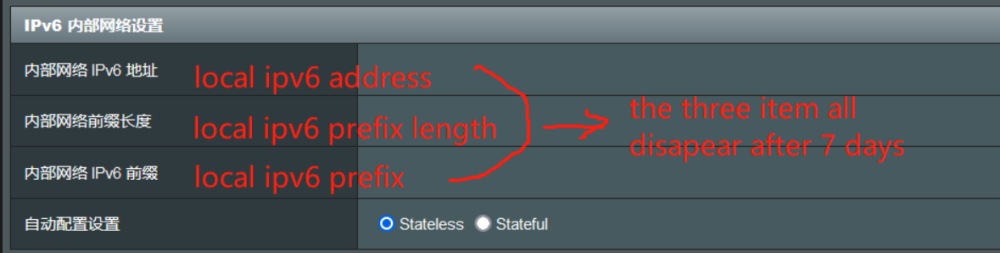
thank you for your replay "cannot get normally" means can not get ONE public address like 2001:470:.... and i think you are right the main problem is the settings of my router, it may does not pass the "router advertisement protocol" rightly, i will try to grab the packet to check it exist or not. and also, you are right "May it be that you have a castrated ISP connection which uses NAT on V6" , the three items below all disappear after 7 days😂
-
1. the unraid server get ipv6 normally on first 7 days 2. after 7 days , the ip service provider will make a remote re-dial, and the ipv6 of my router will change, here is my router's ipv6 info(using ipv6 stateless method) IPv6 Connection Type: Native with DHCP-PD WAN IPv6 Address: 2408:xxxx:xxx:xxxx:xxxx:xxxx:xxxx:xxxx/64 (xxxx is hide number , the ip is ok) WAN IPv6 Link-Local Address: fe80::ec57:551b:a8e0:a444/10 WAN IPv6 Gateway: fe80::9ee3:74ff:fe1d:144e LAN IPv6 Address: /0 LAN IPv6 Link-Local Address: fe80::d65d:64ff:fe34:4ad8/64 DHCP-PD: Enabled LAN IPv6 Prefix: /0 DNS Servers: 3. after router‘s WAN ipv6 change, my unraid server can not get ipv6 normally. 4. i shutdown all vms and dockers, and reboot my unraid server, can not get ipv6 normally again, but my android smart phone can get ipv6 normally all the time root@Tower:~# ifconfig | grep inet6 inet6 fe80::36f7:16ff:fe9c:44ab prefixlen 64 scopeid 0x20<link> inet6 fe80::36f7:16ff:fe9c:44ab prefixlen 64 scopeid 0x20<link> inet6 ::1 prefixlen 128 scopeid 0x10<host> inet6 fe80::5034:31ff:fefc:1ed2 prefixlen 64 scopeid 0x20<link> inet6 fe80::3499:bcff:fe96:6301 prefixlen 64 scopeid 0x20<link> inet6 fe80::fc54:ff:feb9:e244 prefixlen 64 scopeid 0x20<link> inet6 fe80::fcbb:78ff:fe99:40fd prefixlen 64 scopeid 0x20<link> inet6 fe80::fc54:ff:feba:d7ea prefixlen 64 scopeid 0x20<link> root@Tower:~# ping6 fe80::36f7:16ff:fe9c:44ab PING fe80::36f7:16ff:fe9c:44ab(fe80::36f7:16ff:fe9c:44ab) 56 data bytes 64 bytes from fe80::36f7:16ff:fe9c:44ab%bond0: icmp_seq=1 ttl=64 time=0.024 ms 64 bytes from fe80::36f7:16ff:fe9c:44ab%bond0: icmp_seq=2 ttl=64 time=0.025 ms 64 bytes from fe80::36f7:16ff:fe9c:44ab%bond0: icmp_seq=3 ttl=64 time=0.022 ms please help me , many thanks tower-diagnostics-20231014-1101.zip
