





Abstract7227
Members
-
Joined
Everything posted by Abstract7227
-
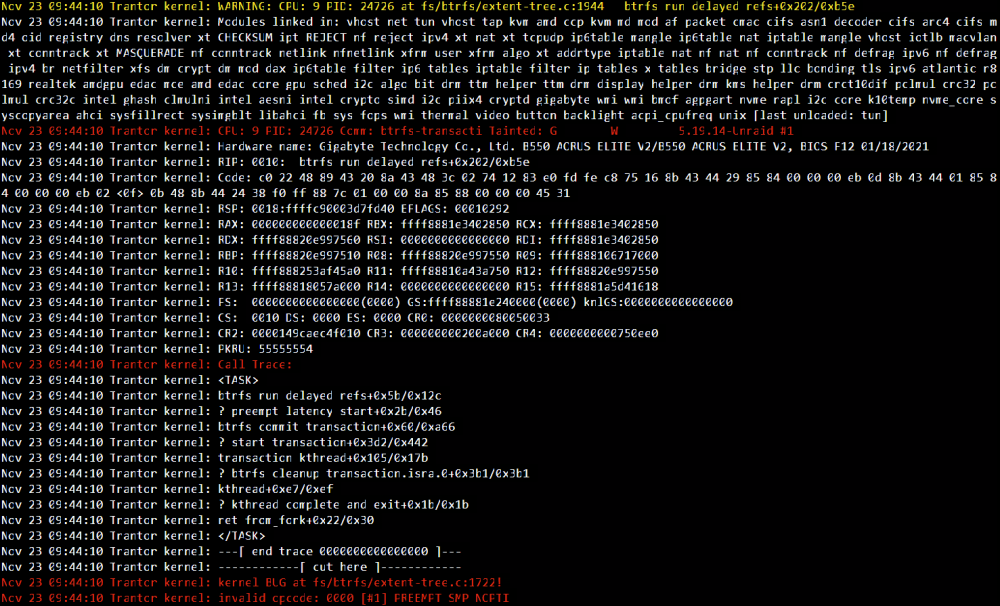
So I got the problem again. diagnostics after reboot included, as well as screenshot of some logs before reboot. So this is after I replaced the RAM and reformated my cache pool trantor-diagnostics-20221123-1355.zip
-
ah kk thx could this have caused the btrfs corruption I had, given that memtest did not find any RAM issues?
-
I moved the uncorrupted files, reformated the cache pool, moved it back and was pleasantly surprised my dockers were very much intact when I reinstalled the images. What I am a bit worried about however is that I recently checked the logs and encountered the following entries: Nov 8 08:54:22 Trantor kernel: nvme nvme0: I/O 64 QID 1 timeout, aborting Nov 8 08:54:22 Trantor kernel: nvme nvme0: I/O 65 QID 1 timeout, aborting Nov 8 08:54:22 Trantor kernel: nvme nvme0: I/O 66 QID 1 timeout, aborting Nov 8 08:54:22 Trantor kernel: nvme nvme0: I/O 67 QID 1 timeout, aborting Nov 8 08:54:22 Trantor kernel: nvme nvme0: I/O 68 QID 1 timeout, aborting Nov 8 08:54:52 Trantor kernel: nvme nvme0: I/O 64 QID 1 timeout, reset controller Nov 8 08:54:52 Trantor kernel: nvme nvme0: I/O 7 QID 0 timeout, reset controller Nov 8 08:55:54 Trantor kernel: nvme0: Admin Cmd(0x6), I/O Error (sct 0x3 / sc 0x71) Nov 8 08:55:54 Trantor kernel: nvme nvme0: Abort status: 0x371 Nov 8 08:55:54 Trantor kernel: nvme nvme0: Abort status: 0x371 Nov 8 08:55:54 Trantor kernel: nvme nvme0: Abort status: 0x371 Nov 8 08:55:54 Trantor kernel: nvme nvme0: Abort status: 0x371 Nov 8 08:55:54 Trantor kernel: nvme nvme0: Abort status: 0x371 Nov 8 08:55:54 Trantor kernel: nvme nvme0: 15/0/0 default/read/poll queues Nov 8 12:08:05 Trantor nginx: 2022/11/08 12:08:05 [crit] 2930#2930: *1016094 pwritev() "/var/lib/nginx/client_body/0000147454" failed (28: No space left on device), client: unix:, server: , request: "POST /pub/devices?buffer_length=1 HTTP/1.1", host: "localhost" Should I be worried about this?
-
Some indeed failed, does that mean those files are lost? I assume the same error would occur when using krusader to move them
-
Noob question, but considering I pointed shares from /mnt/user/appdata to /mnt/cache/appdata on some docker containers. Can I still take the "backup" by changing the cache only shares to "yes" and activating the mover, then reformat the cache pool, setting the shares to "prefer", run the mover again, and changing it to "yes" after? Or wont that work anymore?
-
So I should definitely replace the RAM then? And if I do, I should still reformat the cache pool after a backup?
-
Thx for the response, I ran 2 passes without errors, any other causes I can look at?
-
This might be a unrelated issue, but recently my docker containers became unresponsive again. The docker logs showed some readonly errors, so I guess this is related to problems on my cache pool? Diagnostics during issue included. A reboot fixed the problem here. If I am reading this right, the issue here is related to the cache pool? SMART does not report any errors on the drives though, and the drives are relatively new. Not sure how to troubleshoot this :( trantor-diagnostics-20221105-0238.zip
-
thx for the response, changed the Power Supply Idle Control from auto to enabled, heres to hoping that fixes the problem
-
Hi, Since setup, I have been experiencing server outages every few days. The outage would start becoming noticable because some docker containers would not respond anymore, the webgui would still load most of the time, but if you go to for example the docker containers page, or try to download the diagnostics, the webgui would freeze and the server would become unreachable (even pinging the server would not succeed). included are the diagnostics files after a reboot, since downloading the diagnostics files are not possible during the issue (so I am not sure if they are helpful) I already tried: - disabling some docker containers I thought caused the problem, no luck something that might be important. Some of my dockers have a folder mapping to the /mnt/cache/share instead of /mnt/user/share due to performance issues when going through /user, the shares that are mapped are configures as cache only though. I first thought maybe the mover could not deal with this, but according to unraids documentation, they wouldnt even look at those shares, and some outages start to occur at a time when the mover is not running. Can anyone shed some light on what is going wrong here? trantor-diagnostics-20221102-1712.zip trantor-diagnostics-20221024-0834.zip
-
awesome thx
-
is that in the root directory of that disk? I can't see any lost+found folder (also looked for hidden folders). I also noticed that all my shares are configured as high-water, and that another disk is currently the one getting filled during a move. So I guess I am safe of any data loss then?
-
Hi JorgeB, Thx for the guidance, The disk is mounted again and the files that I could not previously access are now back. Should I be worried on data loss? I assume the parity check will find some errors? Can I assume the "bad" files will be the ones that were last written?
-
Thx for the response, I ran the xfs_repair -nv: Phase 1 - find and verify superblock... - block cache size set to 1480768 entries Phase 2 - using internal log - zero log... zero_log: head block 2972053 tail block 2972049 ALERT: The filesystem has valuable metadata changes in a log which is being ignored because the -n option was used. Expect spurious inconsistencies which may be resolved by first mounting the filesystem to replay the log. - scan filesystem freespace and inode maps... sb_fdblocks 122015995, counted 128830882 - found root inode chunk Phase 3 - for each AG... - scan (but don't clear) agi unlinked lists... - process known inodes and perform inode discovery... - agno = 0 - agno = 1 - agno = 2 - agno = 3 inode 6959670454 - bad extent starting block number 4503567551028270, offset 0 correcting nextents for inode 6959670454 bad data fork in inode 6959670454 would have cleared inode 6959670454 - process newly discovered inodes... Phase 4 - check for duplicate blocks... - setting up duplicate extent list... - check for inodes claiming duplicate blocks... - agno = 0 - agno = 1 - agno = 3 - agno = 2 entry "redacted.txt" at block 4 offset 2368 in directory inode 6959661560 references free inode 6959670454 would clear inode number in entry at offset 2368... inode 6959670454 - bad extent starting block number 4503567551028270, offset 0 correcting nextents for inode 6959670454 bad data fork in inode 6959670454 would have cleared inode 6959670454 No modify flag set, skipping phase 5 Phase 6 - check inode connectivity... - traversing filesystem ... - agno = 0 - agno = 1 - agno = 2 - agno = 3 entry "redacted2.txt" in directory inode 6959661560 points to free inode 6959670454, would junk entry bad hash table for directory inode 6959661560 (no data entry): would rebuild would rebuild directory inode 6959661560 - traversal finished ... - moving disconnected inodes to lost+found ... Phase 7 - verify link counts... No modify flag set, skipping filesystem flush and exiting. XFS_REPAIR Summary Fri Oct 7 11:04:44 2022 Phase Start End Duration Phase 1: 10/07 11:04:06 10/07 11:04:07 1 second Phase 2: 10/07 11:04:07 10/07 11:04:08 1 second Phase 3: 10/07 11:04:08 10/07 11:04:28 20 seconds Phase 4: 10/07 11:04:28 10/07 11:04:28 Phase 5: Skipped Phase 6: 10/07 11:04:28 10/07 11:04:44 16 seconds Phase 7: 10/07 11:04:44 10/07 11:04:44 Total run time: 38 seconds I am not quite sure what to do, if I run the xfs_repair without the -n flag, it says something like "The filesystem has valuable metadata changes in a log, mount the drive first", which I cannot do in its current state does that mean I have to run the xfs_repair with the -l flag while in maintenance mode?
-
Hi all, My nextcloud server recently shut down ungracefully. Upon reboot, I noticed that some files that were listed in my cloud were not accessible anymore. Upon closer inspection, I noticed one of my drives not mounting due to a "Unmountable: Wrong or no file system" error. My current setup (diagnostics attached): 5 4TB drives (2 parity, 3 data), xfs encrypted (not sure if that changes the recovery process) 1 cache pool of 2 1TB nvme drives in RAID1, btrfs encrypted I do have a versioned backup of all my files, but I hope I can avoid recovering from that, as it is a very slow process to do so. trantor-diagnostics-20221007-0822.zip
-
ah ok thx for checking, really appreciate it. This might be a dumb question, but will my docker images "state" so to speak be lost when recreating this? I have a plex container on there for example that I spend a lot of time on, I know the database and such are stored in the appdata folder, but can I be absolutely sure that if I pull the docker images again and configure it with the same settings it will act like it was never deleted?
-
Hi, I am currently getting recurring "Unable to write to Docker Image" errors. My diagnostics however is also giving me errors like this: Page cache invalidation failure on direct I/O. Possible data corruption due to collision with buffered I/O! I did a cache scrub, which told me there were no errors, so I am not sure how to debug this. My cache setup contains 4 1TB drives. Thx in advance. pandora-diagnostics-20220525-1013.zip
-
Hi, One of my servers is experiencing random "crashes" every few days. My docker containers would complain that they cannot access their files anymore, and using the console to list files in /mnt/user/ returns the "/mnt/user/ transport endpoint is not connected randomly" error. Reboot fixes the issue, but the server has become quite important, so I want to fix the issue once and for all. I saw this post that said it is related to docker containers directly moving, copying or unpacking /mnt/user/ files, but I am a little confused, cause don't all docker containers do that, as appdata is in /mnt/user/? For performance reasons, I did change a few docker paths to /mnt/cache instead of /mnt/user for shares that are only on cache drives (nextcloud in particular has very poor performance when you point the appdata to /mnt/user/ instead of /mnt/cache/ eventhough appdata is set to be on cache only). Would changing those paths cause any issues like this? Thx in advance trantor-diagnostics-20220520-0806.zip
-
Aight, thx for the help
-
yeah, like you said, it didn't work either ERROR: cannot read chunk root ERROR: cannot open file system So I have to live with the fact that all of my cache data is gone?
-
no luck: ERROR: cannot read chunk root Open ctree failed Will try --repair now btrfs check --repair /dev/sdX1
-
Thx for the response. I am getting the following error on all of my remaining cache drives: > ERROR: cannot read chunk root > Could not open root, trying backup super Wanted to check if the only thing I can do is go for the btrfs check --repair command, as you state it is not a preferable solution?
-
See attached file pandora-diagnostics-20220516-1428.zip
-
my apologies See attached file pandora-diagnostics-20220516-1232.zip
-
Hi, My current setup has 4 cache drives set to btrfs raid1. One of those 4 drives seems to have died and I wanted to make sure that I am doing things by the book to prevent any data loss. When I boot the server, it shows the failed drive as unassigned (which is a little weird to me, cause with array drives, they usually show as missing + drive name). When I start the array without the failed drive attached, my docker containers seem to be missing. Shouldn't those still show up as the cache pool is set as a raid1 and therefor no data should've been lost? When a spare drive is connected, I have the option to add it to the cache pool and format it, but I want be sure that if I do that, it will just rebuild the raid and give me back my docker containers? Any advice? Thx in advance

