





RVRX
Members
-
Joined
-
Last visited
Everything posted by RVRX
-
Is there a way to reset/reinstall Wireguard + maybe other network settings?
-
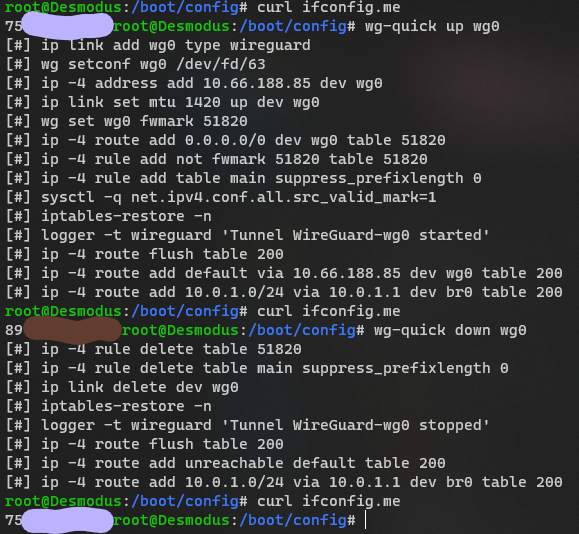
Yeah I have the VPN setup and I can turn it on... BUT... there is no wg0 interface?? i.e. new containers cannot bind to network type wg0
-
Also is wg show all supposed to return anything? The output is nothing for me
-
Anything look off here (other than the IP change lol)?
-
~~Well, after deleting and readding a new config, Unraid now refuses to start any VPN I import...~~ Removed network.cfg, restarted a few times, now I am back to just the original problem again
-
Updating the server saw no change in this behavior. I will try and remove and recreate the VPN interfaces when I have a chance.
-
Just the default config from my provider, nothing that stands out to me as troublesome: [Interface] PrivateKey = XXXXXXXXXXXXXXXXXXXXXX Address = 10.67.169.119/32,fc00:bbbb:bbbb:bb01::4:a976/128 DNS = 10.64.0.1 [Peer] PublicKey = XXXXXXXXXXXXXXX AllowedIPs = 0.0.0.0/0,::0/0 Endpoint = 89.45.224.145:51820
-
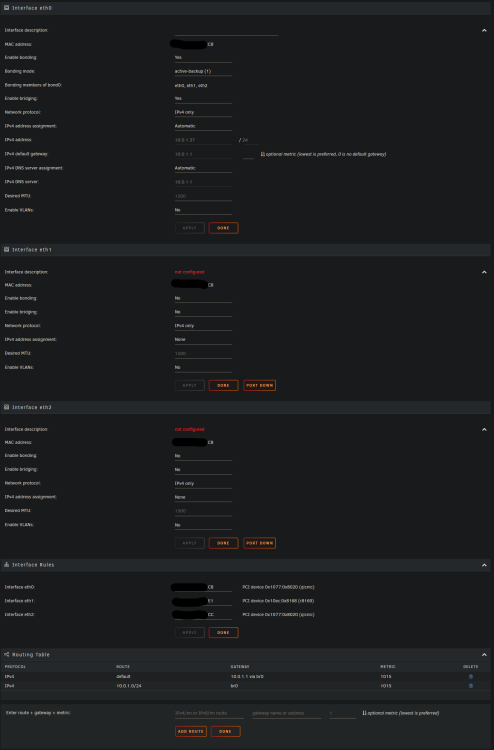
Unraid is using any VPN marked as "for Docker" for all network traffic. This issue popped up randomly a few weeks ago. Short video demonstrating me adding the VPN, turning it on, and seeing the IP the OS uses change: Screenshot of my network settings: Any Advice? At this point I'd settle for just reinstalling Unraid if there is an easy way to do that?
-
My network config: Video of me setting up VPN from scratch:
-
I have a Wireguard tunnel configured as "VPN Tunneled Access for Docker", and randomly within the last 24hrs my server decided to use it for all connections. I noticed this when I couldn't connect to my VPN which uses a DDNS pointing to my LAN, and I noticed it was resolved to my VPN's IP. Confirmed with `curl ifconfig.me` returning the VPN IP as well. `wg0` isn't mentioned in the Networks Settings page at all, so I'm unsure how to debug this. LMK what screenshots and printouts might be helpful. ifconfig.txt
-
Found this line in my syslog, what is this `veth` and why was eth0 renamed to it? Sep 1 10:03:32 Desmodus kernel: veth3a384e9: renamed from eth0
-
Second time this has happened, so I'm looking to actually resolve the issue instead of just rebooting this time. So randomly overnight my server can no longer access the internet. I can still ping all LAN devices just fine (and vise-versa), but not anything on the internet. No, not a DNS issue I don't think (weirdly enough dig requests go through fine nvm, not when using non-default DNS server like 8.8.8.8) as pinging direct IPs outside of LAN doesn't work either. Yes, `eth0` is up. Any troubleshooting tips? root@X:~# ifconfig eth0: flags=6211<UP,BROADCAST,RUNNING,SLAVE,MULTICAST> mtu 1500 ether d0:50:99:8c:04:e1 txqueuelen 1000 (Ethernet) RX packets 112366720 bytes 89441656575 (83.2 GiB) RX errors 0 dropped 0 overruns 0 frame 0 TX packets 120496292 bytes 91951093228 (85.6 GiB) TX errors 0 dropped 0 overruns 0 carrier 0 collisions 0 desmodus-diagnostics-20220901-1216.zip
