





Succulent_Pig
Members
-
Joined
-
Last visited
Everything posted by Succulent_Pig
-
I didn't spot that DHCP wasn't set, why wasn't that set as default?
-
There's no static IP set
-
tower-diagnostics-20260222-1842.zip
-
It's put the names straight issue persists
-
tower-diagnostics-20260222-0926.zip
-
Evening All To preface, I've got a new to me X11SSH-LN4F with a E3-1240 v6, the onboard 1g ports work fine. Hoping someone can point me in the right direction. I've got two 10g NICs, Mellanox Connect X-3 (MCX312A-XCBT) and an Intel X540-T2 (P/N unknown) and I'm connecting into the Unifi ecosystem. Neither work. All the lights flash, can see the MAC address in Unifi but an IP doesn't get handed out. I can see the network adapters inside UNRAID but ethtool shows the links as down. To discount the hardware, they work fine in a windows machine and, sorry to say, I've fired up TrueNAS and they've worked straight off without messing about. Log file attached, I've only got the X-3 installed at the time of the syslog I've had a look at https://forums.unraid.net/topic/142684-what-i-learned-about-installing-a-mellanox-connectx-3/, the firmware on my card doesn't give me those options, it's updated to the latest so that's no help. ethtool output: Supported ports: [ FIBRE ] Supported link modes: 1000baseX/Full 10000baseCR/Full 10000baseSR/Full Supported pause frame use: Symmetric Receive-only Supports auto-negotiation: No Supported FEC modes: Not reported Advertised link modes: 1000baseX/Full 10000baseCR/Full 10000baseSR/Full Advertised pause frame use: Symmetric Advertised auto-negotiation: No Advertised FEC modes: Not reported Speed: 10000Mb/s Duplex: Full Auto-negotiation: off Port: Direct Attach Copper PHYAD: 0 Transceiver: internal Supports Wake-on: d Wake-on: d Current message level: 0x00000014 (20) link ifdown Link detected: no Thanks in advance Dave syslog.txt
-
Morning, I've been having some trouble trying to get a WAVLINK 5Gbe to USB-C adapter working correctly in UNRAID. I've installed the driver from the community app area and followed the instructions to correctly get a 5GB auto negotiation. I can confirm it's correctly negotiated by running ethtool eth0. it'll display 5000Mb/s for about 10 mins, with transfer speeds to back it up, until for some reason it drops down to 10Mb/s again with representative speeds. Reboot the system and repeat the same scenario. Tried the same via a MacBook Pro, can't replicate the issue. Any ideas? UNRAID V7.0.0 Beta 2 HP Mini 400 G6 WAVLINK USB C to Ethernet Adapter NWU340GD (Realtek RTL8157) - connected to the USB-C 3.1 port on the front
-
Figured it out, ended up being a subnet issue. Put them both on the same subnet and away it flew.
-
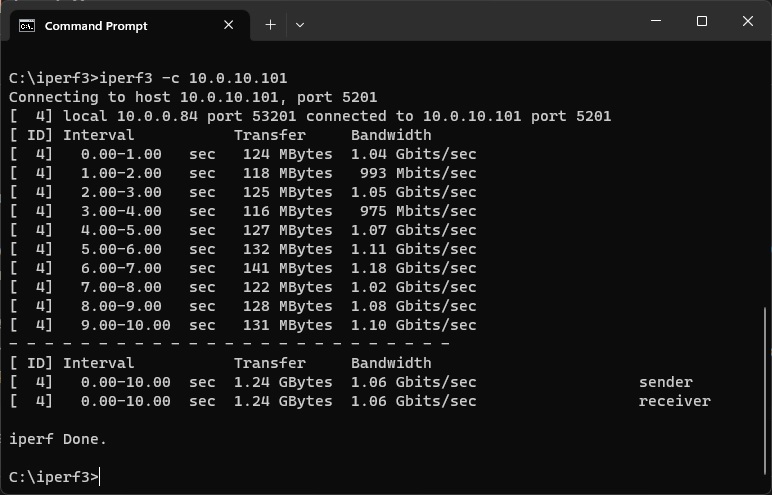
Afternoon all. I was trying to avoid starting another 10 gig networking thread but I think I've exhausted everything that I can find on the forum. My UNRAID machine has got a Mellanox ConnectX-3 card in it, my main machine is on HP 561T card connected together via a Unifi Aggregation Switch. I've had this setup working fine on an alternate OS but not having any luck with UNRAID which is ideally where I'd like to stay. iPerf output I have seen speeds peak up to 200~ a couple of times but obviously that is still far off the mark. To take my main machine out of the equation, I've also tried it in a windows VM which is hosted on the UNRAID machine and that returns only a little better. Diagnostics are attached. Thanks in advance! unraid-diagnostics-20230503-1550.zip
-
Apologies if this has been covered in the past, having no luck finding a solution in the search. I'm trying to pass through a USB PCIE Controller into an Ubuntu VM. The device is in it's own IOMMU group. When selecting the device VM Edit window and then booting, the VM fails to boot. I can see the following in the log: Jun 6 05:52:53 Tower kernel: pcieport 0000:00:1c.5: AER: Uncorrected (Non-Fatal) error received: 0000:00:1c.5 Jun 6 05:52:53 Tower kernel: pcieport 0000:00:1c.5: PCIe Bus Error: severity=Uncorrected (Non-Fatal), type=Transaction Layer, (Requester ID) Jun 6 05:52:53 Tower kernel: pcieport 0000:00:1c.5: device [8086:a33d] error status/mask=00100000/00010000 Jun 6 05:52:53 Tower kernel: pcieport 0000:00:1c.5: [20] UnsupReq (First) Jun 6 05:52:53 Tower kernel: pcieport 0000:00:1c.5: AER: TLP Header: 34000000 03000010 00000000 00008830 Jun 6 05:52:53 Tower kernel: pcieport 0000:00:1c.5: AER: device recovery successful Looking at the system devices, the device with the issue here is: [8086:a33d] 00:1c.5 PCI bridge: Intel Corporation Cannon Lake PCH PCI Express Root Port #6 (rev f0) The device that I'm trying to pass through is the following: [1912:0014] 03:00.0 USB controller: Renesas Technology Corp. uPD720201 USB 3.0 Host Controller (rev 03) I can see that the device is happily bound to the VFIO driver. I have been able to pass through a GPU to another VM in the past so I am fairly happy with settings in the BIOS, just cant figure this bit out. Machine details are: Intel 8700K Asus Maximus Hero XI (Z390) Unraid Version 6.10.2 Thanks in advance! Dave

