





Fredde
Members
-
Joined
-
Last visited
-
Managed to fixit. What i did. whent back to docker image. (7.2.4) Moved all moved everyting i hade on cache pool to array. upgraded to 7.3.2 (that got released today) IT worked. moved back VM share to cache. ( did not what to start got mount loop error that pointed to VM cache file. ) reboot fixed it. moved back share system to cache again (docker) and it worked tested reboot and sitt worked. Soo don´t know what fixed it maybe upgrade when all was on array or the new 7.3.2 hade a fix for it.
-
But if i dont even use docker image anymore, why go back to it again? And Docker directory is the new an better way what i read?
-
Yes it did docker.img got the same problem. soo thats why i changed to Docker directory but that did not help. So now it runs Docker directory on 7.2.4 and works fine. but if i upgrade to newer versions rc.docker failede to start.
-
Hi. Have tryed to upgrade to versions 7.2.7 and 7.3.1 and get the same problem. My docker rc.docker failede to start. What i have tryed: have done a new docker. image dont help. change to docker directory instead same problem. removed nvida quadro P620 card also tryed change drivers befor that. dont help. (and unistalled plugin) fresh install of usb only moved config folder. ( to version 7.3.1) same problem. it seams like it cant mount docker. So i need help. sorry for bad english. Log file uploaded. nas-diagnostics-20260708-1141.zip
-
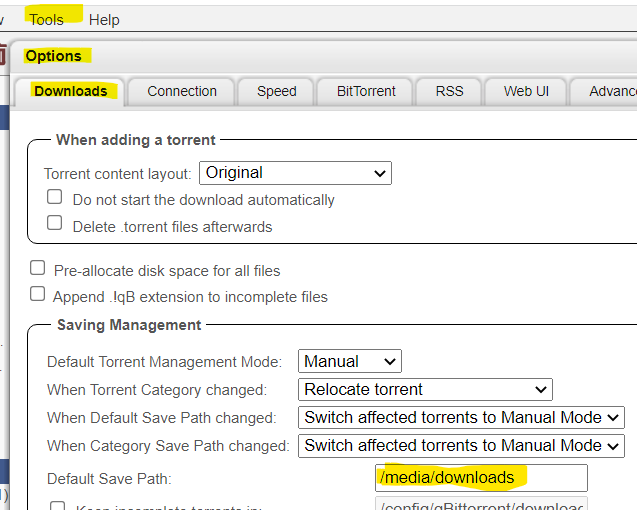
1. go to check the logg. In there you vill have a line like this "[info] Successfully retrieved external IP address 123.123.123.123 " thats says your ext ip adress is. it shuld not be the same as your computers external ip adress. EDIT: just rememberd you can che the IPs here http://checkmyip.torrentprivacy.com/ 2. If i remember correct you need to change it. Do it here. Your is probably /data
-
Fredde joined the community
-
Hello there. 1. Go to https://mullvad.net/sv/account/#/wireguard-config/ and make your config file. You need to login to make you Wireguard key Download your configuration 2. Docker: Edit the container . ( i changed from nordvpn to mullvad and change this settings. ) Container Variable: VPN_USER "Your wireguard key here" Container Variable: VPN_PASS "Leave it blank" Container Variable: VPN_CLIENT "Wireguard" 3. restart the docker container. ( This will create floder "wireguard" in appdata/binhex-qbittorrentvpn/wireguard 4. Copy the file in the zip file you got from Mullvad to appdata/binhex-qbittorrentvpn/wireguard (can be more files in that zip file you only need one) 5. Restart it again and it should now work. Hope it helps.

