




Skip to content
View in the app

A better way to browse. Learn more.

Unraid

A full-screen app on your home screen with push notifications, badges and more.

To install this app on iOS and iPadOS
  1. Tap the Share icon in Safari
  2. Scroll the menu and tap Add to Home Screen.
  3. Tap Add in the top-right corner.
To install this app on Android
  1. Tap the 3-dot menu (⋮) in the top-right corner of the browser.
  2. Tap Add to Home screen or Install app.
  3. Confirm by tapping Install.

lvips

Members
  • Joined

  • Last visited

  1. 我的WX:5170607.请由相关经验的同道中人加我给予指导,感激不尽!
  2. 我正在使用的unraid系统,因为硬盘拆卸过程中未记录顺序,产生无法辨认校验盘和数据盘问题,出现启动阵列提示硬盘错误或没有文件系统。我的unraid是1块校验盘、3块数据盘,目前只识别一块数据盘,请问如何识别校验盘,并解决硬盘错误或没有文件系统的问题,比较着急,等待支持。 另外,准备安装一套新的unraid,如果上述问题无法解决,能否把以前unraid硬盘里的数据,导入到新的unraid中,请指导,感谢!
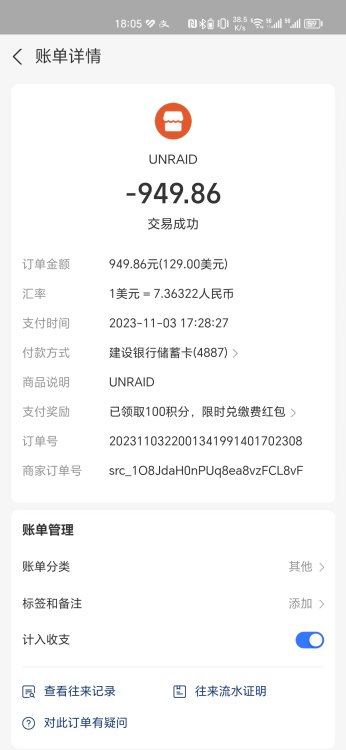
  3. On November 3, 2023, on the official website of unraid China, I passed the [email protected] , purchased the unaid pro version. But I haven't received the key yet. Please verify the situation with your company, ship the goods or refund. The picture includes a purchase voucher and order information. Please reply as soon as possible. Thank you!
Account

Navigation

Search

Search

Configure browser push notifications

Chrome (Android)
  1. Tap the lock icon next to the address bar.
  2. Tap Permissions → Notifications.
  3. Adjust your preference.
Chrome (Desktop)
  1. Click the padlock icon in the address bar.
  2. Select Site settings.
  3. Find Notifications and adjust your preference.