





Rajkumar.krsu
Members
-
Joined
-
Last visited
-
1. 1866 Done! 2. Memtest, Going on, the one with unraid was just rebooting, so downloaded the latest version and have started the test. Since I have 64GB will take some time. 3. Then will just boot the machine and in array booted mode (normal-mode) as it is BTRFS, will try and use "mount -o usebackuproot,ro /dev/nvme0n1p1 /mnt/x. 4. Has Mounted ok. 5. have recovered my data. 6. Have tried the repair option. Does not correct the error, the same numbers keep reappearing. 7. Formatting the Drives. 8. Recreating the Cache pool. 9. Thank you 4 all your help. Hope the above is okay!!!
-
Thank u for the prompt reply. 1. I am going to reduce ram speed to 1866. 2. Run Mem-Test. 3. Which MDx should I run the repair option and could u help me with the command and parameters pls. Thx.
-
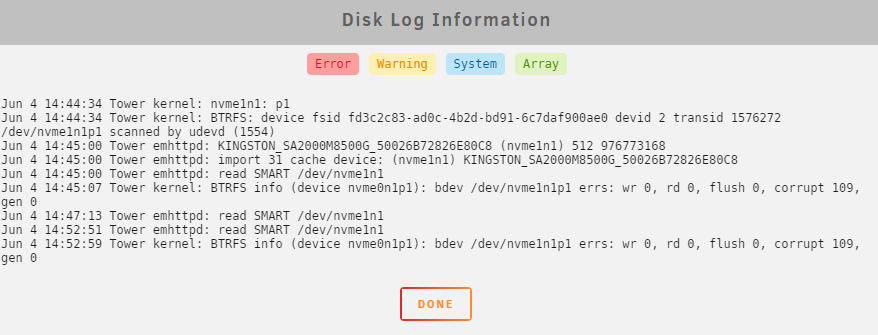
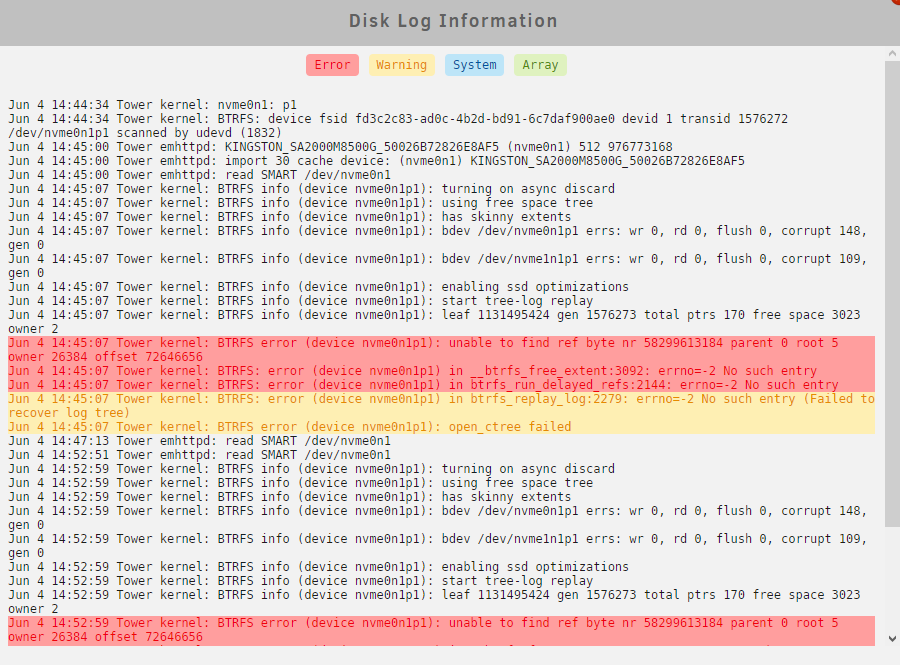
attaching 2 more files cache log info for main and mirror drive
-
Hi, Woke-up in the morning to find my cache pool offline. upon checking found that the system is showing under fs "btrfs" and also "Unmountable: No file system". Attached is a screenshot along with the diagnostics file. Since I have Company data, have not done anything to the system as yet. Any Help would be appreciated, Thx. Rajkumar. tower-diagnostics-20220604-1445.zip


