





MacDreidel
Members
-
Joined
-
Last visited
Everything posted by MacDreidel
-
Yes, can you elaborate on what to look for in the logs? Nothing stood out to me. Always random issues with this setup. I think I'll go ahead and do a rebuild around another system. Just want to verify this is an OS level issue and not some hidden problem with any of the drives.
-
Ahh thank you. Bios was a few years out of date, so that's updated and set "Power Supply Idle Control" to "typical current idle". I haven't overclocked the RAM. It's been pretty stable generally, but does seem to crash/lose connection after a month or so up. So try another rebuild and it should hopefully go through now? Was there something in the diagnostics that pointed the unraid driver crashing out?
-
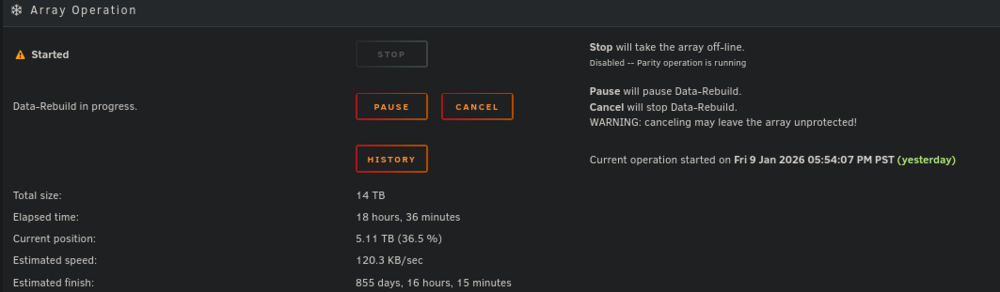
Hello, I've been having some trouble with my unraid server. A while ago I had a hard crash while messing with a vm and everything seemed borked afterward. One of the array drives was marked disabled after booting and I replaced it with a drive I was about to add to the array. Was fine for a couple days. But then the drive appeared disabled again. Now every time I run the rebuild around 36% it gets stuck and the speed keeps reducing. Last night was the 2nd time its done this. When it's in this state the pause doesn't do anything, and if I hit reboot it just hangs on the "rebooting..." page powered on. All the SMART data looks fine, and I've tried different SATA ports/cables. Any idea what is happening here? Do the BTRFS errors in logs mean anything? Thanks for any help in advance. Also I am pretty out of date. Was hoping to stabilize then update the OS and move cache/vms to that 2tb nvme and retire the other SSDs. Edit: I should add it's still currently going. I don't hear the drives spinning up at all and CPU/RAM usage is similar to idle. Also possible related. Docker keeps getting corrupted. It'll be fine a few days then service fails to stop and I delete docker.img and let it rebuild. Currently have it disabled while figuring this out.
-
Diags download fine after restarting. Looks similar to the last time I noticed this and looked at them. Only errors I see are for removed VM templates. I'm sure unrelated to this, but is it expected for unraid to not delete docker app and VM templates when you remove them from the UI? tower-diagnostics-20250109-1906.zip
-
Happens across multiple browser and machines, would be nice to not have to reboot my server every few days. The fact that it's stuck on downloading diagnostics makes me think I should be restarting instead of letting it hang like I have been. Gonna pay more attention this time and see how long it takes to happen again.
-
I've been having this problem for months now, funny I just now look it up and find a 10hr old post. Same as you, can't access web CLI but can still ssh and run htop, honestly just been ignoring it because of that. Everything works but the UI gets janky in the Docker page sometimes too, are you running a lot of containers? May want to post your diagnostics, I remember the only errors I saw last time I looked were for missing xml templates of VMs I already deleted. And it's taking forever to download them now.

