Gandalf1783
Members
-
Joined
-
Last visited
-
Nevermind guys, i started the Array in maintenance mode and am rebuilding it now.
-
Hey folks, happy christmas! I just moved all my 5 HDDs into a different enclosure. Before, 2 of the HDDs were connected via a RAID-Card which just passed the hdds through. Technically, the 2 HDDs were running in a seperate RAID0 / in a Volume with only 1 disk. Therefore, the drives should be able to work just fine. Sadly, the Drive-Names changed and i dont have any reference (Like Serial Number) which of both went into the parity pool and which into the array pool. I made a screenshot before, but the strings are nowhere near close. Is it bad if i swap Parity Drives and Array Drives? Since i have 2 parity drives, i should be able to sustain the loss and rebuild the array if necessary, but I want to avoid that if possible. Is there a way that i can make sure to use the correct drives / tell which one is which (e.g. via partition type?) Thanks!
-
Update: SSH did not run by default. I had to start it. If needed, can I create the diagnostics via CLI so I can post them here? I can provide my networks.cfg file over pastebin: Pastebin Network.cfg Config EDIT: If not clear from post: The network interfaces are up, and can be pinged. Connection to Internet is possible (DNS works too).
-
Hey, my UnRaid Server is not showing the UI upon removal of the default bridge. NGINX seems to be down and cant be started. I have seen other threads with a similar error message, however the steps provided there did not work. I have static IPs on eth1 and eth2, eth0 should be dynamic (DHCP). It looks like it cannot find out which IP to put into the server_name directive. Can I provide one? I can only add a screenshot made from my phone, sorry for that. https://imgur.com/a/CvGxRhr I also rebooted into GUI mode, same issue. IPs are set, and cant start nginx, same error with the same line number (65). Thanks for the help.
-
So, I recently had a power outage. I plugged in a power strip which seems to have caused a short, and well, the breaker turned off. Therefore, everything was restarted. And it seems, that after this restart, everything works fine. The VM is now running for multiple days without corruption, in contrast to what happened before. I can only assume that a software update of the NFS Drivers in Proxmox was not completed / needed a restart, or something like DMA didnt work quite out (though I never got to see errors on the PVE-Host). Therefore, the Issue here is "resolved" while no clear solution was found. For anybody else who has this, try a reboot
-
Not yet, mainly because my parity checks shows 0 errors and the NAS runs fine for other VMs. Keep in mind that the VM that is spitting these errors has the disks on the NAS. I am currently moving the VM disk onto a different disk in my array, cannot see a different reason. Especially since the VM disk isnt even corrupted or anything, it just seems to loose the connection.
-
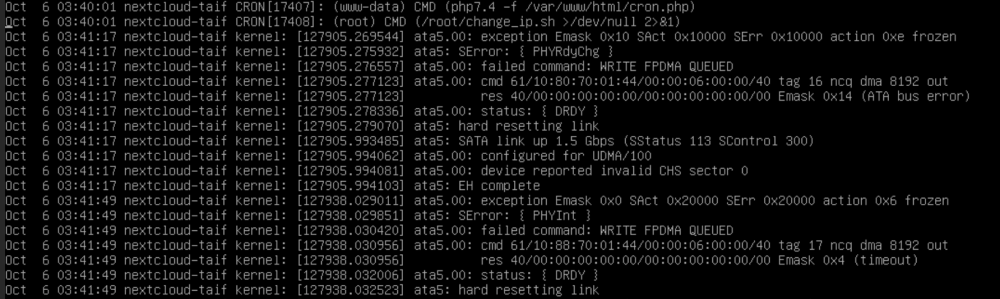
Hey everyone, I have this issue where my Proxmox VM Disks (mounted over NFS from my UnRaid NAS) will throw ata errors after some time. I figured out, that in this case, after the mover run, the issue occured: Unraid Syslog: Oct 6 03:23:00 NAS emhttpd: read SMART /dev/sdd Oct 6 03:40:01 NAS crond[1062]: exit status 1 from user root /usr/local/sbin/mover &> /dev/null Oct 6 04:01:55 NAS emhttpd: spinning down /dev/sdd Syslog of my VM: You can see, that just a minute after he mover seemed to run, it started with this errors. On Oct 4th, the mover also ran at 03:40, but my VM didnt have any errors until 11:44 that day. In this case, Unraid mentioned a disk spindown at 10:44, but the issues arrived an hour later. Is there a known problem with running VM Disks on a NFS Share? I disabled caching (dont have a cache drive though), and i can only guess that my drives dont spin up intime to provide data. I attatched my diagnostics below: Dont know if this is intresting, but my NFS Share is conncted over a 10G Interface (which isnt known to me for problems), but could ofc be a potential issue. Thanks! nas-diagnostics-20221006-1010.zip