





derek_zoolander
Members
-
Joined
-
Last visited
Everything posted by derek_zoolander
-
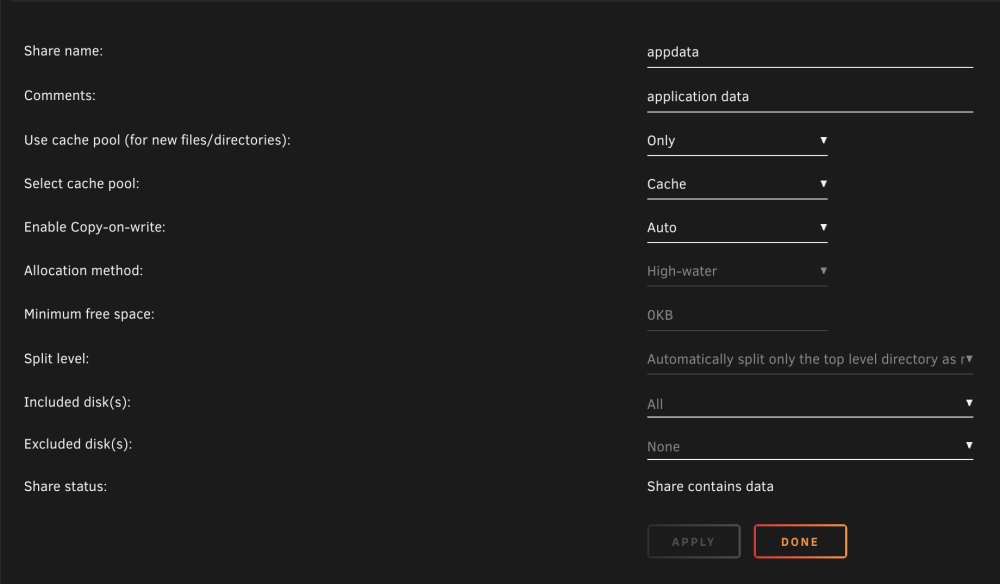
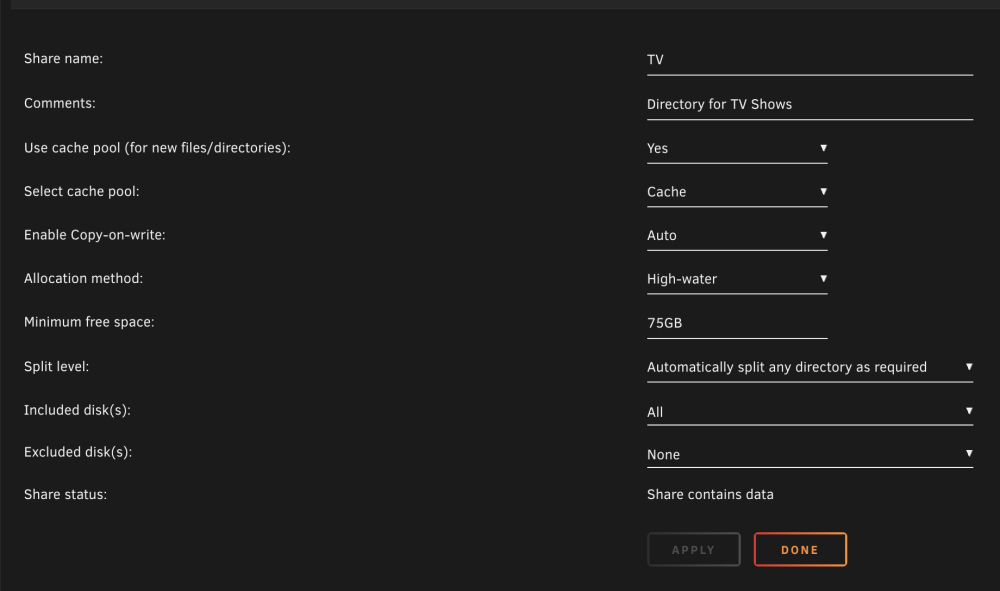
So I am not sure I understand. my appdata + media share settings are attached. Appdata is set to be able to utilize all space, while my media directories are set to leave 75GB free. Second Screenshot is the Pool info. There's 74GB left. How come appdata is not utilizing this space? Am I missing something?

-
Diagnostics attached. Did a large TV backlog download today and have my TV shows set to go to cache first, leaving ~70GB of space before direct writing to the array. Today my entire arr suite has been acting up, getting errors in the log from Radarr saying that /config isnt writable and disk is full. This cannot be though, because Unraid and my settings prevent cache from filling completely. any suggestions? I am sure running the mover will fix it, but I thought keeping the TV/Movie/share minimum free space was to prevent stuff like this & I want to make sure I have things configured correctly to not lock up my server for the next time I do a big backlog action. media-server-diagnostics-20220914-1532.zip
-
I dont use jellyfin, i was just testing when i made that post. Never received any comments regarding the crash so assumed it was a fluke. Maybe someone who is running JF as their daily driver could comment further.
-
Pretty sure Jellyfin always worked
-
I had issue passing hyperthreaded cores to a w7 VM.
-
For anyone having a similar issue. I am on Alderlake - I was passing hyperthreaded cores to the VM. It appears that only passing main cores has resolved this issue. Posting in case anyone else searching for a solution stumbles here
-
Keep running into a problem with a windows 7 VM. As the title says, the VM completely locks up a few minutes after booting, I can VNC into the machine, but everything is just locked up and I have to hard reset. Any thoughts on what is causing this and/or how to resolve? diganostics removed This is also in the VM log: qxl_send_events: spice-server bug: guest stopped, ignoring KVM internal error. Suberror: 3 extra data[0]: 0x000000008000002f extra data[1]: 0x0000000000000020 extra data[2]: 0x00000000000005aa extra data[3]: 0x0000000000000004 RAX=0000000000000000 RBX=fffffa800053f880 RCX=0000000040000070 RDX=0000000000000000 RSI=000000000001bfd8 RDI=0000000000000002 RBP=fffff880009ae9c0 RSP=fffff880009ae918 R8 =0000000000000001 R9 =0000000000000000 R10=fffffa8003c021e0 R11=fffff880009aeaa0 R12=0000000000000000 R13=0000000000000000 R14=0000058000000000 R15=fffffa8000566850 RIP=fffff800026e422c RFL=00000046 [---Z-P-] CPL=0 II=0 A20=1 SMM=0 HLT=0 ES =002b 0000000000000000 ffffffff 00c0f300 DPL=3 DS [-WA] CS =0010 0000000000000000 00000000 00209b00 DPL=0 CS64 [-RA] SS =0018 0000000000000000 ffffffff 00c09300 DPL=0 DS [-WA] DS =002b 0000000000000000 ffffffff 00c0f300 DPL=3 DS [-WA] FS =0053 00000000fff9a000 00003c00 0040f300 DPL=3 DS [-WA] GS =002b fffff8000280ad00 ffffffff 00c0f300 DPL=3 DS [-WA] LDT=0000 0000000000000000 ffffffff 00c00000 TR =0040 fffff80000b96080 00000067 00008b00 DPL=0 TSS64-busy GDT= fffff80000b95000 0000007f IDT= fffff80000b95080 00000fff CR0=80050031 CR2=0000000001dedcf0 CR3=0000000000187000 CR4=000406f8 DR0=0000000000000000 DR1=0000000000000000 DR2=0000000000000000 DR3=0000000000000000 DR6=00000000ffff0ff0 DR7=0000000000000400 EFER=0000000000000d01 Code=25 a8 4b 00 00 b9 70 00 00 40 0f ba 32 00 72 06 33 c0 8b d0 <0f> 30 5a 58 59 c3 90 90 90 90 90 90 90 90 90 90 90 90 90 90 cc cc cc cc cc cc 66 66 0f 1f
-
HW transcoding using the iGPU is plenty fast enough. Jellyfin was working for me using the iGPU, but there are issues with plex currently if you pass through the igpu. SW transcoding in plex using the CPU cores should be fine with a 1080 stream or 2. My 10 yr old 4 core i5 could do 1 1080 transcode.
-
I have an 12600k with asrock z690 pro rs, no issues whatsoever. I dont use igpu yet due to lack of support. Everything else works 100% fine for me. Arr suite, a few random other dockers to support my media ecosystem and a vm or two. 32 gb ram, 500gb nvme cache. 18tb across 6 drives w/ parity. I dont have many plex users and the ones I do are 99% direct play.
-
update: jellyfin did end up crashing eventually with this in the log. Not sure if its related or anything as there was no active transcode occuring, however playback may have been occurring in the browser (I was letting movies run in the background). UnRAID remained stable throughout though 16:47:41] [FTL] [65] Main: Unhandled Exception System.ArgumentOutOfRangeException: Index was out of range. Must be non-negative and less than the size of the collection. (Parameter 'index') at System.Collections.Generic.List`1.Remove(T item) at Emby.Server.Implementations.Session.WebSocketController.OnConnectionClosed(Object sender, EventArgs e) at System.Threading.Tasks.Task.<>c.<ThrowAsync>b__128_1(Object state) at System.Threading.QueueUserWorkItemCallback.<>c.<.cctor>b__6_0(QueueUserWorkItemCallback quwi) at System.Threading.QueueUserWorkItemCallback.Execute() at System.Threading.ThreadPoolWorkQueue.Dispatch() at System.Threading.PortableThreadPool.WorkerThread.WorkerThreadStart()
-
thanks everyone! Got it working! To help out @ich777, I installed JellyFin - seems to be transcoding a 4k movie great through the first 10 mins of playback so far (30% transcode progress though).
-
is it just plex that crashes alderlake iGPU? I have a 12600k, but mainly interested in using my iGPU for VMs, tdarr, etc. as 95% of my plex streams are direct play. Can anyone comment on unRAID stability when plex is not configured to use the iGPU?


