



Skip to content
View in the app

A better way to browse. Learn more.

Unraid

A full-screen app on your home screen with push notifications, badges and more.

To install this app on iOS and iPadOS
  1. Tap the Share icon in Safari
  2. Scroll the menu and tap Add to Home Screen.
  3. Tap Add in the top-right corner.
To install this app on Android
  1. Tap the 3-dot menu (⋮) in the top-right corner of the browser.
  2. Tap Add to Home screen or Install app.
  3. Confirm by tapping Install.

Jordy Leeflang

Members
  • Joined

  • Last visited

Everything posted by Jordy Leeflang

  1. Do you know whats wrong with MacVlan? Because i think it did the trick switching to ipvlan. I just like the way MacVlan works how a client can get an IP from DHCP and be reconized as sepperate clients. It took me a solid day to switch to ipvlan but i think it works it has been stable sinds. Thnx for the advise.
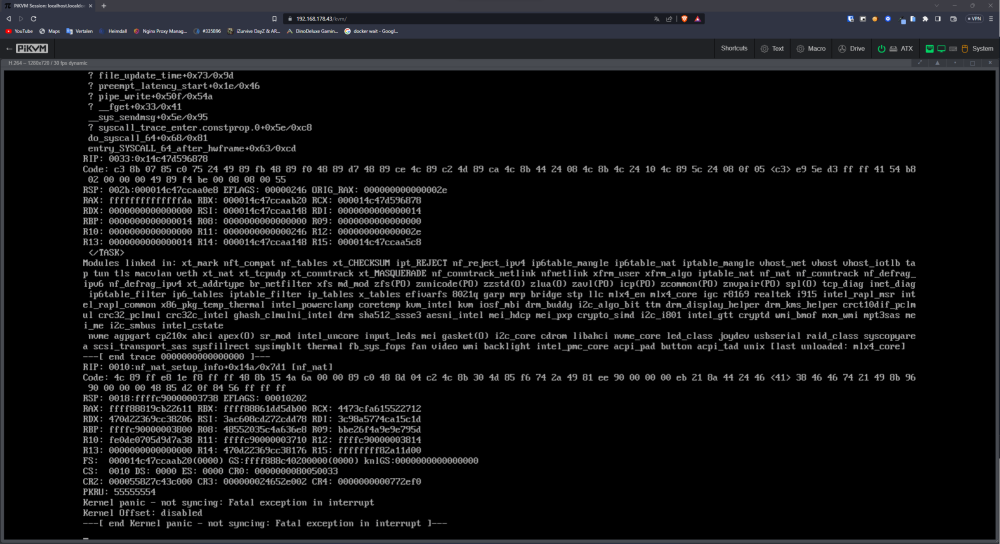
  2. My unraid server has been running fine for the last year or so. But recently it keeps crashing every couple of days. I honestly dont know where to start with troubleshooting would be awsome if someone could help me out. I'll attach the last log and disgnostic files to this post. And also a screenshot from the last therminal/log i can see on my PIKVM after a crash. syslog dekluis-syslog-20230812-0929.zip dekluis-diagnostics-20230812-1128.zip
Account

Navigation

Search

Search

Configure browser push notifications

Chrome (Android)
  1. Tap the lock icon next to the address bar.
  2. Tap Permissions → Notifications.
  3. Adjust your preference.
Chrome (Desktop)
  1. Click the padlock icon in the address bar.
  2. Select Site settings.
  3. Find Notifications and adjust your preference.