






Junker der Provinz
Members
-
Joined
-
Last visited
Everything posted by Junker der Provinz
-
Hi @reinv, thanks for the kind words and for the detailed request! ShipLog 3.5.0 is out and can read a changelog file. Open the ShipLog status page (http://<your-server>:8484), click source in the Domoticz row and paste the file's URL. The GitHub file view link works too, ShipLog turns it into the raw link itself: https://github.com/domoticz/domoticz/blob/development/History.txt The bubble then shows the top section of the file. For Domoticz that's "Version 2026.4", the upcoming release that collects all the beta changes. The beta builds (2026-beta.18377 and so on) never show up as headings in History.txt, so ShipLog can't pick the exact span there. For projects with a CHANGELOG.md and version headings it shows the sections between your running and the newest version. For bug reports or feature requests, GitHub is the best spot, I see those fastest there: https://github.com/junkerderprovinz/shiplog/issues
-
ArrowLoopTwo-way file sync that shows you the plan before it moves anything. What is this?ArrowLoop keeps two folders in step: an Unraid share and a laptop, a share and a cloud, or two servers. It remembers what both sides last agreed on, so it can tell a file that is new on one side from one that was deleted on the other. Before a run it lists every change with its direction and its reason; untick what you disagree with, and nothing is touched until you start it. It reaches every rclone backend, compiled in rather than shelled out to: local folders and shares, SMB, SFTP, S3-compatible storage, WebDAV clouds such as Nextcloud and OpenCloud, and the rest. The same engine runs as this container, as a desktop app for Windows, macOS and Linux, and as an Android app. Highlights & FeaturesEvery change is listed before a run, and single ones can be dropped Deletions go to a trash on the side that loses the file, never straight away A run that would delete more than half the known files stops and says so, and a side that suddenly lists nothing is refused, because an unmounted disk looks exactly like an emptied folder An edit on both sides keeps both versions, and an edit beats a deletion Schedules, real-time watching, scripts before and after a run, and a notification when a run fails Encryption at the destination through rclone's crypt A password, two-factor authentication and passkeys for the WebUI, under Settings, Security 42 languages, light and dark themes Images: junkerderprovinz/arrowloop:latest on Docker Hub and ghcr.io/junkerderprovinz/arrowloop:latest, for amd64 and arm64 RequirementsUnraid 6.10+ Keep the WebUI on your LAN until you set a password under Settings, Security: until then anyone who can reach it can start a sync that deletes files The Data path is mounted read-write, because a two-way job writes to both sides Bugs, Problems, WishesSomething not working, a question or an idea? The best place for it is an issue on GitHub: github.com/junkerderprovinz/arrowloop/issues. Everything stays in one place there, and nothing gets lost in a long thread. For a bug, whether you post it there or here, these help: Unraid version (Settings → System Information) Image tag (latest or a pinned version) Output of docker logs --tail 200 ArrowLoop The job's two sides (a local path, an SMB share, a cloud and so on), and what you expected against what happened Whether the run stopped with a message, and its text CreditsBuilt on rclone, embedded as a library, which is what lets one engine reach every backend. If ArrowLoop keeps your files where they belong, you can buy me a coffee. Self-hosted, AGPL-3.0 licensed: you run it, you own your data and the responsibility.
-
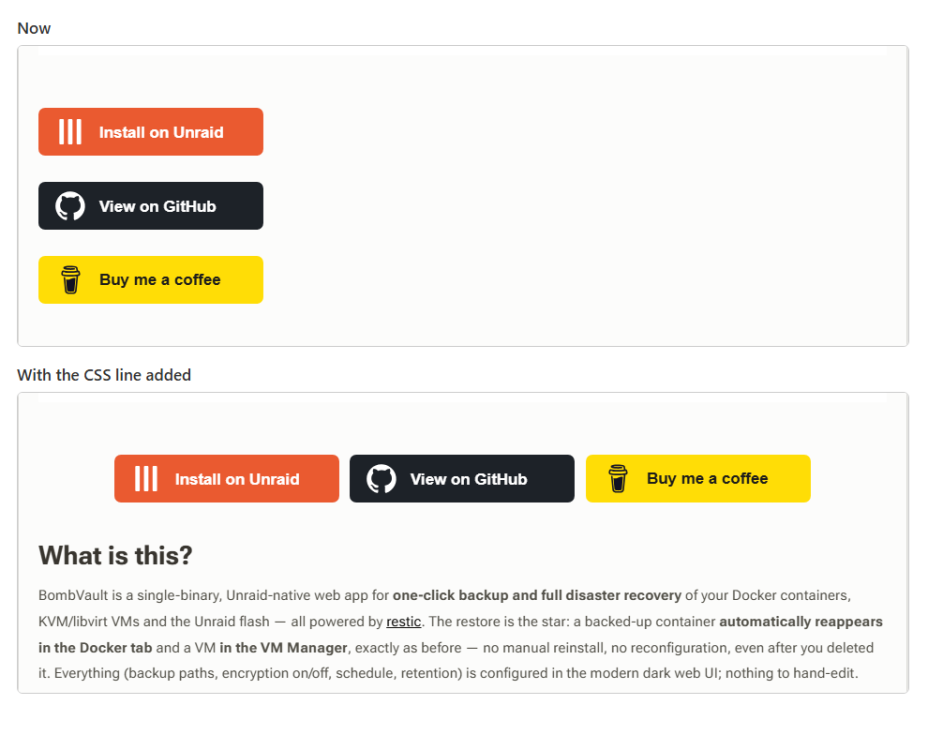
Hi @elibosley, My support threads have a row of three link buttons under the banner: three images in one centered paragraph. They used to sit side by side in the middle. Now each one sits on its own line, flush left. You can see it in my BombVault support thread: https://forums.unraid.net/topic/199509-support-junkerderprovinz-bombvault/ Every image in a post gets the class ipsRichText__align--block, which is display: block, so the paragraph's text-align: center doesn't reach them anymore. The image menu only offers Normal, Left and Right, so I can't fix it from inside the post, and tables have no alignment at all. The theme already has .ipsRichText__align--inline { display: inline-block }, but the editor doesn't let you pick it. Either "inline" could go into the image alignment menu, or this one line of custom CSS would do it: .ipsRichText p[style*="text-align:center"] .ipsRichText__align--block:not(.ipsRichText__align--width-fullwidth) { display: inline-block; } I tried the line in the browser on the live thread. The three buttons go back into one centered row, and full-width images like the banner stay as they are. Before and after screenshot attached. Thanks!
-
Hey @dam_j, glad it's working now, and thanks for letting me know! About the iOS app: your guess is right. The App Store version has its look built in and doesn't pull the branding from your server, so the Branding app only changes the web interface and the sign-in page. To get your own logo and colours into the app, you'd have to build your own copy from OpenCloud's source code, which has a branding file for exactly that. That needs an Apple developer account and your own distribution through the App Store or TestFlight, so it's well outside what the container can do. Nextcloud's apps do pick up the server colours, but OpenCloud's apps don't read any theming from the server at all. For bug reports or feature requests, GitHub is the best spot, I see those fastest there: https://github.com/junkerderprovinz/opencloud/issues
-
Hi @dam_j, no, it's not the language. An update only pulls the new image. Unraid never adds new fields to the edit page of a container that's already installed, so "Branding admin app" won't show up on its own, however many updates you install. I've reported that to Unraid: https://github.com/unraid/webgui/issues/2765 You need to add the variable once by hand: 1. In the Unraid web interface, open the Docker tab. 2. Click the OpenCloud icon and choose Edit. 3. Scroll to the bottom and click "Add another Path, Port, Variable, Label or Device". 4. In the window that opens, set Config Type to Variable, Name to Branding admin app, Key to BRANDING_APP and Value to true, then click Save. 5. Click Apply at the bottom of the edit page. Unraid recreates the container with the new variable. After that, sign in to OpenCloud with an admin account. Branding is in the app menu next to your avatar. If it still isn't there, please open an issue on GitHub with the container log. I see those fastest there: 1. On the Docker tab, click the OpenCloud icon and choose Logs. A window with the log opens. 2. Click into that window, press Ctrl+A to select everything, then Ctrl+C to copy it. 3. Open https://github.com/junkerderprovinz/opencloud/issues and click "New issue". 4. Describe what you see, then paste the log between two lines that contain only three backticks (```) so it stays readable. Thanks!
-
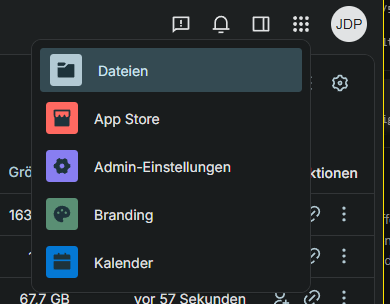
Branding is new in the template, and Unraid doesn't add new template fields to a container that's already installed, so your edit page doesn't show it yet. You can add it by hand: 1. On the Docker tab, click the OpenCloud icon and choose Edit. 2. At the bottom, click "Add another Path, Port, Variable, Label or Device". 3. Set Config Type to Variable, Name to Branding admin app, Key to BRANDING_APP and Value to true. Save, then Apply. After the restart, sign in with an admin account and open the app menu next to your avatar. Branding shows up there; other accounts don't see it.
-
@dam_j Small update on this: v1.3.0 ships a Branding app in the web interface, so the logo and the text no longer need a hand-edited theme.json. Set Branding admin app to true in the advanced view of the template and restart once. Admins then get a Branding entry in the app menu for the instance name and slogan, a logo for light and dark mode, the favicon, the login background, and whether the sign-in card is light, dark or follows the browser. The login page shows all of it as well, and saved changes apply without another restart. Colours are not in the app. While it is on, it rewrites the theme list in themes/_branding/theme.json at every start, so custom colours in that file get replaced. If the palette matters more to you than the app, leave the toggle off and keep editing the file by hand. It is off by default, so nothing changes if you do nothing.
-
Hey @dam_j Glad it works! Yes, you can, but not from a settings page. OpenCloud reads a theme file from the Data folder: Open https://YOUR-SERVER-IP:9200/themes/opencloud/theme.json (or your own OpenCloud URL) and save it. That's the theme currently in use. Put it at /mnt/user/appdata/opencloud/data/web/assets/themes/opencloud/theme.json (create the folders) and your logo in an assets folder next to it. Edit it: text: common.name and common.slogan logo: common.logo and clients.web.defaults.logo, e.g. themes/opencloud/assets/mylogo.svg colours: clients.web.themes[].designTokens.roles (primary is the main one) Hard-refresh the browser (Ctrl+F5). The login page uses the logo from the same file. For a background image there, add the variable IDP_LOGIN_BACKGROUND_URL to the template with the URL of your image. The login page's own colours are built in and don't follow the theme.
-
Hey @JesterEE thanks for putting both images through their paces and writing it up. That was useful feedback, and all three points were fair. They are fixed in v2.5.0, which is out now. Quitting the app You were right that ich777's behaviour is the better one. The session now watches Krusader: close it in the browser and a fresh one starts, so refreshing the tab brings you straight back without restarting the container. Diff tool Kompare is bundled and wired into File > Compare by Content. RAM This turned out better than I expected. The heavy part is not the encoder but the X server: it reserves its whole framebuffer up front, about 4 bytes per pixel, and the base image sizes that screen at 15360x8640. That is 530 MB for a resolution nobody uses, and it also explains why your 3070 barely moved the number. GPU rendering changes where frames are encoded, not that allocation. The screen size is now a template setting rather than something I decided for you: a dropdown of presets with the memory cost written on each entry, plus a free field if you want a size that is not in the list. Nothing is capped unless you pick a cap. Measured here on a live container: full 15360x8640: ~700 MiB 3840x2160: ~295 MiB 3440x1440: ~210 MiB 1920x1080: ~200 MiB At your 3440x1274 the ultrawide preset should put you near 210 MiB, which is well under the bar you named. I would be curious whether your numbers match mine. One small ask: reports like this are very welcome as issues on GitHub (https://github.com/junkerderprovinz/krusader/issues), where they are easier for me to track and to link a fix to. The forum works too, though, and I would much rather read it here than not at all.
-
StrawDroid: a real Android emulator for UnraidA phone you can break. What is this?A straw knight is the practice dummy: built in the shape of the real thing so somebody can strike at it without anybody getting hurt. This container runs the real Android emulator, the same AVD Android Studio starts, headless on a Selkies desktop. The screen arrives in your browser over WebRTC and is encoded on the box's own GPU, and adb reaches it over the network, so Android Studio deploys and debugs on it exactly like a phone on a cable. It is deliberately not Android-in-a-container. ReDroid and Waydroid run the Android userspace on the host kernel: no battery, no motion sensor, no power HAL. Doze therefore never fires and the limits on background work never apply, so a test rig built on one is green because it never asks the question. A real AVD asks, and it answers on demand. HighlightsAndroid 16, API 36, google_apis, x86_64. The newest level on purpose: it is the strictest about background work, and it carries Play services and a real SAF folder picker adb over the network: adb connect <ip>:5555 and Android Studio lists it as an ordinary device Doze on demand, which is the whole point of a real AVD: adb shell dumpsys deviceidle force-idle A share that reaches the phone: anything dropped into /share turns up on the device under Download/share, so a build can be installed by tapping it, without a terminal WebRTC, not VNC: judging how an app feels is judging its scrolling and its transitions, which is exactly the part a framebuffer diff smears The device arrives set up: wallpaper, dark mode, an empty home screen and monochrome icons everywhere, done once on the first boot and never written again, so anything you change afterwards is yours Persistent by design: /config holds the device itself, including installed apps and granted permissions, so a restart is not a factory reset Image: ghcr.io/junkerderprovinz/strawknight:latest RequirementsUnraid 6.10+ /dev/kvm on the host, passed in via Extra Parameters (--device=/dev/kvm). On bare metal it is simply there; inside a VM it needs nested virtualisation. Without it the emulator does not start, and the container log says so in as many words Memory: an emulator is a virtual machine and holds its memory whether anybody is testing or not. Measured idle, with no app installed, about 6 GB. The template caps it at 8 GB and four cores amd64 only. The system image is x86_64, so there is nothing for an arm64 build to run It is deliberately not set to restart on its own. Start it when it is needed and stop it after Posting a bug reportPlease post: Unraid version (Settings > System Information) Image tag (latest or a pinned vX.Y.Z) Output of docker logs --tail 200 StrawKnight Whether /dev/kvm is present on the host: ls -l /dev/kvm Whether you changed EMULATOR_GPU, EMULATOR_DEVICE, EMULATOR_RAM or the /config mount GitHub issues with the same information are just as welcome: github.com/junkerderprovinz/strawknight/issues CreditsBuilt on the Android emulator and Google's system images, on LinuxServer's Selkies base image. The device ships with Lawnchair (Apache-2.0) and the Arcticons icon pack (GPL-3.0) by Donnnno, both unmodified. budtmo/docker-android did this first and is well kept; this one differs in putting the emulator on a hardware-encoded desktop rather than behind noVNC. If StrawKnight saves you a spare phone, you can buy me a coffee. Self-hosted, AGPL-3.0 licensed. You run it, you own your data and the responsibility.
-
@luke.smith.name Glad that got you further, and the edit answers it: the password is in the recovery kit. Worth adding, because it is the part that catches people: for a repository you RECEIVED, the password comes from the sending instance's APP_KEY, not the receiving box's. Deriving it from the wrong key looks exactly like a corrupt repository. You do not need the kit either. It is computed, not stored: printf 'bombvault:restic-repo' | openssl dgst -sha256 -mac HMAC -macopt hexkey:$APP_KEY -r | cut -d' ' -f1 On "repository contains errors": try restic repair index first, then restic repair snapshots if snapshots stay unreadable. BombVault only reads a received repo, so it will not repair it for you. All of this is in v8.5.0: the Receiver page now says it when a check fails, the encryption card names the kit, and the derivation is in the docs. Bugs and feature requests are best on GitHub, that way I can link them to the fix and come back to you when it ships: https://github.com/junkerderprovinz/bombvault/issues
-
Hey @luke.smith.name, thanks for taking the time to write all that up. It was genuinely useful, especially that you separated what went wrong from what you thought was causing it. All six points are in v8.4.0: https://github.com/junkerderprovinz/bombvault/releases/tag/v8.4.0 1. Receiver location. A path under /mnt is a host path, and BombVault runs in a container where the host's /mnt sits somewhere else. The error blamed the APP_KEY, which sent you off in the wrong direction, and I'm sorry that cost you time. It now names the relative path to use instead. One more thing worth knowing: the Sending APP_KEY is the sending box's key, not the receiver's. That one catches almost everybody. 2. Tamper test. A 404 from the far side was being read as a pass. It now says "inconclusive" rather than claiming a protection nobody actually demonstrated. 3. The restic container. You were right about the symptom. The docker run itself is fine, I checked it against a real rest-server, but a container Unraid did not create from a template has no Edit form behind it, so falling back to a CA container was a perfectly sensible move. The wizard now also gives you an "Unraid template (XML)" tab: save it under /boot/config/plugins/dockerMan/templates-user/, then Docker > Add Container. Every field stays editable and --append-only stays where you can see it. 4. Docs. There's now a worked two-box example with real values, five steps, and a table for what protected / NOT protected / inconclusive each mean. It calls out both traps from point 1. Translated into all 25 languages. 5. "Immutable baked in." Half done, and I'd rather say so than pretend otherwise. The recipe path is fixed above, and the protection card now marks an off-site copy that isn't append-only as an amber gap instead of a grey dash. What's still missing is BombVault deploying the receiving container itself. That touches the receiver model, which is new, so I'd rather give it its own round than rush it in here. 6. Sources / jobs / repositories. This one deserves a proper discussion, so it has its own issue: https://github.com/junkerderprovinz/bombvault/issues/190 Interesting thing I found while writing it up: all three axes already exist in the data model. What's missing is a name for a combination and a screen that shows them. I'd really like your take there, especially on what you went looking for and didn't find. And a small favour, if you don't mind: for bugs and feature requests, GitHub issues are the best place. https://github.com/junkerderprovinz/bombvault/issues It just means I can link them to the commit that fixes them and come back to you when it ships, which is harder to do from a thread. Questions, ideas and general chat are always welcome here though, and thanks again for the detail.
-
Hey @Retrolamer1337, that one is on me. I said "in Settings" and left it at that, but the Settings page has seven tabs, so it was not much of a direction. It is on the Schedules tab, and it is the last card on it, below the five per-domain schedules. Adding #schedules to your Settings URL jumps straight to that tab. The card is titled "Backup Everything" and it has been in every release since 8.0.0, so 8.3.0 has it. If it is still not there once you are on that tab, say so and I will dig further.
-
Hi @Retrolamer1337, sorry for the slow reply, and thanks for the request. It landed while v8.0.0 was being built, and it turned out to be one of the things that release adds. 8.0.0 went out today. You were right that per-container hooks were the only thing on offer. v8.0.0 adds Backup Everything: one pass that runs containers, then VMs, then flash, then folders, then BombVault's own config, with its own pre-hook and post-hook. Those run on the host shell, not inside a container, so a curl is exactly what they are for. You will find it in Settings, and it takes its own schedule. The post-hook fires once, after all five have been attempted, and it fires whether they succeeded or not. That is deliberate: a hook that only runs on success is no use as a dead man's switch, because the case you most want to hear about is the one where something went wrong. The single exception is a pass that could not even be recorded as started, where firing would be a false "done", so silence still means something. Where it does not match your list: you asked for five hooks, one after each group. What ships is one hook after the whole pass. If a single ping when everything is done is the goal, that is covered exactly. If you need a different endpoint after the containers than after the VMs, that is not there yet. Say so and I will look at it. One caveat worth knowing: the per-container hooks you have today run inside the container, these run on the host shell. Different environment, so a command that works in one will not necessarily work in the other.
-
TL;DR:your OpenCloud share is cache->array, so it goes through Unraid's FUSE layer, and there is also a real crash-on-timeout bug on the OpenCloud side that a burst of small-file uploads triggers. That combo explains both the fatal crashes and the GUI hang (php-fpm workers backing up on blocked I/O). Cheapest next step: run opencloud storage-users uploads sessions --processing inside the container to check for a stale-session backlog like opencloud-eu/opencloud#3283 hit. If that is not it, moving the data volume off the array (or at least NATS_NATS_STORE_DIR) onto a direct pool path is the storage-side fix. Detail below. Hi @BlindOwl, sorry you have been fighting this for two weeks. I run OpenCloud on Unraid myself and went down the same rabbit hole from the OpenCloud side, so hopefully some of this helps. I put the OpenCloud-specific details in the GitHub issue that is already cross-linked here (opencloud-eu/opencloud#3271), so I will keep the deep stuff there and stick to the Unraid side in this post. First off, your Aug 7 isolated test is the most useful thing in this thread. Only the OpenCloud stack running, everything else stopped, and the Work folder still killed the box within seconds. That takes contention with your other containers off the table. It is OpenCloud's own I/O pattern on its own, and 2000+ small files is exactly the shape of workload that does it. I also went through your syslog and the docker log you attached, and the timing lines up exactly: a burst of uploads starts, and about 6 seconds later OpenCloud's own postprocessing service hits a fatal error trying to publish to its internal message bus and the whole process exits. To your three questions. Fair warning up front: this is my reasoning from how Unraid is put together and from the logs you posted, not something I confirmed by reading emhttpd's source, so treat it as a well-fitting theory rather than gospel. 1. Why the web UI eventually goes unresponsiveThe webGUI is nginx plus php-fpm, and a lot of its pages stat /mnt for the dashboard graphs and various status pages. Your syslog shows exactly this: repeated "upstream timed out... auth-request.php" errors every 20 to 40 seconds, then "server reached max_children setting (50)" a couple minutes in. Once the pool is maxed out, every request gets a 504, including the /sub/session,var,notify subrequest that drives the live-updating parts of the GUI. That matches your symptoms very neatly too: the Processor graph reads /proc and touches no disk, so it kept working, while System, Interface and the VMs tab all stat /mnt and died first. 2. Why diagnostics and powerdown -r do nothingSame root cause, I believe. Both of them walk your shares and disks, and both wait on emhttpd. If php-fpm and whatever it is calling into are backed up on I/O, emhttpd gets stuck behind the same queue. SSH stays alive because Unraid's root filesystem is a RAM disk, so a shell works fine as long as you do not touch anything under /mnt. 3. Whether a graceful reboot is possible in that stateProbably not, once it has gone that far, though I want to be upfront that I could not fully confirm the mechanism here. My first instinct was that something ends up stuck in uninterruptible D state in the kernel, which nothing in userspace can kill, and that would also explain your own observation that opencloud processes were still in htop after the stack was stopped. I looked for the kernel's own hung-task warnings in your syslog to back that up and did not find any, and the diagnostics you managed to grab were from after the reboot rather than during the hang, so I cannot actually confirm D state versus plain heavy queueing at the php-fpm/application layer. Either way the practical answer is the same: once php-fpm and the GUI are backed up this badly, catching it early is the real win, not fighting a clean shutdown after the fact. Which brings me to MowMdown's IOWait tip, which is the right next step and I would build on it a bit. Have top open before you kick off the Work sync and watch the wa number. If it climbs and stays high while the GUI degrades, that confirms I/O saturation directly on your hardware. While you are in htop, the state column is worth watching too, since an opencloud process flipping to D would settle the question above either way. One bit of context that is likely relevant. Your appdata and domains shares are exclusive, so they bypass shfs entirely through the symlink Unraid sets up for that. But your OpenCloud share is cache to array, and a cache to array share can never be exclusive (that needs primary set to a single pool and secondary set to none). So OpenCloud's data volume, which holds its embedded NATS message bus, its KV buckets, the file tree metadata and the upload staging area, goes through FUSE every time, and once the mover has run, across the parity-protected array as well. That is not a great home for thousands of small synchronous writes landing at once. There is a genuine bug on the OpenCloud side making it worse too: their postprocessing service currently treats any transient failure publishing an event to the internal NATS bus as fatal to the whole server process, with no retry, which is exactly the "fatal error - exiting" line in your docker log. A burst of small-file uploads is precisely what sets that off. That plus the mitigation options (short version: get that data volume off the array path) are written up in #3271, I did not want to dump all of it in here. Last thing, Traefik stopping outright is the one piece I cannot explain cleanly. If its own logging or healthcheck touched a blocked path, or the docker daemon got sluggish under host-level I/O pressure, that would do it, but I am not going to pretend I know which. Hope some of that is useful. Happy to compare notes, I am on the same stack.
-
HandBrakeNVIDIA, Intel and AMD hardware encoding, an automated watch-folder converter, Selkies — the most complete HandBrake container for Unraid. What is this?A modern, plug-and-play Docker image for HandBrake, the open-source video transcoder. You get the full transcoder GUI in your browser via Selkies, dark by default using HandBrake's own native GTK dark mode, plus a watch-folder daemon that transcodes anything dropped into /watch without opening the UI at all. Hardware encoding is supported on all three major GPU vendors — NVIDIA NVENC, Intel Quick Sync and AMD VCE — which no other HandBrake container on Unraid covers. Built on Ubuntu (via linuxserver/baseimage-selkies), so NVIDIA's proprietary glibc libraries load without issue, something the Alpine-based community image has never been able to ship. Everything is configurable from the Unraid template, no SSH or config-file editing required. HighlightsGPU-accelerated hardware encoding on every major vendor — NVIDIA NVENC, Intel Quick Sync (QSV) and AMD VCE — the only HandBrake container on Unraid that covers all three Selkies instead of noVNC — a hybrid VNC/H.264 web desktop with a real bidirectional browser clipboard, native file upload/download, high-DPI ready, no separate VNC client Dark by default — HandBrake's own native GTK dark mode, not a repaint; switch to light with one variable Automated watch-folder conversion — drop a file into /watch, get a transcode in /output; atomic output so a media scanner never indexes a half-written file 5 conversion hooks — before/after every job, end of a scan pass, per-file custom arguments, and a hook for conversions started manually in the GUI Staging directory — keep in-progress transcodes off the array while they run, on a cache pool or elsewhere Web file manager, a web terminal (Ctrl+Alt+T) and desktop notifications, all built into the browser session Shared-watch-folder locking — run two containers against one watch folder to convert twice as many files at once, safely Multi-arch — amd64 + arm64, both gated by a CI smoke test that really transcodes a clip before anything is published Image: ghcr.io/junkerderprovinz/handbrake:latest RequirementsUnraid 6.10+ For NVIDIA hardware encoding: the Nvidia-Driver plugin (ich777) and --runtime=nvidia in Extra Parameters For Intel or AMD hardware encoding: --device=/dev/dri in Extra Parameters, and the host's open-source i915/xe (Intel) or amdgpu (AMD) kernel driver A reverse proxy is optional — the container already serves HTTPS itself on port 3001 with a self-signed certificate Posting a bug reportPlease post: Unraid version (Settings → System Information) Image tag (latest or a pinned vX.Y.Z) Output of docker logs --tail 200 handbrake Your GPU_VENDOR setting, and if it's not none, the output of docker exec handbrake cat /config/handbrake-gpu.log Whether you changed any AUTOMATED_CONVERSION* variable, or the /watch / /output / /storage mounts GitHub issues with the same info are also welcome: github.com/junkerderprovinz/handbrake/issues. Got AMD hardware, or Intel hardware older than a Gen12 iGPU? A hardware report helps close the last unverified gaps. CreditsPackages HandBrake (GPL-2.0, artwork CC BY-SA 4.0) on top of linuxserver/docker-baseimage-selkies and the Selkies web-desktop project. If this saves you a trip to a proprietary transcoding tool, you can buy me a coffee. Self-hosted, AGPL-3.0-licensed wrapper around GPL-2.0 HandBrake — you run it, you own your data and the responsibility.
-
Hey @HHUBS, thanks for testing, and sorry for the trouble! A second-instance failure like that is worth tracking properly rather than sorting out here in the thread. Could you open an issue at https://github.com/junkerderprovinz/unraid-apps/issues with the log you posted above? That way it won't get lost and I can look into it properly.
-
Hi @HHUBS , thanks for the report and the screenshot, that's genuinely useful. This is a bug in the template, not something you did wrong: the "Database" field under Advanced View had a default path, and mounting a fresh empty folder there hides the database this image already ships built in, which then can't start. It's an unfixed upstream issue: euro-office/documentserver#299. Fix for your existing container: open its Edit page, switch on Advanced View, clear the "Database" field completely, then Apply. It should come up clean within a minute using the bundled database. I've just fixed the template so new installs leave that field blank by default, and corrected two other mount paths that were silently pointing nowhere useful while I was in there.
-
Two separate things here: **Test connection failing:** your config has `type = r2` — that's Cloudflare R2's rclone backend, not Backblaze B2's. B2 uses `type = b2` with the exact same `account`/`key` fields you already have (that `K005...` key is B2's own format). Change `type` to `b2`, save, test again. **Real bug found:** "Test connection" was hiding the actual reason behind a generic "not reachable" no matter the cause — fixed in **v7.8.2**, out now. Pull the new image and it'll show the real error, so this kind of thing is self-diagnosable going forward. Bug reports and feature requests are always best on GitHub, I catch those fastest there: https://github.com/junkerderprovinz/bombvault/issues 🙂
-
Hi @roachman, thanks for the report, real bug on your end. Off-site credentials: the rclone/S3 cards were wrongly hidden behind Advanced mode in Settings, that's why only the Recovery page worked. Fixed for the next release. For now: enable Advanced mode (top right of Settings) and they'll show up directly on the Off-site tab, no need to go via Recovery. VM backup failing: separate from the above, most likely cause is the SSH connection to your Unraid host (VM backup needs that, container backup doesn't). Check Settings → System → SSH status, and post the exact error if it's still failing. Bug reports and feature requests are always best on GitHub, I catch those fastest there: https://github.com/junkerderprovinz/bombvault/issues 🙂
-
Hi @stiernacken Good news: I just added a one-click toggle for exactly this in v1.2.0. Quick clarification first: OpenCloud already has search, it matches file/folder names and metadata out of the box. Apache Tika isn't a second search engine, it's a text-extractor the search service uses to read the text inside documents, which turns "search by name" into "search inside PDFs/Office files" too. (That `TIKA=:tika.yml` bit is from OpenCloud's official docker-compose deployment and doesn't apply to this Unraid container.) To enable it: 1) Install a Tika container from Community Applications (search "Tika"), image `apache/tika`, port `9998` (a `-full` tag also OCRs scanned images). Note its address, e.g. http://TIKA_IP:9998 2) Update the OpenCloud container to v1.2.0, then in its template set "Full-text search (Tika)" = true and "Tika server URL" = that address, and Apply. That's it, the wrapper wires up the rest. Heads-up: only files uploaded or changed after this get their contents indexed; existing files aren't re-indexed automatically, so re-upload or edit a file to test. README: https://github.com/junkerderprovinz/opencloud#full-text-search-apache-tika-optional Docs: https://docs.opencloud.eu/docs/dev/server/Services/search/Search-info/ For bug reports or feature requests, GitHub is the best spot, I see those fastest there: https://github.com/junkerderprovinz/opencloud/issues 🙂 And thanks again, your question is exactly what turned into the v1.2.0 toggle! Shout if it doesn't come up, happy to help debug.
-
v2.4.0 is out. Two things in here matter to everyone, and one is opt-in. Everyone gets a long-overdue Element updateThe build workflow pinned Element Web and the admin UI in its own environment and passed those values as build arguments, which silently overrode the Dockerfile. The published image had been shipping Element Web 1.11.92 while the Dockerfile advertised 1.12.23, and the dependency bot had been dutifully opening update PRs against values that never reached the built image. Versions now live in one place, so this release carries the Element jump that had been stuck. In the same pass the admin UI moved from Synapse-Admin, whose last release was in March, to Ketesa — the maintained continuation by etke.cc. Same URL at :8080/admin/, drop-in replacement, still actively developed. A startup guard that had been decorativeThe init scripts have claimed since v2.1.1 to halt the container on a broken configuration so the problem is visible. They did not. s6-overlay defaults to "continue silently" when an init script fails, so a missing SERVER_NAME or a failed config generation produced a running-but-wrong container instead of a loud stop. It now actually stops, with the reason in the log. QR code device linking, opt-inIf you have ever opened Element's Settings → Sessions → Link new device and found Show QR code greyed out with "Not supported by your account provider", that is not an Element bug. QR device linking is built on OAuth 2.0, and a plain Synapse with password logins has none to offer. Synapse will not even start with the feature flag unless authentication is delegated. So this release ships Matrix Authentication Service inside the image. It is off by default and does nothing until you turn it on. With the switch off, not one byte of the generated Synapse config differs from before — that is asserted in CI on every build, because a container update should never rearrange anybody's authentication. Turning it on is a real decision, not a checkbox. It needs a second empty PostgreSQL database and a second reverse-proxy host with HTTPS, and it changes how people sign in: the password field disappears in favour of a browser flow, login by email address stops working, password changes move to the auth service's own web UI, and encrypted bridges break. Your existing accounts stay in Synapse until you migrate them, which the container can now do for you on the next start — it runs before Synapse comes up, which is exactly the offline window the migration needs. Users keep their sessions and are not signed out. The README section Delegated Auth and QR Code Login spells all of that out, including what breaks. Read it before enabling anything, and take a database backup: once the auth service has started and someone has signed in, only a restore undoes the migration. UpgradingNothing to do beyond the usual update. If you do not touch the Delegated Auth fields, the container behaves exactly as it did before. Force Update rather than a plain restart, since Unraid will otherwise happily reuse the cached image on the same tag. Full changelog: github.com/junkerderprovinz/matrix/releases/tag/v2.4.0 As always, bug reports with the Unraid version, the image tag and docker logs --tail 200 Matrix get sorted fastest.
-
@Kayn thanks for the report, and glad JD_UI_SCALE is working well for you. Both points are fixed in v4.4.1: 1. Download Overview panel corner icons: the settings (wrench) and close (X) icons in the corner of the Download Overview panel were a near-invisible dark grey on the dark theme. They are now drawn in light grey, so they read clearly like the panel's other icons. 2. LinkGrabber "Customize this Bottom Panel" menu: the active entries (Package or Link Properties, Overview Panel visible, Sidebar visible, Autostart Download and the rest) gave no sign of which were on. Each active entry now carries a small light check badge, so its on and off state is clear at a glance. Pull the latest image (or 4.4.1) and recreate the container to get both. Thanks again for flagging them. I'm always happy to see bug report on GitHub. Feel free to open issues there. It's easier for me to stay on top of everyting there.
-
Hey @Kazem , back home now and I had a proper look at this, as promised. Right now the per-container option only stops and later restarts the dependencies you name for that one container's backup window; it does not yet model a global restart order or wait for a dependency to become healthy before continuing. That is exactly the gap you hit, with Pi-hole not up yet when Authelia and Nextcloud came back. So the useful feature here is not just a backup order but an ordered restart with a wait-for-that-dependency-to-be-healthy gate, and that is what I would build toward. There is already an open issue on GitHub for backup and restart ordering, #119, and I have added your scenario to it. Feel free to jump in there with anything: your concrete example (Pi-hole first, wait until it is healthy, then Authelia, Nextcloud, Pelican and Wings) is exactly the kind of detail that helps me get the design right. Thanks again for the detailed report.
-
Hi, thanks, glad it is working well otherwise. That error is a hard 12 hour cap on a single backup run: BombVault detaches a backup so it survives a closed browser tab, but it also stopped a run after 12 hours so a wedged job could not hold the repository lock forever. For a backup over 1 TB, especially to a slower or cloud target, 12 hours is simply too short, which is why it stopped at 11 hours 59 minutes with "context deadline exceeded". That is fixed in v7.2.0: the cap is now 48 hours by default and configurable with a new BACKUP_MAX_HOURS setting (a number of hours, or 0 to remove the cap entirely). Update the image, and if 48 hours is still tight for your dataset set BACKUP_MAX_HOURS higher. Thanks for the report, and feel free to open a GitHub issue any time for things like this so I can track them.


