BlackCube
Members
-
Joined
-
Last visited
-
Hi, quick simple question: I am in search of an energy efficient 10G NIC. I first tried intel x520/x540 but my C-states would suddenly only go down to C3. Then I read that the AQUANTIA AQC107S supports higher C-states and tried two cards with that chip... but that didn't work eighter : / Did it work for any of you? And are there any other cards that support C7 or higher? Because it seems like 10G networking while beeing power efficient is not possible to me? Thank you very much for any advice
-
So I managed to break this drive real bad ^^' Oh boy... Thank you for your support guys I am very grateful
-
I get this response every time I check the filesystem on drive 2: drive 2.txt
-
OK, I think I got you. Thank you very much. Do you have any idea what I can do about disk 2?
-
I did this screenshot before using check filesystem. As seen in the screenshot the first disk was containing more data before the check. Why is that? It seemed ok/mountable before. Just not inside the array. Where did all of that data go?

-
The lost+found share is <500gb big T.T I need a backup but backing up 20TB is so expensive
-
Since Disk 1 was my main drive all my Dockers/VMs are not working anymore now. I said I played around a lot with hardware over the last few weeks but it was working until last friday. Then I was gone over the weekend and my array was suddenly offline. The Server mind you was still on
-
Oh noooo I see what you mean. There is a giant lost+found folder now. How did that happen!? Was it allready there before the filesystem check? The first drive is now part of the array again but it still shows "Device is disabled" and what can I do about Disk 2

-
What does the -L option do? Also I checked the first drive again and got this:drive 1 second try.txt
-
As can be seen in the screenshots, the two drives behave differently. I can mount the first drive when the array is offline and all data is still accessible. The second drive can't be mounted at all, but it's less important since it contained less data. I checked the filesystems. drive 1.txtdrive 2.txt
-
Thank you for linking that page diagnostics-20240617-1644.zip
-
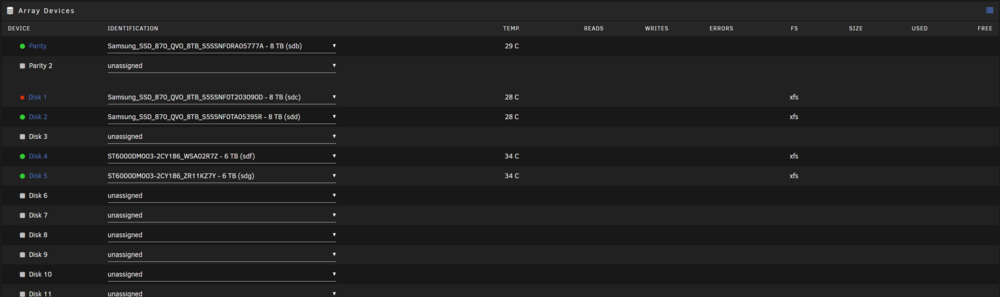
Hey guys, I have a problem and I think it's my own fault... I played around with hardware quiet a lot in the last weeks and now my main drives are not recognized by the array. I mounted them while the array was offline by using Unassigned Devices and I think that might have caused the issue... The disks are in the right order. The first image shows the array before start up. The second image shows its state a fter start up. I'm happy to run diagnostic tools and upload diagnostic files, I just don't know which ones/where they are. Thank you for any advice.

-
Unfortunately no, I never found a solution..
-
Danke für den Hinweis Durch das Aktivieren von persistent auth konnte ich jetzt eine channels.m3u Datei herunterladen. #EXTM3U #EXTINF:-1 logo="http://192.168.178.21:9981/imagecache/304" tvg-id="d5f3812707bff9ff6338daee6559843a" tvg-chno="1",RTL http://192.168.x.x:9981/stream/channelid/662827989?profile=pass #EXTINF:-1 logo="http://192.168.178.21:9981/imagecache/302" tvg-id="b943839d8284ca2691d06c7e2a789ab1" tvg-chno="2",ZDF http://192.168.x.x:9981/stream/channelid/495141817?profile=pass
-
Nachdem ich meinen Nutzernamen und das Passwort eingegeben habe kriege ich dieses Resultat.