





crystalno
Members
-
Joined
-
Last visited
-
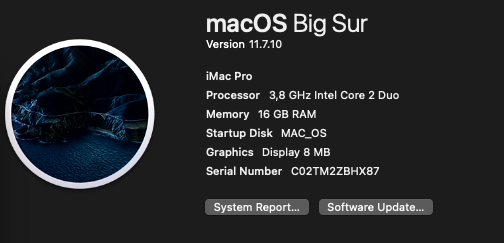
hallo jetzt muss ich noch mal was dazu schreiben ich bin langsam mit meinen latein am ende.. wie bekomme ich das hin das mir nicht nur 8 MB angezeigt werden... habe die grafikkarte schon durchgereicht ist eine GTX 1650 und weiß nicht mehr weiter.. kann mir da einer weiter helfen... danke
-
wie kann ich den das Plugin/Treiber deaktiveren
-
ich mach das gleich so home-server-diagnostics-20230902-1723.zip
-
sry das ich doof frage aber ist NIC, BOS, VFIO/IOMMU
-
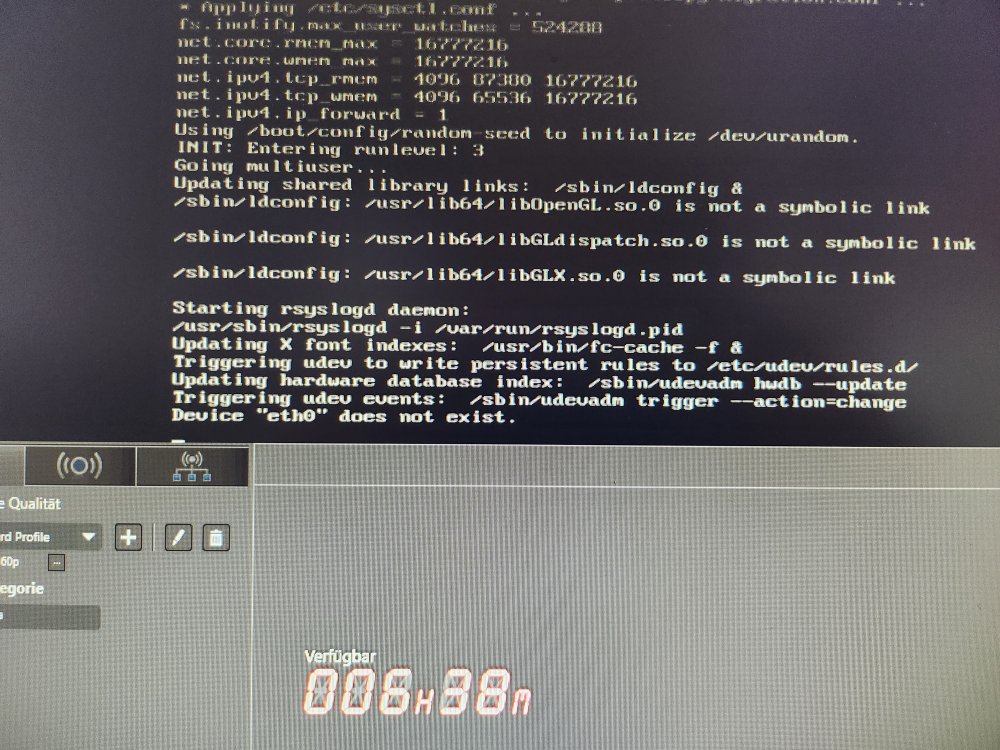
Hallo, ich habe seid neusten ein problem mit mein UNRIAD habe ein neustart gemacht und bekomme als nachricht "device eth0 does not exist" und ich habe keine keine ahnung was ich machen soll... ich habe auch keine zugriff drauf ausser via angeschlossenem monitor und kommt auch noch dazu IPv4 address: not set Aktulles Unraid 6.12.2 brauche dringt hilfe.... danke
-
Unfortunately I don't know that much, but I looked for everything together home-server-diagnostics-20230703-1446.zip

-
Yes, I installed that and the fans can't find the sensors for the temperatures
-
Hello, could someone help me for the BIOSTAR Group B450NH mainboard, there are no drivers to read the temperature, for example cpu and mainboard temperature, is there a solution... thank you

