




Skip to content
View in the app

A better way to browse. Learn more.

Unraid

A full-screen app on your home screen with push notifications, badges and more.

To install this app on iOS and iPadOS
  1. Tap the Share icon in Safari
  2. Scroll the menu and tap Add to Home Screen.
  3. Tap Add in the top-right corner.
To install this app on Android
  1. Tap the 3-dot menu (⋮) in the top-right corner of the browser.
  2. Tap Add to Home screen or Install app.
  3. Confirm by tapping Install.

llarsen

Members
  • Joined

  • Last visited

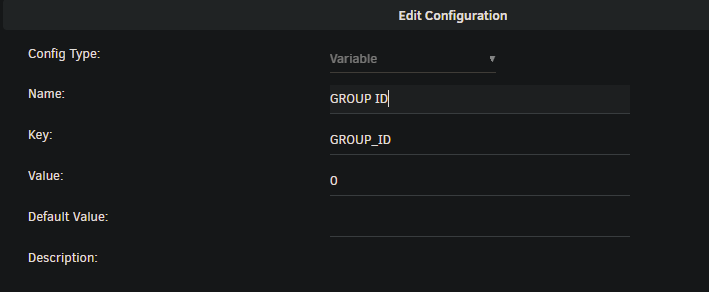
  1. I found the discord channel and looked through the chat and found the resolution! I needed to create new Variables with the following info: Once i did that, everything worked!
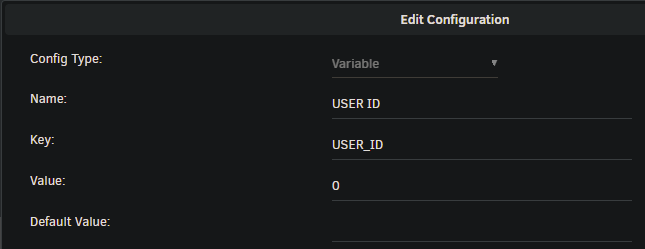
  2. I have installed the patch.. but it still doesnt work for me. Any ideas why this may be? I checked the unraid console and can see that i2c-dev and i2c-piix4 are loaded, but nothing is using it. RGB patch is installed as well as the P3R-OpenRGB docker container... I checked the i2c devices on the unraid console and can see that its set as /dev/i2c-2, i updated the path in the P3R-OpenRGB container settings, but still no luck...
Account

Navigation

Search

Search

Configure browser push notifications

Chrome (Android)
  1. Tap the lock icon next to the address bar.
  2. Tap Permissions → Notifications.
  3. Adjust your preference.
Chrome (Desktop)
  1. Click the padlock icon in the address bar.
  2. Select Site settings.
  3. Find Notifications and adjust your preference.
