





Pluvichor
Members
-
Joined
-
Last visited
Everything posted by Pluvichor
-
This may be premature, but I've rebuilt Disk 1 and Disk 2 is at about 75%~ without any further issues. It looks like those extenders were the problem, and I still can't believe how long they've been in my server and potentially causing issues. Thanks again for the help, Jorge.
-
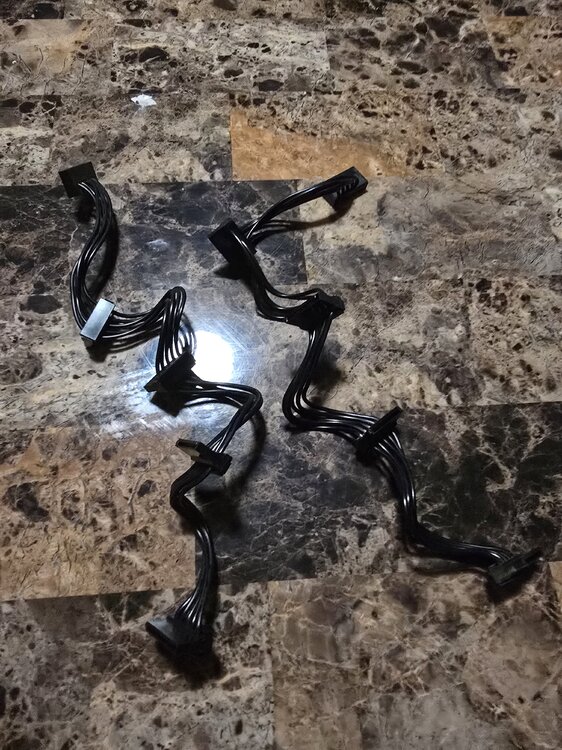
I am facepalming so hard right now. So I finally bothered to open up my server and look at the power cables themselves, and not just the connections attached to the disks. Both of the two groups of disks that have been giving me problems (the daisy chains of Disks 1&2 and Disks 3&6) are attached to an additional extender cable (I don't know the name, I'll attach a picture) that were then attached to the disks. I must have attached these extenders years ago, because I don't remember doing so at all -- in the era when I wanted to daisy chain most of my drives to one cable instead of splitting them up). It seems beyond coincidence that the two groups of disks that have been given me grief happen to be the ones that were attached to these extenders. I have begun rebuilding Disk 1. Fingers crossed it was these damn extenders that were the cause of my current (and older????) issues.
-
Sorry for the repeat-posting, but want to provide an important update! It wasn't long into attempting to rebuild Disk 1 that the disk was disabled again. I figured I'd stop the array and restart it in maintenance mode to run checks on the disks, but when I stopped the array, Disk 2 is also disabled (albeit it, because the array is stopped, Unraid hasn't warned me yet, but both disks have a red X under the Main tab. These two disks are daisy-chained together so I assume it is their power connector that is the issue. Attaching the diagnostics. Thank you. starryskynet-diagnostics-20260615-2131.zip
-
After about an hour of waiting, decided to manually reboot the server. The login screen popped up pretty quickly and my heart froze when I saw the setup screen following login, but I pressed skip and my settings look normal. Going to download a boot backup and attaching diagnostics just in case anyone wants to have a look (is the boot USB okay?). Next step is to try rebuilding Disk 1. starryskynet-diagnostics-20260615-2054.zip
-
Update a day later: Disk 6 finished rebuilding and got to rechecking the connections (I wondered if in moving the server back to its place in the closet, a connection was jostled and came loose). Nothing seemed fishy. I ordered a new power cable that's due to arrive in a few days. Between now and then, I thought I'd try rebuilding Disk 1, but before that-- I rebooted the server and noticed that it took a loong while for the login screen to become available on my desktop. Usually, it pops up within around a minute of powering on the server. This time it took 5 minutes+. Long enough that I considered cutting power and rebooting it again -- but the login screen appeared and I figured it was just a slow startup. I decided to update the server OS (7.2.4 -> 7.3.1) and that required another server restart. Except this time, I've been sitting waiting for the login screen to pop up again, but it's been 15+ minutes and still nada. I'm hesitant to cut power and try rebooting again because I'm not sure if that may affect the OS update. My gut intuition is to just let the server sit for however long it needs to finish rebooting, in the hopes that this wait is because of the server acting very slowly. I'm basing this off a previous episode, wherein I had a disabled disk in the array, and I noted that alongside that, my server was behaving extremely slowly... a slowness that completely went away when the disabled disk issue was resolved. Something else I'm wondering about, is there any chance my current issues (disabled disks and slow server startup) are related to my boot USB? I haven't replaced it since I built the server in July 2022. Any chance it's due for replacement and causing these issues? Or do the diagnostics indicate otherwise? Any advice for how to proceed is greatly appreciated.
-
Yes, I'm using cables to daisy chain two disks together. To be specific, I previously had trouble (that you helped me identity) a while back with the disks on my main NAS box being daisy-chained to 4-5 drives per cable. In an effort to reduce these connections (and because it seemed like having this many disks chained together on one cable was causing my disabled disk troubles), I reduced the amount of disks chained together to a max of 2 per cable. My PSU has 6 SATA connections in the back, and so 12 drives in the main box, 2 per cable to the PSU, seemed like the best way to split them up. Disk 6 (the original disabled drive) is still rebuilding, currently at 54%~. I am inclined to finish waiting for it to finish rebuilding before I stop the server again to re-check the connections. I'm just really hoping I don't get another disabled disk between now and then, but so far, it's just Disk 1 that's gone rogue. This is kind of a long-shot, but a month back when I was last dealing with disabled disks because of PSU issues, I ran out of Corsair branded power cables that came with the PSU (the PSU is a Corsair 1600i) and, in a pinch, I used a generic power cable I had in my drawer (I noted the pins looked different from the ones that came with the PSU). I know Corsair can be finicky when it comes to using the correct power cables because of their pins, but I figured I'd try the cable and see if the server powered on normally without error -- and save myself the money and waiting time on a new cable delivery if it did. The server did work then, and worked fine in the month since, so I figured I was in the clear, but is there any chance my current disabled disk issues are somehow related to that cable being used in the server? I won't know for sure until I power down and inspect the connections, but I don't think the disks I'm currently dealing with (6 & 1) are connected to that cable (the disks that were giving me trouble last month were 4 & 5). For that matter, these disks 1 and 6 are not chained together (I believe disks 1 & 2 are chained together, and 6 is chained to 3). Sorry, I know the above paragraph is a lot of info to parse. Just figured I throw it out there in case it is relevant. Thank you for any guidance.
-
Hello, update: I checked the connections and THOUGHT I found the SATA cable a bit loose on the disk in question (I emphasis thought because it's also possible I imagined it because I'm so desperate for a solution and it was the first disk's connections I checked). I re-pressed all the connections in, and started the re-build hoping this was my issue. When there wasn't an error some 12%~ into the rebuild, I felt comfortable stepping away for a few hours. When I returned, I saw the awful news that another disk (Disk 1) has now been disabled as well. The rebuild on the initial disabled disk is still ongoing without issue (?), but I am attaching the new diagnostics so someone can advise. Should I let the rebuild continue or stop it? Does the second disabled drive hint toward some other overall issue? Thank you. starryskynet-diagnostics-20260614-1719.zip
-
Hello, I got the dreaded warning that one of my disks was disabled and the contents emulated tonight. I'm attaching the diagnostics so someone with more know-how can direct me to how best proceed. Thank you. starryskynet-diagnostics-20260614-0203.zip
-
Hey, that seems to have done the trick! Files now visible on Windows, and Plex working as intended. Thank you!
-
I changed the configuration to only save to the array (I typically don't use the cache for this), but this hasn't fixed my issues accessing the data in my array, either via Windows file explorer or Plex.
-
Yes, the cfg file and the folders on the array both use the lowercase "media". starryskynet-diagnostics-20260502-0236 (5).zip
-
I performed a dummy change (changed the SMB Security Settings), and this created a new cfg file in the /config/shares/ location, but this doesn't seem to have fixed my issue. Still can't access the data on the disks, and the share still just says saving to cache.
-
Ah, sorry about that. I misunderstood, my fault. Doing that, I found and deleted the media cfg file. I am rebooting the server now to see what happens. EDIT: nothing changed on a reboot.
-
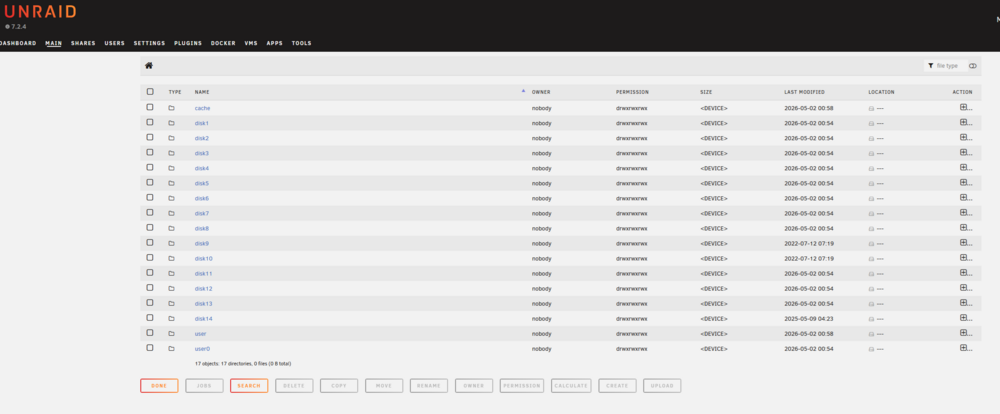
Sorry to sound obtuse, but I'm not sure how to locate that location. When I click the file manager button in the web UI, this screen (attached) pops up, but none of the folders seem to lead to a config/shares/ location. EDIT: Also, I tried renaming the "Media" share to remove the uppercase and restart the array to see if anything changed. Just resulted in two Media and media shares (different cases) and now my Plex doesn't work.
-
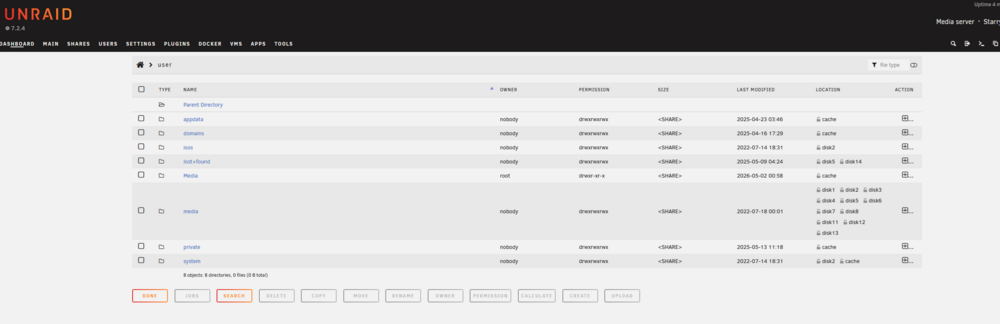
Hey, thank you. I think you and JorgeB are on the right track regarding case sensitivity being an issue here. Before I can proceed to delete this .cfg file, I may need help locating it. I attached a picture of what the file manager shows under "user". There are two media folders, one capitalized and one not. The one that is capitalized shows a more recent modified date, but only lists the cache. The uncapitalized one shows a much older modified date, but shows more disk locations. Please advise.
-
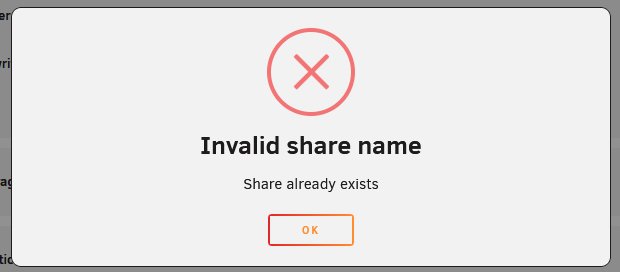
I couldn't delete the share on the web GUI because the delete checkmark is greyed out (share must be empty to be deleted) -- and when I tried renaming "Media" to lowercase "media", I got this error. Before I do anything else, I just want to confirm that I'm on the right path.
-
My server was having trouble the last few days. I addressed this issue (power cable daisy chain) and rebuilt the disabled drives with no issue, but now I'm finding my main "media" share is inaccessible from my desktop / doesn't seem to be properly reported in the Unraid GUI (the media share there is saving new files to cache instead of the array??). The data still seems to be located in the same place however (or else I'd be freaking out) -- clicking the file manager in the GUI shows the data on the drives, and even Plex is playing media from the server. The only other thing which may be relevant, is that shortly before the server had issues with the disabled drives/power cables, I was fiddling with the SMB security settings on some of the shares and the Flash (I think I changed them from Public to Private). Thank you for any tips. starryskynet-diagnostics-20260501-2229 (4).zip
-
Sorry, posting this from work and won't be able to tinker on my server until later. Just had a quick question in the meantime. I was re-reading the old thread and saw again your advice regarding the amount of drives it is safe to daisy-chain via Sata to Sata being 2. I have 16 disks in my case and my power supply (ax1600i) has 6 SATA slots (currently chained in groupings of 3, 4, 4, 3, 2). does that mean I am limited to 12 disks (2 daisy chained disks per sata slot) in my NAS? I have a DAS which I disconnected previously and if so, I can move four disks over to see if that alleviates the issues? OR I can try grouping my disks into 3, 3, 3, 3, 2, 2 -- but if 2 is the absolute limit if daisy chain-able disks, I will do the former. Edit: Also, sorry. In response to your question, I believe I mostly swapped SATA cables around, and did replace one. Won't know more until later.
-
Hello! About two months back (May 08), I made a post here because my server was experiencing disabled drives. Long story short, I was advised that I was daisy chaining too many drives together to the PSU, and after splitting up my drives, my server bounced back and has been performing great... until tonight. First one drive became disabled (Disk 4) and then shortly after I did a re-start, another also became disabled (Disk 5). My server is also extremely slow (takes much longer to re-start, start array, check drive for file system errors, etc) and that was something I noted during my last bout of troubles, but that went away when the server was "fixed". I figure I'll open it up tomorrow and maybe split the drives even further in case this is another power splitter issue (one of the disabled drives was also afflicted last time) -- but I thought I'd post here first with the diagnostics in case anyone sees a more glaring solution. Thank you for any assistance! starryskynet-diagnostics-20250630-0316.zip
-
Just a quick update because I'm still going to have two days or so of disk re-building, but I think my major issues have been solved. The answer does seem to have been the power/splitters causing my disks to randomly not be recognized, corrupting file systems (I think when I was restarting when unraid was trying to rebuild). I'll hold off until the rebuild is complete to mark as solved, but thank you everyone that helped!! A minor issue I noted in the meantime, my dockers don't seem to be working properly. When I go to the Docker tab, I just see a yellow exclamation and "Docker Service failed to start." It's not super important just now, but any pointer about how to fix that after rebuilding would be appreciated. Thank you.
-
I'm reporting my updates live so excuse the strange tense of this post. First, Unraid UI booted up fine and is reporting no missing disks, only disk5 and disk14 with their disabled status (this will be first diagnostic attached). I hit START, and it's taking longer to start up than usual but after about a minute~, it starts up and begins a data rebuild. That's progress -- but now a very big issue: Disk1, Disk5, and Disk14 are showing this error message: "Unmountable: wrong or no file system." (this will be the second diagnostic attached). Any advice for how to proceed from here? I'm salvaging the files I can access in the meantime, but should I data rebuild Disk 14 and Disk5, and then try a new configuration to see if the data on Disk1 is fine? Don't know if that makes sense, I'm working off the idea that my issues were power related all along and the drives are actually fine, but maybe I'm missing something obvious? EDIT: Figured out how to try repairing file system corruption in maintenance mode. Did it (aside from the disks above, Disk2 apparently also had some corruption to fix), and that seems to have fixed my unmountable issues. Will try re-building the disabled drives now. starryskynet-diagnostics-20250509-0255.zip starryskynet-diagnostics-20250509-0303.zip
-
Err, slight hiccup. I added a new splitter to the PSU and connected parity1 and disk1 to it. The big issue is that now, the server doesn't start when I try powering on. I had no idea! I'll take a look at how the rest of the disks are split, but I'm pretty sure they're mostly daisy chained via sata with one or two molex connections only. I'll see what I can do about that now... Tinkering with the PSU has me wondering if my initial problems (disabled disks) were power-related all along. My problems began to really kick off a month ago when I shrunk my array and moved data disks from the DAS into the main NAS. Maybe the DAS was off-setting some of the power issues the main NAS was straining under due to daisy chaining too many disks? I'm tempted to get the DAS going again and plug some disks back into it to see if that helps. EDIT: Yep, not good. My daisy chains look like this: 3, 4, 4, 3, 2 (these last two split from the 5 which reduced it to 3). I'm going to try a different splitter just in case (I believe I used one which did not come with the PSU -- just grabbed it from a pile, but I checked my PSU box and it came loaded with more). ALSO, sorry for my ignorance, by molex to sata, do you mean that the daisy chain begins with a connection to the PSU, right? I panicked at first because I wasn't sure what a SATA-> SATA splitter was and thought all my connections were that, but googling images is telling me different things. EDIT2: Replacing the splitter now lets the server power on. Had no idea you couldn't just use whichever, but I compared the heads that plug into the PSU, and the "missing" prong were in different places. Will report back with an update shortly...
-
I unplugged/replugged all the sata cables to the mother board and returned the previously swapped cables to disk1 and parity2 and it no longer showed the four missing drives -- just the disabled disk5 and disk14 as before. (First diagnostics.) THEN, I tried starting the array and when I did that, the four disks (parity1, parity2, disk1, and disk2) disappeared from the UI list. (Second diagnostics.) They are incidentally daisy chained to one splitter so I'll try replacing that splitter (if I have a spare one somewhere around), or moving around power cables. EDIT: I hadn't looked taken a closer look at the power cabling in a good long while. 5 of the disks are daisy chained -- including one of the disabled ones, disk5. I believe I had an issue a year or two back with daisy chaining too many disks causing an issue so I'm going to split that up into two and three chains now, see if that helps. starryskynet-diagnostics-20250509-0143.zip starryskynet-diagnostics-20250509-0150.zip
-
I swapped the sata cables of parity2 and disk1 to their neighboring disks (parity1 and disk2 respectively) and now all four disks are missing from the UI window. Attaching the diagnostics. I'll be tinkering with the cables to see if they can come back by reinserting/replacing/etc... starryskynet-diagnostics-20250509-0126.zip
-
I'll try that and report back. Before that though, I'm experiencing some pretty strange behavior from Unraid. I tried starting the server just now and one of my parity drives was listed as a smaller size than is correct (wrong -- and the correct size and drive serial listed below it). I tried initiating a restart through the UI and the server hasn't come back online 8+ minutes later. I'll do a manual restart shortly, but I've never encountered this kind of delayed response from unraid before. EDIT: Server UI popped back up shortly after posting this update. Now the parity drive is missing entirely instead of being reported wrong size. I'll try changing cables around now.



