





lepetitprince
Members
-
Joined
-
Last visited
-
That fixed it - thank you!
-
I have this up and running on my system, but am having trouble getting it to recognize my Nvidia GPU. I have an RTX5090 and am using the open source drivers (v. 580.95.05). Plex and other dockers are able to see and use the card without issue. Any ideas on what I'm doing wrong? The log output shows the InitHWSupport line but with no devices. INFO[2025-11-26 14:29:26] [InitHWSupport] Supported HW codecs [0]: INFO[2025-11-26 14:29:26] stash version: v0.29.3-60-gd14053b5 - Official Build - 2025-11-26 01:17:35 INFO[2025-11-26 14:29:26] stash is listening on 0.0.0.0:9999 INFO[2025-11-26 14:29:26] stash is running at http://localhost:9999/ Here is the config I am currently using. I've tried --gpus=all and with/without the specific NVIDIA_XYZ variables. Still no luck. docker run -d --name='stash-s6' --net='proxynet' --pids-limit 2048 -e TZ="America/Chicago" -e HOST_OS="Unraid" -e HOST_HOSTNAME="Tower" -e HOST_CONTAINERNAME="stash-s6" -e 'PUID'='911' -e 'PGID'='911' -e 'AVGID'='22' -e 'AUTO_AVGID'='FALSE' -e 'TZ'='US/ET' -e 'MIGRATE'='FALSE' -e 'STASH_STASH'='/data/' -e 'STASH_GENERATED'='/generated/' -e 'STASH_CACHE'='/cache/' -e 'STASH_METADATA'='/metadata/' -e 'NVIDIA_VISIBLE_DEVICES'='all' -e 'NVIDIA_DRIVER_CAPABILITIES'='all' -e 'CUSTOM_CERT_PATH'='/config/certs' -l net.unraid.docker.managed=dockerman -l net.unraid.docker.webui='http://[IP]:[PORT:9999]' -l net.unraid.docker.icon='https://raw.githubusercontent.com/feederbox826/stash-s6/main/docs/icon/favicon.png' -p '9999:9999/tcp' -v '/mnt/user/Storage/Beach Fam/[RAW VIDEO]/':'/data':'rw' -v '/mnt/disks/1936E21CD262/Stash/config/':'/config':'rw' -v '/mnt/user/appdata/stash-s6/pip-install':'/pip-install':'rw' -v '/mnt/disks/1936E21CD262/Stash/generated/':'/generated':'rw' --runtime=nvidia 'ghcr.io/feederbox826/stash-s6:hwaccel-develop'
-
Update: @jweber93's answer was the solution. I moved some GPU's around and added a PCI-E extension to be able to fit a new USB controller; passed the whole controller to the VM and now everything works. Thanks for the help @SimonF and @jweber93!
-
Thanks for the info, I was worried someone would say that. I have 2 GPUs on my mobo blocking my available PCI-E slot, but I just purchased the PCI-E USB card and an extension cable that will hopefully make it fit.
-
I do. Is this what you're looking for? One is unattached, one is attached, and one is the device's log. Let me know if I can provide anything else!
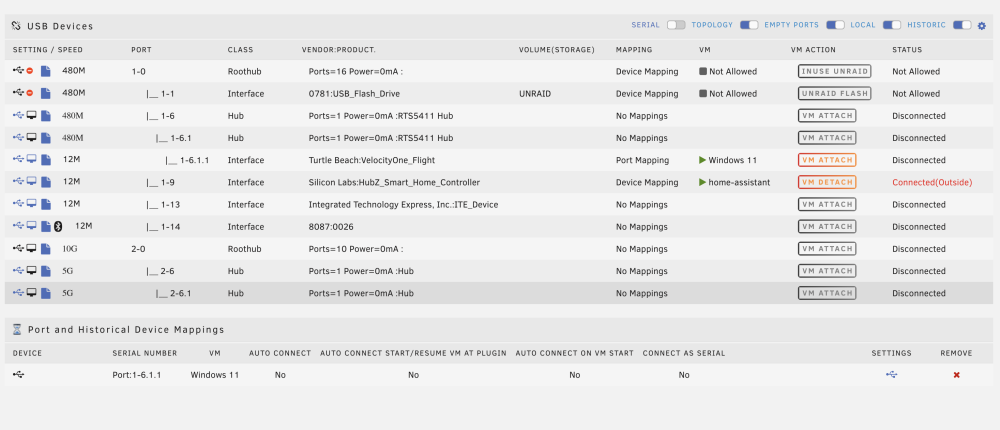
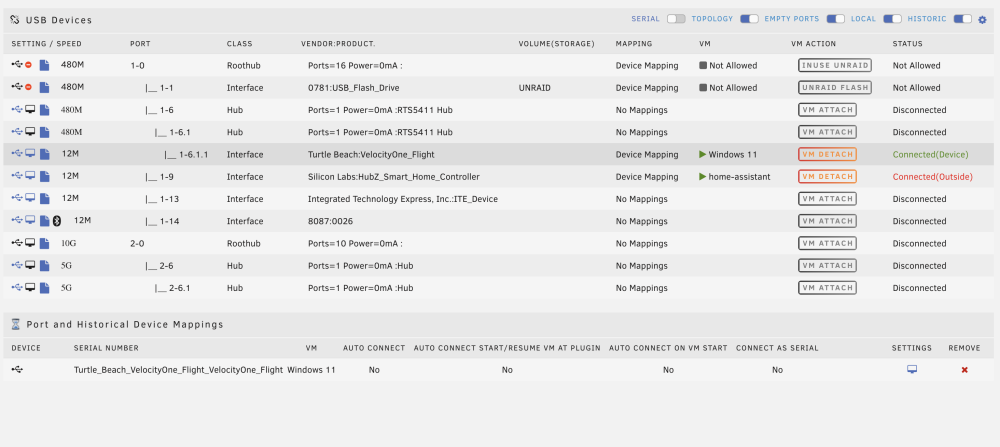
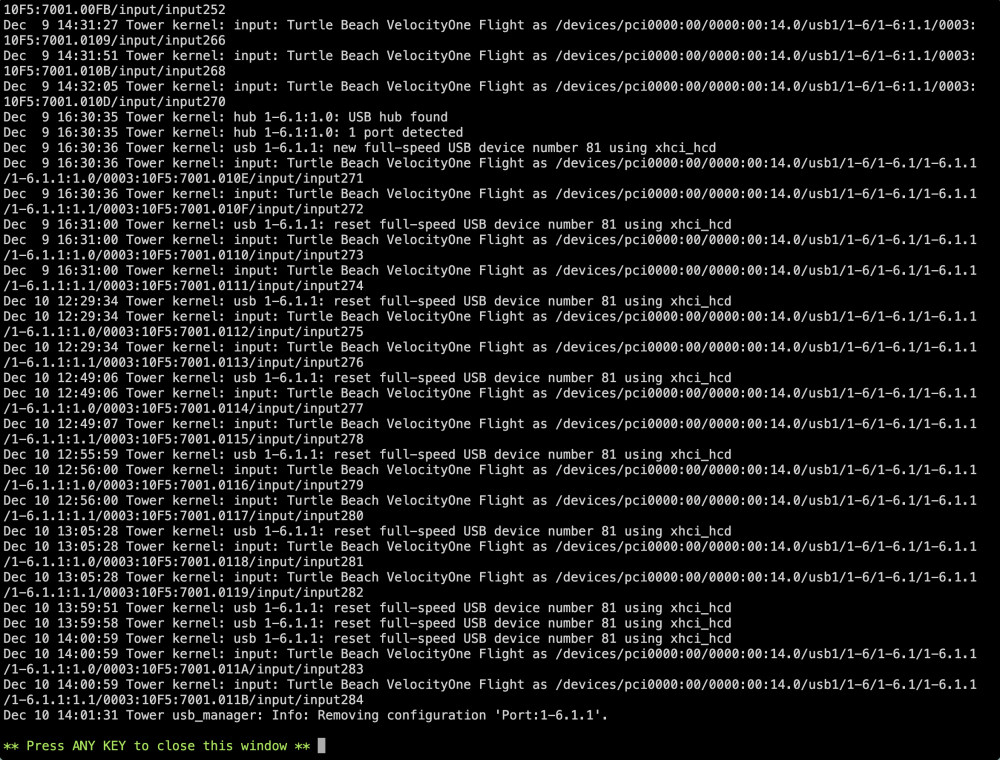
-
Yeah, I've tried all ports. Attached diagnostics. There are some errors; it looks like they occur when I detach the device. Tower Diagnostics 20231209.zip
-
Good thought, I hadn't tried adjusting that yet. It is 3.0 qemu XHCI. I did just try the other two options, 2.0 and 3.0 nec. 3.0 nec does the exact same as 3.0 qemu. 2.0 connects, shows up in Device Manager for ~ 1 second, then disconnects. But the device itself never turns off like it does in 3.0.
-
Yes, it only shows as one device in lsusb (in the VM Windows Device Manager it shows as a composite USB device and two game controller devices). lsusb output: # lsusb Bus 002 Device 013: ID 0bda:0411 Realtek Semiconductor Corp. Hub Bus 002 Device 012: ID 0bda:0411 Realtek Semiconductor Corp. Hub Bus 002 Device 001: ID 1d6b:0003 Linux Foundation 3.0 root hub Bus 001 Device 102: ID 10c4:8a2a Silicon Labs HubZ Smart Home Controller Bus 001 Device 015: ID 10f5:7001 Turtle Beach VelocityOne Flight Bus 001 Device 009: ID 0bda:5411 Realtek Semiconductor Corp. RTS5411 Hub Bus 001 Device 008: ID 0bda:5411 Realtek Semiconductor Corp. RTS5411 Hub Bus 001 Device 005: ID 8087:0026 Intel Corp. AX201 Bluetooth Bus 001 Device 004: ID 048d:5702 Integrated Technology Express, Inc. ITE Device Bus 001 Device 002: ID 0781:5598 SanDisk Corp. USB Flash Drive Bus 001 Device 001: ID 1d6b:0002 Linux Foundation 2.0 root hub udev output: # udevadm info --name /dev/bus/usb/001/015 P: /devices/pci0000:00/0000:00:14.0/usb1/1-5/1-5.1/1-5.1.1 N: bus/usb/001/015 E: BUSNUM=001 E: DEVNAME=/dev/bus/usb/001/015 E: DEVNUM=015 E: DEVPATH=/devices/pci0000:00/0000:00:14.0/usb1/1-5/1-5.1/1-5.1.1 E: DEVTYPE=usb_device E: DRIVER=usb E: ID_BUS=usb E: ID_FOR_SEAT=usb-pci-0000_00_14_0-usb-0_5_1_1 E: ID_MODEL=VelocityOne_Flight E: ID_MODEL_ENC=VelocityOne\x20Flight E: ID_MODEL_ID=7001 E: ID_PATH=pci-0000:00:14.0-usb-0:5.1.1 E: ID_PATH_TAG=pci-0000_00_14_0-usb-0_5_1_1 E: ID_REVISION=1010 E: ID_SERIAL=Turtle_Beach_VelocityOne_Flight_VelocityOne_Flight E: ID_SERIAL_SHORT=VelocityOne_Flight E: ID_USB_INTERFACES=:030000:010100:010200: E: ID_VENDOR=Turtle_Beach E: ID_VENDOR_ENC=Turtle\x20Beach E: ID_VENDOR_FROM_DATABASE=Turtle Beach E: ID_VENDOR_ID=10f5 E: MAJOR=189 E: MINOR=14 E: PRODUCT=10f5/7001/1010 E: SUBSYSTEM=usb E: TAGS=:seat: E: TYPE=0/0/0 lsusb -vs output: # lsusb -vs 001:015 Bus 001 Device 015: ID 10f5:7001 Turtle Beach VelocityOne Flight Device Descriptor: bLength 18 bDescriptorType 1 bcdUSB 1.10 bDeviceClass 0 bDeviceSubClass 0 bDeviceProtocol 0 bMaxPacketSize0 64 idVendor 0x10f5 Turtle Beach idProduct 0x7001 bcdDevice 10.10 iManufacturer 1 Turtle Beach iProduct 2 VelocityOne Flight iSerial 3 VelocityOne Flight bNumConfigurations 1 Configuration Descriptor: bLength 9 bDescriptorType 2 wTotalLength 0x0103 bNumInterfaces 5 bConfigurationValue 1 iConfiguration 0 bmAttributes 0xa0 (Bus Powered) Remote Wakeup MaxPower 500mA Interface Descriptor: bLength 9 bDescriptorType 4 bInterfaceNumber 0 bAlternateSetting 0 bNumEndpoints 2 bInterfaceClass 3 Human Interface Device bInterfaceSubClass 0 bInterfaceProtocol 0 iInterface 0 HID Device Descriptor: bLength 9 bDescriptorType 33 bcdHID 1.10 bCountryCode 0 Not supported bNumDescriptors 1 bDescriptorType 34 Report wDescriptorLength 201 Report Descriptors: ** UNAVAILABLE ** Endpoint Descriptor: bLength 7 bDescriptorType 5 bEndpointAddress 0x81 EP 1 IN bmAttributes 3 Transfer Type Interrupt Synch Type None Usage Type Data wMaxPacketSize 0x0040 1x 64 bytes bInterval 4 Endpoint Descriptor: bLength 7 bDescriptorType 5 bEndpointAddress 0x02 EP 2 OUT bmAttributes 3 Transfer Type Interrupt Synch Type None Usage Type Data wMaxPacketSize 0x0040 1x 64 bytes bInterval 4 Interface Descriptor: bLength 9 bDescriptorType 4 bInterfaceNumber 1 bAlternateSetting 0 bNumEndpoints 1 bInterfaceClass 3 Human Interface Device bInterfaceSubClass 0 bInterfaceProtocol 0 iInterface 0 HID Device Descriptor: bLength 9 bDescriptorType 33 bcdHID 1.10 bCountryCode 0 Not supported bNumDescriptors 1 bDescriptorType 34 Report wDescriptorLength 95 Report Descriptors: ** UNAVAILABLE ** Endpoint Descriptor: bLength 7 bDescriptorType 5 bEndpointAddress 0x83 EP 3 IN bmAttributes 3 Transfer Type Interrupt Synch Type None Usage Type Data wMaxPacketSize 0x0040 1x 64 bytes bInterval 4 Interface Association: bLength 8 bDescriptorType 11 bFirstInterface 2 bInterfaceCount 3 bFunctionClass 1 Audio bFunctionSubClass 1 Control Device bFunctionProtocol 0 iFunction 0 Interface Descriptor: bLength 9 bDescriptorType 4 bInterfaceNumber 2 bAlternateSetting 0 bNumEndpoints 0 bInterfaceClass 1 Audio bInterfaceSubClass 1 Control Device bInterfaceProtocol 0 iInterface 3 VelocityOne Flight AudioControl Interface Descriptor: bLength 10 bDescriptorType 36 bDescriptorSubtype 1 (HEADER) bcdADC 1.00 wTotalLength 0x0048 bInCollection 2 baInterfaceNr(0) 3 baInterfaceNr(1) 4 AudioControl Interface Descriptor: bLength 12 bDescriptorType 36 bDescriptorSubtype 2 (INPUT_TERMINAL) bTerminalID 1 wTerminalType 0x0201 Microphone bAssocTerminal 0 bNrChannels 2 wChannelConfig 0x0003 Left Front (L) Right Front (R) iChannelNames 0 iTerminal 0 AudioControl Interface Descriptor: bLength 10 bDescriptorType 36 bDescriptorSubtype 6 (FEATURE_UNIT) bUnitID 2 bSourceID 1 bControlSize 1 bmaControls(0) 0x01 Mute Control bmaControls(1) 0x00 bmaControls(2) 0x00 iFeature 0 AudioControl Interface Descriptor: bLength 9 bDescriptorType 36 bDescriptorSubtype 3 (OUTPUT_TERMINAL) bTerminalID 3 wTerminalType 0x0101 USB Streaming bAssocTerminal 0 bSourceID 2 iTerminal 0 AudioControl Interface Descriptor: bLength 12 bDescriptorType 36 bDescriptorSubtype 2 (INPUT_TERMINAL) bTerminalID 4 wTerminalType 0x0101 USB Streaming bAssocTerminal 0 bNrChannels 2 wChannelConfig 0x0003 Left Front (L) Right Front (R) iChannelNames 0 iTerminal 0 AudioControl Interface Descriptor: bLength 10 bDescriptorType 36 bDescriptorSubtype 6 (FEATURE_UNIT) bUnitID 5 bSourceID 4 bControlSize 1 bmaControls(0) 0x03 Mute Control Volume Control bmaControls(1) 0x00 bmaControls(2) 0x00 iFeature 0 AudioControl Interface Descriptor: bLength 9 bDescriptorType 36 bDescriptorSubtype 3 (OUTPUT_TERMINAL) bTerminalID 6 wTerminalType 0x0301 Speaker bAssocTerminal 0 bSourceID 5 iTerminal 0 Interface Descriptor: bLength 9 bDescriptorType 4 bInterfaceNumber 3 bAlternateSetting 0 bNumEndpoints 0 bInterfaceClass 1 Audio bInterfaceSubClass 2 Streaming bInterfaceProtocol 0 iInterface 3 VelocityOne Flight Interface Descriptor: bLength 9 bDescriptorType 4 bInterfaceNumber 3 bAlternateSetting 1 bNumEndpoints 1 bInterfaceClass 1 Audio bInterfaceSubClass 2 Streaming bInterfaceProtocol 0 iInterface 0 AudioStreaming Interface Descriptor: bLength 7 bDescriptorType 36 bDescriptorSubtype 1 (AS_GENERAL) bTerminalLink 3 bDelay 1 frames wFormatTag 0x0001 PCM AudioStreaming Interface Descriptor: bLength 11 bDescriptorType 36 bDescriptorSubtype 2 (FORMAT_TYPE) bFormatType 1 (FORMAT_TYPE_I) bNrChannels 2 bSubframeSize 2 bBitResolution 16 bSamFreqType 1 Discrete tSamFreq[ 0] 48000 Endpoint Descriptor: bLength 9 bDescriptorType 5 bEndpointAddress 0x87 EP 7 IN bmAttributes 13 Transfer Type Isochronous Synch Type Synchronous Usage Type Data wMaxPacketSize 0x00c0 1x 192 bytes bInterval 1 bRefresh 0 bSynchAddress 0 AudioStreaming Endpoint Descriptor: bLength 7 bDescriptorType 37 bDescriptorSubtype 1 (EP_GENERAL) bmAttributes 0x00 bLockDelayUnits 0 Undefined wLockDelay 0x0000 Interface Descriptor: bLength 9 bDescriptorType 4 bInterfaceNumber 4 bAlternateSetting 0 bNumEndpoints 0 bInterfaceClass 1 Audio bInterfaceSubClass 2 Streaming bInterfaceProtocol 0 iInterface 3 VelocityOne Flight Interface Descriptor: bLength 9 bDescriptorType 4 bInterfaceNumber 4 bAlternateSetting 1 bNumEndpoints 1 bInterfaceClass 1 Audio bInterfaceSubClass 2 Streaming bInterfaceProtocol 0 iInterface 0 AudioStreaming Interface Descriptor: bLength 7 bDescriptorType 36 bDescriptorSubtype 1 (AS_GENERAL) bTerminalLink 4 bDelay 1 frames wFormatTag 0x0001 PCM AudioStreaming Interface Descriptor: bLength 11 bDescriptorType 36 bDescriptorSubtype 2 (FORMAT_TYPE) bFormatType 1 (FORMAT_TYPE_I) bNrChannels 2 bSubframeSize 2 bBitResolution 16 bSamFreqType 1 Discrete tSamFreq[ 0] 48000 Endpoint Descriptor: bLength 9 bDescriptorType 5 bEndpointAddress 0x08 EP 8 OUT bmAttributes 13 Transfer Type Isochronous Synch Type Synchronous Usage Type Data wMaxPacketSize 0x00c0 1x 192 bytes bInterval 1 bRefresh 0 bSynchAddress 0 AudioStreaming Endpoint Descriptor: bLength 7 bDescriptorType 37 bDescriptorSubtype 1 (EP_GENERAL) bmAttributes 0x00 bLockDelayUnits 0 Undefined wLockDelay 0x0000 Device Status: 0x0002 (Bus Powered) Remote Wakeup Enabled
-
I have a Windows 11 VM running for gaming. It runs games well and hasn't had any issues since I set it up. I recently purchased a Velocity One Flight controller to use with MSFS. When I plug it into unRaid without attaching it to the VM, the device powers on and lights up like it should. However, when I attach it to the VM it immediately appears to powers off/crash (the LEDs on the device all shut off). It shows up in Windows Device Manager correctly and shows up when I run joy.cpl correctly as gaming devices. However, only the x axis is picked up by windows. No button presses or other axis work. The only reference to something like this online I can find is this reddit post. I have tried killing some processes like the user mentions, but no luck. When I plug the device into a windows 11 laptop it functions correctly, showing up as the device and not powering off, so I don't believe the device has a problem. I have tried in Windows; - turning off USB power management (in power settings and device manager) - driver updates / uninstall / reinstall - firmware updates for the Velocity One Flight itself I have tried in unraid: - attaching device in VM settings - attaching device using USB Manager - every USB port I have I have not tried passing through the entire USB controller because my system only has one and I'm out of PCI slots to add one. Any tips, suggestions, things to try? Thanks!



