




Skip to content
View in the app

A better way to browse. Learn more.

Unraid

A full-screen app on your home screen with push notifications, badges and more.

To install this app on iOS and iPadOS
  1. Tap the Share icon in Safari
  2. Scroll the menu and tap Add to Home Screen.
  3. Tap Add in the top-right corner.
To install this app on Android
  1. Tap the 3-dot menu (⋮) in the top-right corner of the browser.
  2. Tap Add to Home screen or Install app.
  3. Confirm by tapping Install.

ArchivesWizard

Members
  • Joined

  • Last visited

Everything posted by ArchivesWizard

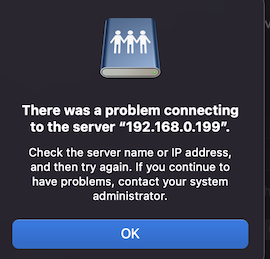
  1. Hello! I have this exact same issue! Exactly the steps as above (but I do have a user created) and those credentials give the following error still... Any ideas what else could change to allow UnRaid to work for me? I have the IPV4 address typed in as smb://192.168.0.199/archives/ where archives is my share I'm trying to access. This share has read/write permissions for the given user. Am I missing something somehow? I have yet to be able to access anything from my 2021 Mac running Monterey OS.
Account

Navigation

Search

Search

Configure browser push notifications

Chrome (Android)
  1. Tap the lock icon next to the address bar.
  2. Tap Permissions → Notifications.
  3. Adjust your preference.
Chrome (Desktop)
  1. Click the padlock icon in the address bar.
  2. Select Site settings.
  3. Find Notifications and adjust your preference.