rtrochford90
Members
-
Joined
-
Last visited
-
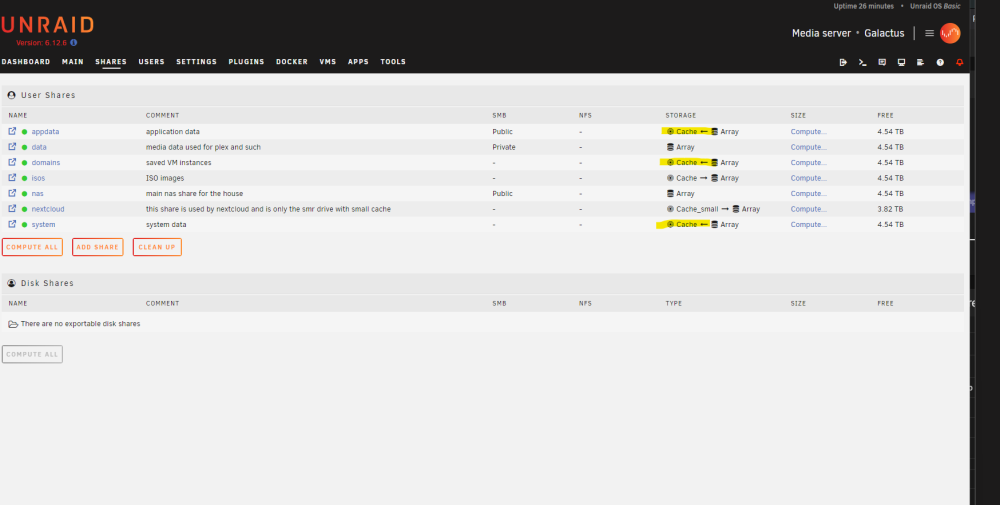
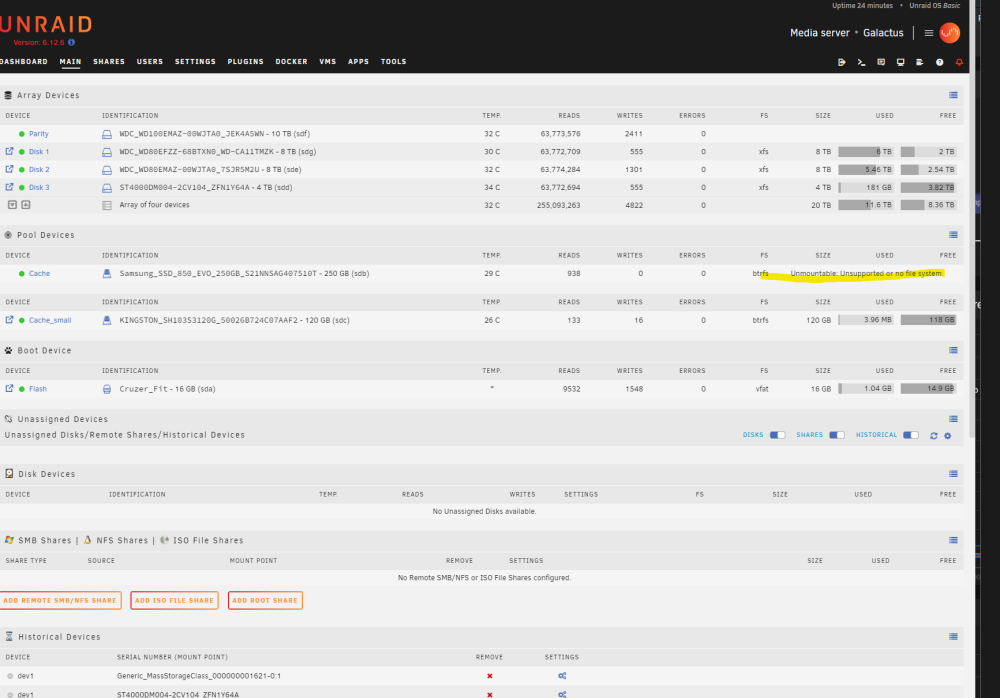
After work I was able to do some digging. Fix-Common-problems linked me to the faq-6 post here using the first recommended step, i was able to get the drive to mount. I then used the mc command to open Midnight Commander, and I am in the process of copying the contents of /temp over to a share. Once on the share, I intend to back them up on my PC to get a living copy OFF of the unraid hardware. Then I suppose I will format the disk and move everything back over. I will continue to update this post as I work though this. I still dont know what caused the problem... strangely... inside my home-assistant VM, I am running an Zigbee Network and a zigbeetomqtt broker. A few weeks back, I had a Hue bulb die on me. I went to remove "Family Room Left" from the network, but accidently removed "Living Room Left", which was a good bulb. Getting it paired back up is a pain, but the bulb still responds to group events when I target the group its in... (it still can turn on and off) so i left it for now. Since then, I have had the VM lock up and go into an unbootable state (fixed by a host(unraid) reboot) and have had several other VM hangups since then. perhaps I have been getting a bunch of errors on the zigbee side inside the VM and the log was filling the drive or something? Perhaps a red-hearing, but I was shocked to see the cache drive holding 160gb (in the transfer I am currently waiting to finish) and I would be surprised if the drive has a hardware failure (though that is always possible) because I have not got any warnings that i can remember, and it mounted up just fine... If I can get this recovered, what steps can I take to prevent this in the future? is there a way I can effectively create a raid 1 out of 2 identical drives and then use that as a cache drive? so if one poops the bed, I dont lose my tv and lights and everything else the server controls? should domains, app-data, isos, and system data not all be on the cache? (where should they be?)
-
weirdly enough, the drive shows smart status of healthy
-
Hey all. I have an unraid server that essentially runs my home. Plex, nextcloud, duckdns, others, all running in docker containers. I also have a VM running Home Assistant that itself has lots of things that will be hard to recover, like my zigbee mesh. This morning I woke up and none of my lights were working (Home assistant VM). Figured something must have wigged out. I went and all my docker containers and vms were showing as running but I couldnt accesss anything. Gave the server a reboot and... lights still not working. weird. Upon reboot I noticed that all of my docker containers and my VM were gone. OH NO. So I had a bunch of notifications about things not being compatible with my unraid version. Thinking that perhaps there were sudden dependency issues (maybe something was on auto update?) I updated unraid from 6.10.4(?) to 6.12.6. still, docker containers are gone and so is my VM only now, I notice one of my 2 cache drives is showing as "Unmountable: unsupported or no filesystem". And the hard part is I dont know if it was like that before the update or not. I assume not, and I assume that is my problem. Also, it looks like app_data, domains, and system shares are/were pointed to that cache drive. So, Now I am in a weird spot and dont know how to move forward without making things worse. I am assuming the cache drive may have died? and since app_data was there, it went with it? Is there a restore process of some kind i can do? Should I work on trying to restore an old static state (is that a thing?), or just power forward? I can see all the docker containers in previously installed. Should I just bring them back up? Will all of my docker settings come back? Can I get that VM back from its last state? My heart is sunken in my stomach realizing that I had the VM and app data pointed to a drive that perhaps just went nuclear. I am not sure what logs to include that would be helpful. FWIW I have not tried to format the ssd yet. chance anything is recoverable? Any help is appreciated. galactus-syslog-20231213-2124.zip