




.jpg.4832032aef6f5008d4cbb596c68a4697.jpg)
ChetesDaJag
Members
-
Joined
-
Last visited
-
Yes like new disks? I hope that makes sense... my "missing disk" was an old disk that had hella errors but was unmountable so I took it out My main problem is that the "IBM-XIV" disks wont show up in the unassigned disk area, and I cant use them... Also one of the drives that are in the unassigned area doesn't want to mount... so I'm pretty confused
-
I hope this helps? Im really confused gilbertsss-diagnostics-20220721-1300.zip
-
Hi, I need some serious help, here is a basic rundown of my situation... I have an Unraid Server, its running out of space, bought some new drives, installed the drives and hooked them up, but only one drive is recognized by the Unraid Server at all? and even then I try to mount the drive but it wont let me, even though the drive came out with zero errors. Luckily the Drives are recognized by the system, and that leaves me to here. I am lost and confused please Help! I am painfully new to Unraid, but I know how to build computers if that helps give you an understanding of my knowledge I installed some community plugins like: Preclear, Fix Common Problems and Unassigned Devices, but they don't seem to help my problem. I provided some screenshots of the drives The Drives with the "IBM-XIV" are the unrecognized ones
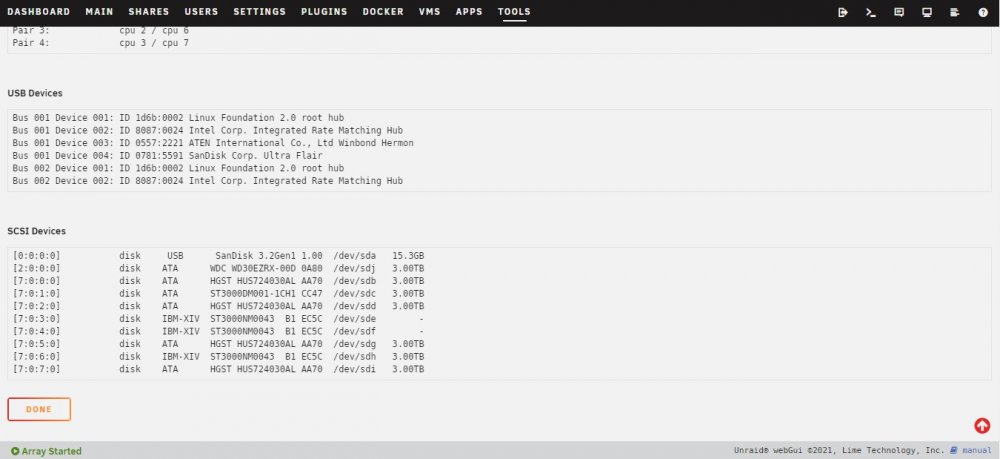
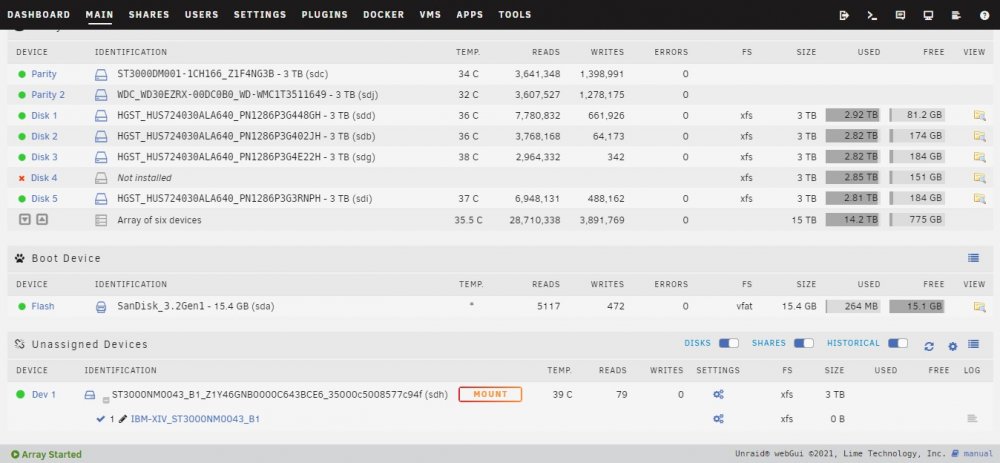
.thumb.jpg.60c126c843abff5ff4640d63c983cd88.jpg)

