





Stannis33
Members
-
Joined
-
Last visited
Everything posted by Stannis33
-
Thanks for the help everyone - I found some unused cables inside the sever, plugged those into the disk and the parity sync suceeded As this disk has now passed 2 extended SMART tests and built parity twice in the last month is it likely that the disk itself is probably fine and this was a connection issue - be it bad cables, me not plugging it in properly when I swapped the disk, other?
-
Erm this is where I run into a slight snag........ I did not build this machine myself, I don't really know what is plugged in, where or how. I am trying to figure it out but I am a long way from understanding! :-/ it does appear to use power splitters though.
-
I think the parity needs rebuilding to get it out of error state........what I do not understand is......if it tries to rebuild, and it can't complete because it now cannot read one of the other disks (because of the potentially wonky cable) and I end up with both a parity and data disk in error state am I screwed? Or can that mess be got out of as there is nothing wrong with my data disk or its contents (I hope!) - presumably by getting new cables and then trying again?
-
at the risk of asking a stupid question............if it is a dodgy cable, and that is now attached to another disk, will that not mess up the parity build?
-
SMART test claims to have passes, logs attached bob-smart-20260701-1430.zip What do I do now?
-
OK, thanks. I presume let that run and post the results in about 16 hours.......unless it blows up sooner :-/
-
Presumably stop the parity check (which seems to be paused) first? That might be a stupid question but I don't want to do anything wrong!
-
Erm......help. The parity disk has now gone into error state and says disabled Latest diagnotics attached. I have absolutely no idea what to do now :-/ bob-diagnostics-20260701-1357.zip
-
Sorry, I knew I'd forgotten something - my brain is fried bob-diagnostics-20260701-1105.zip
-
My system is currently running a parity check and I have just received a notification that my parity drive has read errors. 2 things: This disk is only 3 weeks old It is a Seagate drive which always reports millions of raw read errors, even when first plugged in Is this likely just a quirk of the Seagate reporting confusing things? All of the "important" SMART attributes are still reporting 0 I know I should probably run an extended smart test - but not until the parity check is finished. Or is that not actually necessary with Seagate's quirky reporting? Thanks
-
I've solved my problem. There was an old USB TV tuner that I don't use, so I unplugged it. Turns out the container very much wants it to be there though as when I plugged that back in the container immediately started.
-
Ummmm can someone please help. Plex was working fine last night I have just had to turn off my server to replace some disks. Specifically replaced the parity drive, now rebuilding. Removed a disk which had already been removed from the array and was just sitting there. Added a new disk which is not part of the array and it is sitting there waiting to be added to the array. After restarting, other docker containers appear to be OK, but my Plex container will not start. I get "Execution error. Server error" when I attempt to start it and the uptime section says "Exited (128)" I cannot find many logs and they don't seem to say much anyway. I really don't know what has happened or what to do. Can someone help me?
-
Thanks for your help everyone - my disk is out (of the array if not yet the machine) and parity successfully rebuilt.
-
I think Docker is all OK. The appdata is not on the array disks - I do know that is wrong My Docker backup app ran overnight and I don't think it started the containers properly (sometimes they seem to get a bit confused and need restarting again) - but I hadn't realised that had happened and just assumed I'd done something wrong messing with the disks, which with my track record was quite likely.
-
Panic over...........they have woken up again.......odd.........
-
Ummm.........so it seems that most of my Docker containers aren't working properly. I don't believe I touched any part of their data when moving things around - it was all videos, backups etc Is this likely just a coincidence and I need to reboot my server (this does happen from time to time - I think it's network-y) or could I have actually have broken the containers with this process?
-
Ah, yes, that is exactly what I had done........thanks
-
So I stopped the array Did new config, preserve all Set "disk 5" to "no device" in Main.....but....... The instructions say "'Start the array, but do not check the "Parity is valid" box.' But I see no such box This is what I see What have I don't wrong?

-
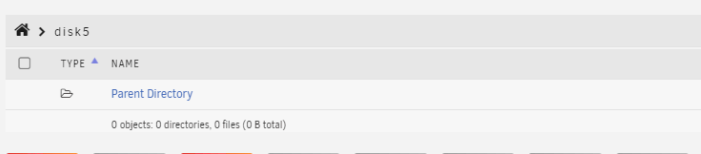
yes, that was a stupid question now I think about it........ 2 more questions........ so it's finished, the logs don't say anything about things it couldn't move, but Main still shows this browsing the disk though shows Is the disk actually empty? it moved almost everything onto the same disk which is now above its warning threshold Can I move a few folders to another disk? There seems to be an option if you go Main -> browse disk -> pick a folder -> Move If I pick eg a folder from disk1/Videos and move it to disk3/Videos will that actually work, or will that make a big mess? If the latter, how do I actaully move some stuff to other disks?

-
So for this disk I would literally just use mover start -e disk5 |& logger & Is that correct? Does the array need to be in maintenance mode or anything, should I avoid writing anything new to the sever in case it ends up on that disk?

-
I find myself needing to move all the data off one of my data disks and onto the others so that I can remove the disk from the array (and the system) But I cannot work out what is the best / correct way to do this. I've found various instructions for various methods but it is not clear to me how / if the data will actually be preserved with some of them. How do I safely achieve this without losing data? I don't care which of the other disks the data ends up on, I just need it off the disk in question. Thanks
-
OK, thanks. Sorry for all the questions - I'm just trying to understand how it now works....
-
Are there any active/obvious notifications of critical things like disk failures? Or do you now have to go manually check for everything?
-
Ah, no. I do not Just to check, it is this kind pf notification I am referring to Do you still need Connect for that?

-
I see that has been a change in notification behaviour since my last version (6.9.2) which made it so that the in browser notifications would auto-close I have found the setting which says if you set it to 0 they should not auto-close, which I have done, but I still have no notifications visible in the morning (I used to always have at least 1 often 5 or 6) Does this setting set to 0 mean that notifications should actually remain visible? If so, why might mine not be? Or does it not work that way and they are actually always meant to be hidden behind that bell icon (where I eventually found them all) even with it set to 0? Thanks



