





NightWriter
Members
-
Joined
-
Last visited
Everything posted by NightWriter
-
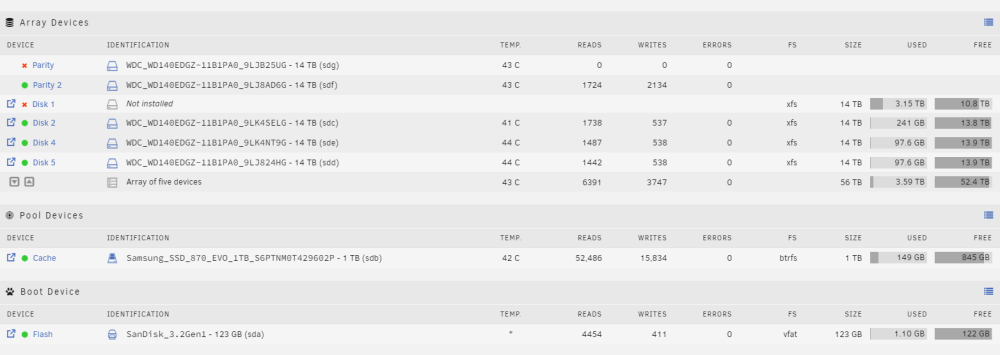
Thank you! This got me all my data back. However, it's still showing "Not Installed" and reporting the wrong size. (see attached).
-
Ran it with the (-L). Thank you for all the help. Very new to all of this. Disk 1: -L (New) Phase 1 - find and verify superblock... Phase 2 - using internal log - zero log... ALERT: The filesystem has valuable metadata changes in a log which is being destroyed because the -L option was used. - scan filesystem freespace and inode maps... clearing needsrepair flag and regenerating metadata - found root inode chunk Phase 3 - for each AG... - scan and clear agi unlinked lists... - process known inodes and perform inode discovery... - agno = 0 - agno = 1 - agno = 2 - agno = 3 - agno = 4 - agno = 5 - agno = 6 - agno = 7 - agno = 8 - agno = 9 - agno = 10 - agno = 11 - agno = 12 - process newly discovered inodes... Phase 4 - check for duplicate blocks... - setting up duplicate extent list... - check for inodes claiming duplicate blocks... - agno = 0 - agno = 3 - agno = 1 - agno = 2 - agno = 4 - agno = 5 - agno = 6 - agno = 7 - agno = 8 - agno = 9 - agno = 11 - agno = 12 - agno = 10 Phase 5 - rebuild AG headers and trees... - reset superblock... Phase 6 - check inode connectivity... - resetting contents of realtime bitmap and summary inodes - traversing filesystem ... - traversal finished ... - moving disconnected inodes to lost+found ... Phase 7 - verify and correct link counts... Maximum metadata LSN (1:28285) is ahead of log (1:2). Format log to cycle 4. done
-
I should note, there wasn't a lost and found folder.
-
I was able to sneak away and get that ran for you. unraid chkcilesystemstatus.txt
-
Disk 1 went out about 6 months ago, and I haven't addressed that since it was removed (time/low priority). Since that drive went down, the system has ran fine, up until yesterdays reboot. I have pulled that drive from my array. I'd like to add, only issues are with the media not coming back after reboot. All dockers/vms/game servers are running fine.
-
I was enjoying some of my media and then decided to reboot my server when I went for a late lunch. I didn't have a chance to use any of my media after the reboot until this morning. When I went into my Plex server, I noticed all files, but 1, were gone. Still in Plex, half of all the thumbnails were there, but when I click on them, they say, "Please check that the file exists and the necessary drive is mounted." I have had some issues with my drives. A drive (parity) went down a while ago and it hasn't been resolved. I haven't had time to reconfigure my unraid, but it has been running fine since. (6 months +). So, the missing Parity and Disk 1 is normal. This was that way prior to the data going missing. Thanks for your time/help. writersden-diagnostics-20230818-0845.zip
