





Cotanaj
Members
-
Joined
-
Last visited
-
I think I found a contributing factor (at least for me). It was not the client: I did end up switching to qbittorent + vuetorrent UI and had the same issue. I have stability and excellent performance now that I reconfigured my shares and started to leverage hard links. I have not had a "stroke" since the switch (fingers crossed). Here is the trash guide to set it up. I hope this helps.
-
My current line of thinking: The moving of the files once a download is complete is suspiciously aligned to when the entire server becomes unresponsive "strokes". I'm going to try RtorrentVPN and see if I get stable pulls and moves with a significant load to see if I can point to a config or hardware issue.
-
I may have been was wrong here. Since my last post, if I put any load on Deluge, it "strokes". I am not sure if its when it needs to move the data post complete or what but it is consistent. I had syslog to flash turned on and its pulled post "Stroke" & hard reset. syslog
-
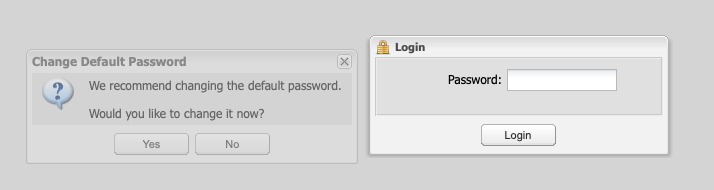
I logged in on the server GUI and was able to launch and login to deluge with no issue with the default password. I was hoping that changing the password there would clear something up on the WebUI and it did not. WebUI behavior regardless of password. I also removed it all (including app data) and installed deluge from the linuxserver's repo and the behavior was the same. I did notice since it was the first time logging it did ask to change the default password (see attached photo) but it was de-emphasized and therefore not accessible. Being able to login from the server got me functional so thank you. I am however looking forward to a fix. Additional note: that "stroke" is unfortunately sounding familiar... for another thread since it does not sound related (at least for me)
-
Version 2.1.1 Default password no longer functional. Behavior Upon clicking the login button with default password "deluge", entered credentials are removed and login pop-in window is reset asking for a password. No login failure notice. If I try anything else other than "deluge", I get the proper login failed message "You entered an incorrect password" Integration with Sonarr & Radarr still functional. Testing so far I have uninstalled the app -rm the app data Reinstalled No change in behavior. Tried authentication in multiple browsers and machines. Any suggestions?
