





LukasArmstrong
Members
-
Joined
-
Last visited
Everything posted by LukasArmstrong
-
Actions completed. I'm still getting warnings about files on app data, domains, and system being unprotected. Though I believe this is due to having only 1 drive in the cache pool. I'll try to consolidated my drives to make room for a another sata drive for the cache pool. tower-diagnostics-20250323-0825.zip
-
sir, yes sir tower-diagnostics-20250322-2220.zip
-
Hey Trurl, I wanted to report that my disk has completely rebuilt. Everything is working as expected. Thank you so much again! However, I was curious about what tips you have for me about how to improve my Docker/VM setup. I can attach a new Diagnostics if you'd like.
-
You're amazing! Thank you so much! Disk 2 is rebuilding. I'll report back tomorrow or so when the disk as fully rebuild so you can school me up on my Docker/VM setup.
-
I followed your instructions exactly. Here is the diagnostics you requested. tower-diagnostics-20250320-1720.zip
-
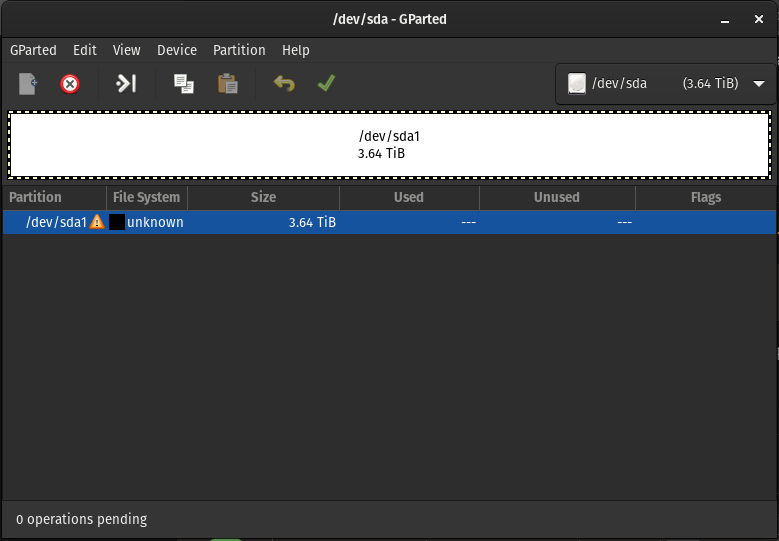
This might be a little confusing so please bear with me. I still have the disk that I originally tried to add a few weeks ago. I wasn't sure it if was precleared, so I installed it to my desktop and found it was precleared or at least gparted doesn't know what do with it (image of gparted added). As for original disk2, I no longer have that disk. I have already shipped it off to be RMA'd. It actually started failing so hard that it started to prevent my NAS from even starting.
-
No, I intended on letting unraid clear the disk for me
-
Nope
-
To completely honest, it a couple of weeks ago, so I don't remember the exact details but I didn't get far at all with that process. I vaguely remember it being: - Added Drive - Unraid detected drive and wanted to format. - Imeddiately got an error about it being unmountable. That when I realized I didn't have the lanes for another drive and opted to remove the drive.
-
aye aye captain 🫡 tower-diagnostics-20250319-2012.zip
-
Hello Unraid Community! Apologies if this a duplicate post. I tried to post this before without signing in and didn't see anywhere where my post had made it through or received any emails about it. I'm having an issue where I can't rebuild a failed drive due to a missing unassigned drive. To provide some context and background: A couple of weeks ago I tried to add another drive to my unraid server, but fail to account for not having enough PCIe lanes to use and format the drive. I opted to uninstall the drive instead of getting errors about it being unmountable. This ended up causing the perpetual "missing" drive. Probably fatal flaw, but I figured it was fine for a little bit until I had some down time to figure out how the remove this "missing" drive. Fast forward to now, I, unfortunately, had a drive die. I have a replacement for it, but unraid won't let me start up the array for a rebuild because "Too manywrong and/or missing drives". Is there a way to get around this? There was never a drive there and with my understanding of parity, it should be possible to rebuild. However, please feel free to correct me if I'm missing something! Thank you!
