clovercake
Members
-
Joined
-
Last visited
Everything posted by clovercake
-
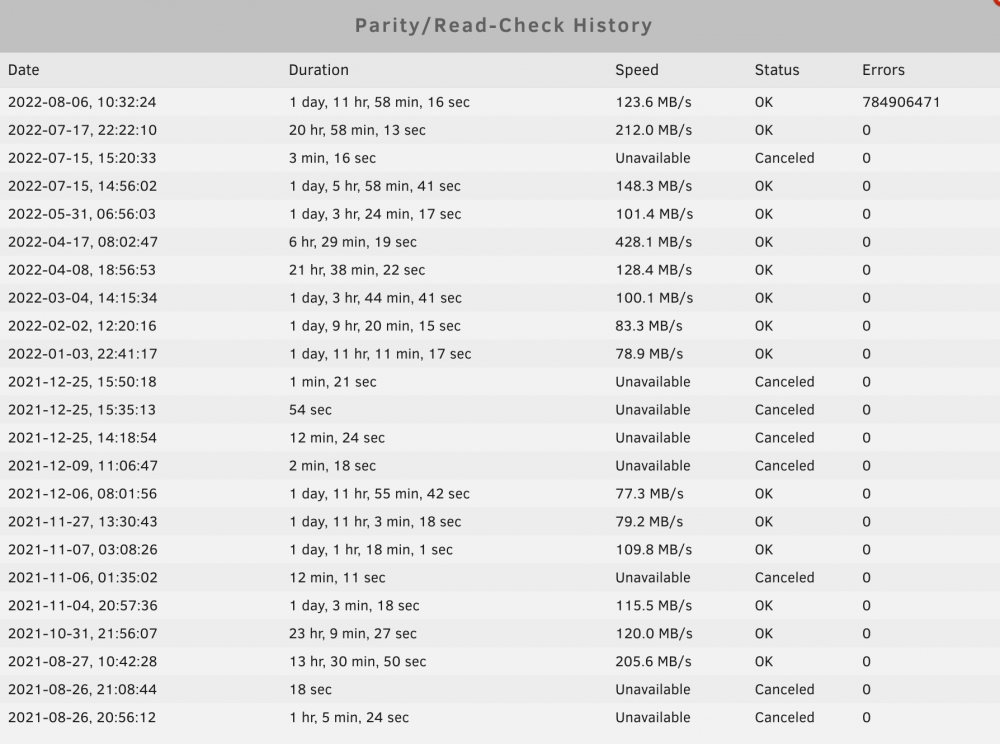
Looks like this is the prob. Got 0 errors on the 3rd parity check.
-
> Parity swap copies parity to the larger disk then rebuilds the replaced data drive to that former parity drive. Is that what you actually did? Yes. Didn't realized there's a normal replace drive procedure, therefore went with the parity swap. Disk 1 (Old Parity) -> Data Drive Disk 2 (New Drive) -> Parity Disk 3 (New Drive) -> Data Drive
-
Sorry for the confusion. I bought two new drives (16TB). Replaced (Parity swapped) the parity drive (10TB -> 16TB) Then, added a new slot in the array for the second 16TB drive.
-
Added the first drive via the parity swap procedure (new drives are larger than the parity drive). Rebuilt parity. Then added in second drive. Rebuilt parity.
-
I did added 2 new drives on 7/15, but nothing between 7/17 ~ 8/16.
-
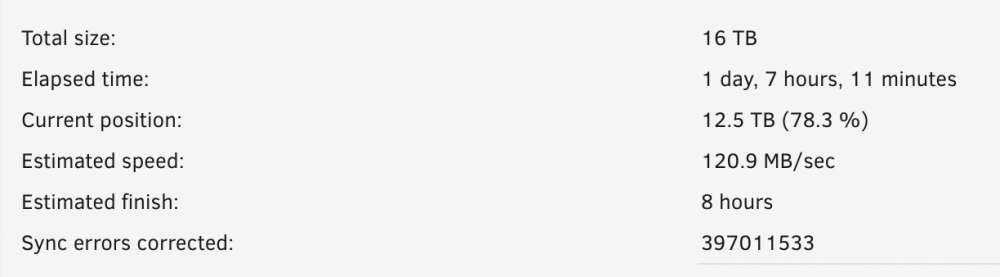
Had a unclean shutdown a few days ago, performed parity check and got 700m+ errors. Executed the parity check again, while expecting 0 errors, it still split out 400m+ errors at 80%. :( tower-diagnostics-20220807-2248.zip