





ithius
Members
-
Joined
-
Last visited
-
I'm getting this error now in the Plex logs after deleting and recreating the container: Failed to load preferences at /config/Library/Application Support/Plex Media Server/Preferences.xml Failed to load preferences at /config/Library/Application Support/Plex Media Server/Preferences.xml
-
total 0 drwxr-xr-x 1 root root 31 Jul 21 13:00 Application\ Support/ my Preferences.xml file is also empty. How would I restore it from a backup?
-
unfortunately it's still not working
-
How would I fix that?
-
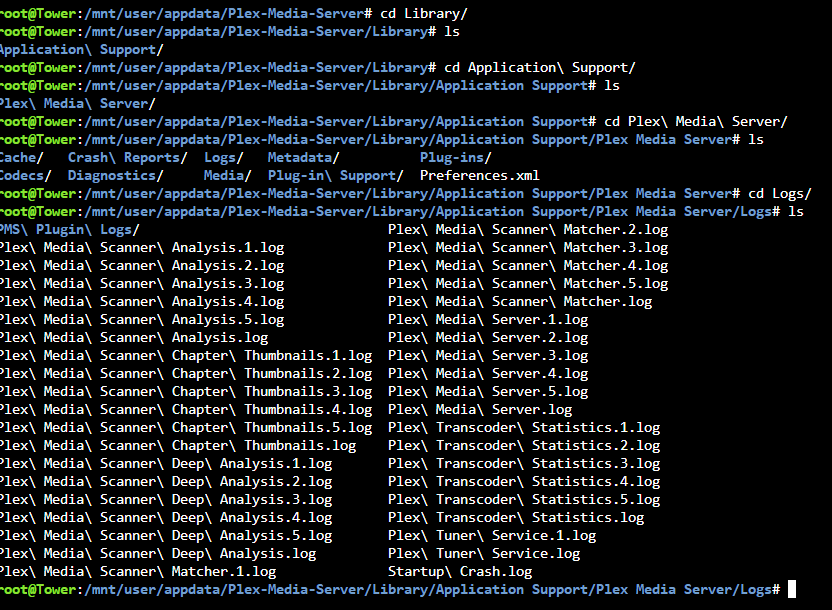
Here's something weird. My newest Plex Media Server.log file is from 2 days ago. The Startup Crash.log file lists this: root@Tower:/mnt/user/appdata/Plex-Media-Server/Library/Application Support/Plex Media Server/Logs# cat Startup\ Crash.log Aug 10, 2022 08:31:45: Failed to initialize logging: Empty or non-existant file.
-
Is the auto-generated folder structure supposed to look like this?
-
No, I'm not. Tells me: Hmmm… can't reach this page10.0.0.3 refused to connect.
-
Yes, Plex logs show the following: [s6-init] making user provided files available at /var/run/s6/etc...exited 0. [s6-init] ensuring user provided files have correct perms...exited 0. [fix-attrs.d] applying ownership & permissions fixes... [fix-attrs.d] done. [cont-init.d] executing container initialization scripts... [cont-init.d] 40-plex-first-run: executing... [cont-init.d] 40-plex-first-run: exited 0. [cont-init.d] 45-plex-hw-transcode-and-connected-tuner: executing... [cont-init.d] 45-plex-hw-transcode-and-connected-tuner: exited 0. [cont-init.d] 50-plex-update: executing... [cont-init.d] 50-plex-update: exited 0. [cont-init.d] done. [services.d] starting services Starting Plex Media Server. [services.d] done. That's exactly what I did. Power company said the power would be down for 6 hours. I shut down the server cleanly. Didn't think I needed to add that part, but I guess I did.
-
My docker container for Plex (plexinc/pms-docker) is running, shows no issues, but I can't connect to the UI. When Plex was set up, I was not having this issue. One morning, our power went out for several hours (longer than the backup PSU could run for), so my unRAID server was shut down. Since coming up, I can't connect to Plex. I can connect to every other docker container, like Radarr, Sonarr, etc., but not Plex. I've tried rebooting several times or manually stopping/starting the Plex docker container, but it's not working. I've confirmed that the IP address of the unRAID server has not changed, and Plex is still using the same IP as before. I've confirmed that the port forward on the router is still set to 32400. I'm new to unRAID, so I'm at a loss. Any help would be appreciated!
