rupeshjoy143
Members
-
Joined
-
Last visited
-
Hi there, just want to let you know that the THIS issue has been resolved. There are some unexpected shut downs happening, now, trying to troubleshoot it now
-
Would you say at this point the best thing to do is replacing the cache drive and then try to rebuild the docker image? Or would you do that now and then replace the drive?
-
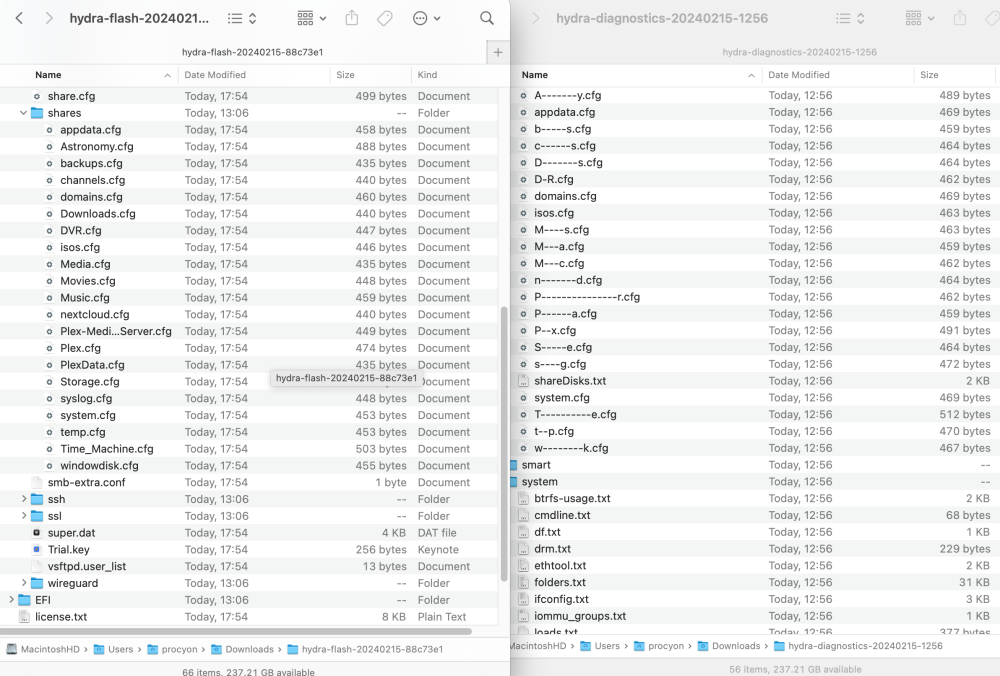
I do have a backup of the flash drive. The flash backup seems to have the .plg file on there. Here is the readout from the requested CLI total 429M drwx------ 11 root root 8.0K Dec 31 1969 ./ drwxr-xr-x 20 root root 440 Feb 15 17:44 ../ drwx------ 8 root root 8.0K Feb 15 17:44 .git/ -rw------- 1 root root 180 Aug 16 2022 .gitattributes drwx------ 3 root root 8.0K Aug 7 2022 EFI/ -rw------- 1 root root 8.0K Jan 1 1980 FSCK0000.REC -rw------- 1 root root 24K Jan 1 1980 FSCK0001.REC -rw------- 1 root root 8.0K Jan 1 1980 FSCK0002.REC -rw------- 1 root root 8.0K Jan 1 1980 FSCK0003.REC -rw------- 1 root root 8.0K Jan 1 1980 FSCK0004.REC drwx------ 2 root root 8.0K Aug 7 2022 System\ Volume\ Information/ -rw------- 1 root root 334M Nov 27 12:11 bzfirmware -rw------- 1 root root 65 Nov 27 12:12 bzfirmware.sha256 -rw------- 1 root root 6.3M Nov 27 12:10 bzimage -rw------- 1 root root 65 Nov 27 12:12 bzimage.sha256 -rw------- 1 root root 61M Nov 27 12:11 bzmodules -rw------- 1 root root 65 Nov 27 12:12 bzmodules.sha256 -rw------- 1 root root 29M Nov 27 12:12 bzroot -rw------- 1 root root 1.2K Nov 27 12:12 bzroot-gui -rw------- 1 root root 65 Nov 27 12:12 bzroot-gui.sha256 -rw------- 1 root root 65 Nov 27 12:12 bzroot.sha256 -rw------- 1 root root 2.5K Nov 27 17:10 changes.txt drwx------ 11 root root 8.0K Feb 16 11:16 config/ drwx------ 2 root root 8.0K Dec 19 2022 extra/ -rw------- 1 root root 4.5K Jan 31 19:33 hardware -r-------- 1 root root 120K Aug 7 2022 ldlinux.c32 -r-------- 1 root root 68K Aug 7 2022 ldlinux.sys -rw------- 1 root root 7.8K Nov 27 17:10 license.txt drwx------ 2 root root 8.0K Feb 15 17:44 logs/ -rw------- 1 root root 1.8K Nov 27 17:10 make_bootable.bat -rw------- 1 root root 3.3K Nov 27 17:10 make_bootable_linux -rw------- 1 root root 2.4K Nov 27 17:10 make_bootable_mac -rw------- 1 root root 142K Nov 27 17:10 memtest drwx------ 2 root root 8.0K Nov 15 2022 preclear_reports/ drwx------ 2 root root 8.0K Feb 15 13:47 previous/ drwx------ 2 root root 8.0K Sep 27 2022 syslinux/ -rw------- 1 root root 492 Nov 27 17:10 syslinux.cfg-
-
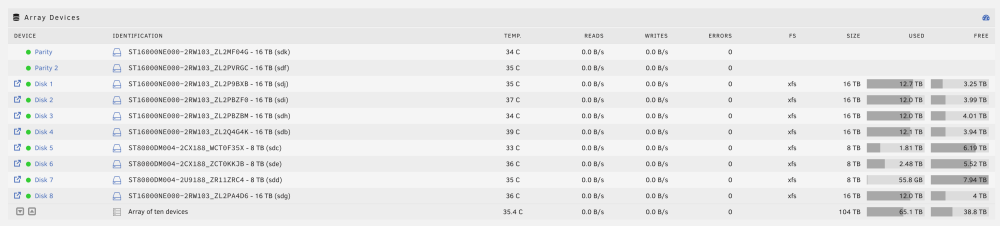
So yes, I do see the shares now, however, it seems like Docker is still not working. Under Apps, it looks like I have to install the Community Applications Plugin again Disk 7 is empty, Disk 5, 6 & 7 are my older drives, so I'm working through getting them upgraded to new drives with more storage That's how I initially setup the server, but my nVME drive started failing SMART. I think I moved it to prevent interruption in usage. Then we had a baby and I lost track of time and things I did. So, my question is, what's the best way to go about replacing the drive? I purchased a new drive already, just need to change it and do whatever is needed on UnRAID to get it setup.
-
hydra-diagnostics-20240215-1744.zip
-
withont -n Phase 1 - find and verify superblock... Phase 2 - using internal log - zero log... - scan filesystem freespace and inode maps... - found root inode chunk Phase 3 - for each AG... - scan and clear agi unlinked lists... - process known inodes and perform inode discovery... - agno = 0 - agno = 1 inode 2147483777 - bad extent starting block number 4494803803541339, offset 5699399040681087 correcting nextents for inode 2147483777 bad data fork in inode 2147483777 cleared inode 2147483777 - agno = 2 - agno = 3 - agno = 4 - agno = 5 - agno = 6 - agno = 7 - agno = 8 - agno = 9 - agno = 10 - agno = 11 - agno = 12 - agno = 13 - agno = 14 - process newly discovered inodes... Phase 4 - check for duplicate blocks... - setting up duplicate extent list... - check for inodes claiming duplicate blocks... - agno = 0 - agno = 1 - agno = 8 entry "docker.img" in shortform directory 2147483776 references free inode 2147483777 junking entry "docker.img" in directory inode 2147483776 - agno = 4 - agno = 6 - agno = 2 - agno = 7 - agno = 9 - agno = 11 - agno = 5 - agno = 10 - agno = 3 - agno = 12 - agno = 13 - agno = 14 clearing reflink flag on inodes when possible Phase 5 - rebuild AG headers and trees... - reset superblock... Phase 6 - check inode connectivity... - resetting contents of realtime bitmap and summary inodes - traversing filesystem ... - traversal finished ... - moving disconnected inodes to lost+found ... Phase 7 - verify and correct link counts... done with -L Phase 1 - find and verify superblock... Phase 2 - using internal log - zero log... - scan filesystem freespace and inode maps... clearing needsrepair flag and regenerating metadata - found root inode chunk Phase 3 - for each AG... - scan and clear agi unlinked lists... - process known inodes and perform inode discovery... - agno = 0 - agno = 1 - agno = 2 - agno = 3 - agno = 4 - agno = 5 - agno = 6 - agno = 7 - agno = 8 - agno = 9 - agno = 10 - agno = 11 - agno = 12 - agno = 13 - agno = 14 - process newly discovered inodes... Phase 4 - check for duplicate blocks... - setting up duplicate extent list... - check for inodes claiming duplicate blocks... - agno = 0 - agno = 4 - agno = 7 - agno = 2 - agno = 5 - agno = 6 - agno = 8 - agno = 9 - agno = 10 - agno = 11 - agno = 1 - agno = 3 - agno = 12 - agno = 13 - agno = 14 Phase 5 - rebuild AG headers and trees... - reset superblock... Phase 6 - check inode connectivity... - resetting contents of realtime bitmap and summary inodes - traversing filesystem ... - traversal finished ... - moving disconnected inodes to lost+found ... Phase 7 - verify and correct link counts... Maximum metadata LSN (68:3418958) is ahead of log (1:2). Format log to cycle 71. done
-
Phase 1 - find and verify superblock... Phase 2 - using internal log - zero log... - scan filesystem freespace and inode maps... - found root inode chunk Phase 3 - for each AG... - scan (but don't clear) agi unlinked lists... - process known inodes and perform inode discovery... - agno = 0 - agno = 1 inode 2147483777 - bad extent starting block number 4494803803541339, offset 5699399040681087 correcting nextents for inode 2147483777 bad data fork in inode 2147483777 would have cleared inode 2147483777 - agno = 2 - agno = 3 - agno = 4 - agno = 5 - agno = 6 - agno = 7 - agno = 8 - agno = 9 - agno = 10 - agno = 11 - agno = 12 - agno = 13 - agno = 14 - process newly discovered inodes... Phase 4 - check for duplicate blocks... - setting up duplicate extent list... - check for inodes claiming duplicate blocks... - agno = 0 - agno = 2 - agno = 1 - agno = 7 - agno = 4 - agno = 5 - agno = 8 - agno = 3 - agno = 10 - agno = 9 - agno = 11 entry "docker.img" in shortform directory 2147483776 references free inode 2147483777 would have junked entry "docker.img" in directory inode 2147483776 - agno = 6 inode 2147483777 - bad extent starting block number 4494803803541339, offset 5699399040681087 correcting nextents for inode 2147483777 bad data fork in inode 2147483777 would have cleared inode 2147483777 - agno = 12 - agno = 13 - agno = 14 No modify flag set, skipping phase 5 Phase 6 - check inode connectivity... - traversing filesystem ... entry "docker.img" in shortform directory inode 2147483776 points to free inode 2147483777 would junk entry - traversal finished ... - moving disconnected inodes to lost+found ... Phase 7 - verify link counts... No modify flag set, skipping filesystem flush and exiting.
-
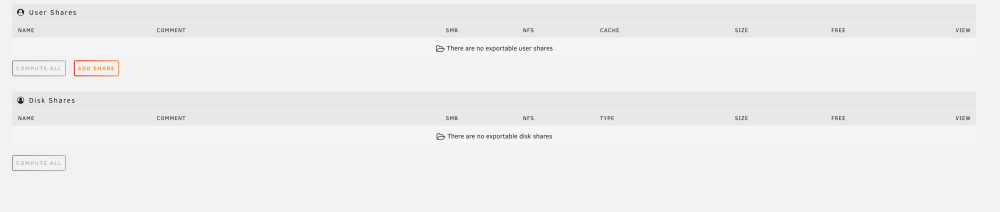
Hi everyone, we had a snow storm which resulted in a power outage overnight. I have an UPS which is set to shut down my UnRAID server and it looks like something went awry. This morning when I woke up and turned it back on, I do not see any of my shares. When I go to my shares, it says "There are no exportable user shares" Docker and VM's say "Docker/Libvirt service failed to start" I can still see the array and all my files. The data appears to be intact. I have a backup of the flash drive and it seems to have the share listed properly, but the diagnostics show missing information. I hope it makes sense. I don't mind making new shares and resetting up everything. I just don't want to lose data. The drives pass diagnostics and most of the drives are new. hydra-diagnostics-20240215-1256.zip