





robti
Members
-
Joined
-
Last visited
-
Thanks that gives me something to look at
-
Hi running current build 7.0.0 and was running parity check and had 6 hours left after 20+ hours and tried to log in and found server was off, only way to start was to switch the psu off and leave for a minute and then switch it back on and it restarted. Any ideas? broxi-diagnostics-20250124-1713.zip
-
Thanks just in time I did this and my parity check kicked in, but I was able to see in the shares that I could now set the free space and which discs to use, so looks like it’s fixed thank you
-
Okay first of all thanks for taking the time to reply to me, any help on how to proceed in plain English as a newbie
-
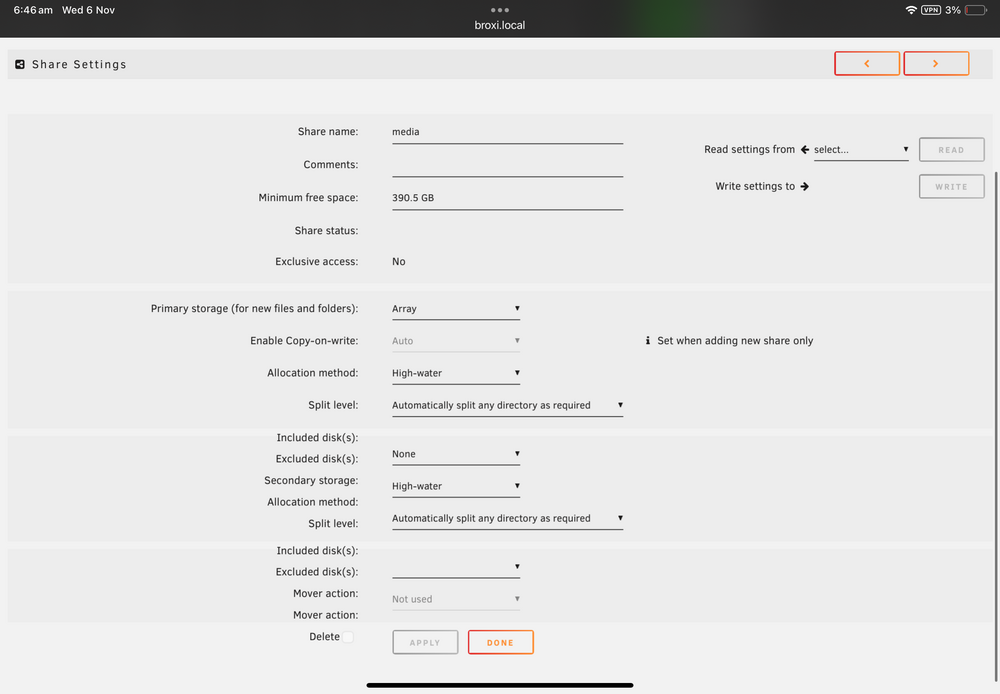
Trying to add to my media share, also rebooted and can’t add, exclude drives to the shares or change the minimum free space in any shares
-
Hi running beta 4 and I can’t move any files onto the array I get error no free space but have 35Tb free. I download onto a ssd alter the files then move onto array using Windows and smb broxi-diagnostics-20241105-2351.zip
-
Update after running “etc/rc.d/rc.samba restart” still unable to connect, so tried with my user name instead of root and it all works again, does this sound correct, it’s been a while but thought I logged in via root
-
running 7.0.0-beta.4 and have lost access to my shares from windows with error the network path was not found, any help? broxi-diagnostics-20241101-0930.zip
-
Hi running 7 beta 4 and just added a couple of Sas drives and noticed I can’t spin them down like the sata drives, any pointers to solving this?
-
Hi I have cleared out 4 small drives to be removed from my array and before I remove them I also decided I don’t now need dual parity as I will be down to only 3 array drives, so can anyone help on the process of adding one of my parity drives to the array?
-
So nothing on it unraid needs, just double checking?
-
Hi I removed old parity drive and am currently rebuilding parity with two new drives, in regards to the old disconnected parity drive can I remove it permanently and put in windows machine?
-
Version 7 beta 3 i have lost the web ui for ha after working fine for months, I have tried a restart but the same result, also I had a custom logo that has gone back to default ( I know how to fix, just mentioning in case it’s related), any ideas ? broxi-diagnostics-20241007-2327.zip
-
Running 7.0.0-beta.3. Hi I have been looking at the guides but can’t see anything for the above. I assume run preclear on new drive to test but then I am lost. Is there a guide or post I can follow as the recommended route ? Thanks
-
I was Just worried about having a sas as parity mixed with a SATA drive
