





EmmersonMacLean
Members
-
Joined
-
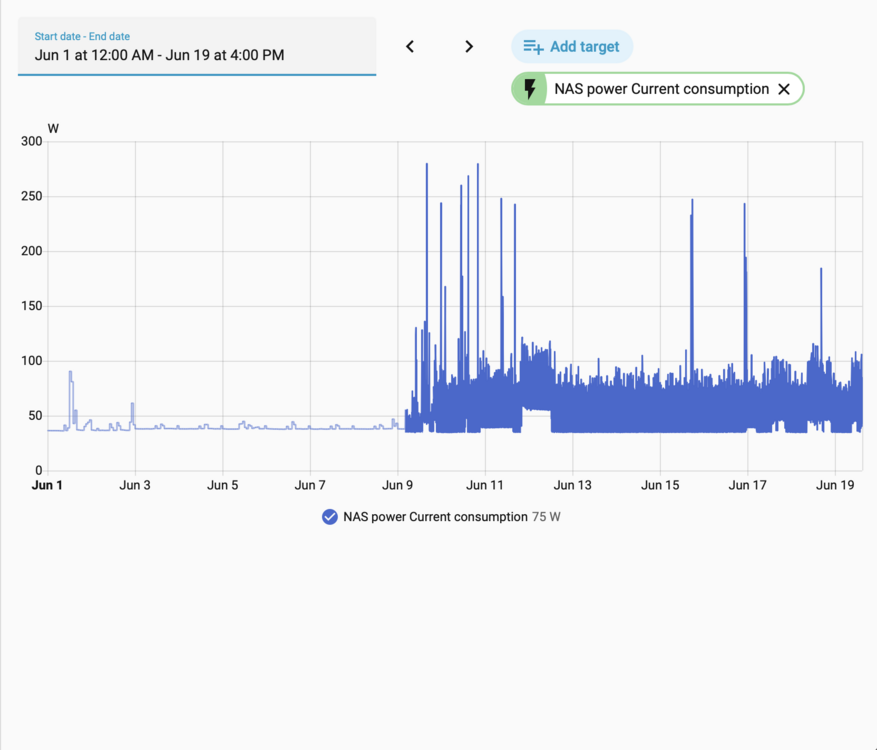
Hi All, I'm running a low power Unraid server and closely track my power consumption. I noticed a massive power consumption change after upgrading from Unraid 7.2.4 to 7.3.1. I'm choosing to downgrade my OS for now but would love any insight or assistance with getting power consumption back to similar levels to 7.2.x Hardware I'm running is an intel 12400 and Intel B580 for low power but high performance Local AI and transcoding for myself. Usually the server idles around 38Watts but after upgrading my average power consumption is now 50Watts with no change to docker containers or day to day operations. I don't run any VM's, I'm noticing the Intel B580 is constantly power spiking and the CPU is also struggling to stay in low power states. Looking at CoreFreq I can't find any containers causing issues. Attached is a screenshot from my power meter for the NAS, would appreciate any help from other users, thanks.
-
Hi all I'd like to add more fuel to the fire for getting battlemage supported in Unraid. I currently have a B580 in my server as the only graphics card and it's pretty useless even passed through to a VM. Unraid only recognizes this card as a PCIe 1.1 x1 device so when passed through I cant get ReBar enabled or much performance out of this card in a Windows VM. I'm planning to use the card for plex transcoding, Gaming VM and some light AI experimenting so support natively in Unraid can't come soon enough. Looking forward to the release of 7.1.
