





Niggo
Members
-
Joined
-
Last visited
-
Sooo, after all this time... an update. At some point I realized I was using SAS and SATA disks in the same enclosure. Same exact disks except for the connector. Now, I did know that, I was just not fully aware of the implications. The SAS disks, obviously, showed up just fine when plugging in two controller into the disk shelf. You might already know where this is going. The SATA disks, however, were not. This is due to the fact that SAS disks are capable of connecting to two controllers/HBAs simultaneously but SATA disks are not. Thus, whenever I plugged in the second IOM on the disk shelf, the SATA disks kept randomly deciding which controller they were going to talk to. The SAS disks did not mind at all, since well, they are dual-controller capable. Well, so much for that.
-
I would like to add, mine still don't work. The same two of the four devices show up intermittently, while the two other 16TB disks are just not happening. Meanwhile I've replaced the HBA with an Adaptec one (78165) since it has HBA mode by default and you can just change it to whatever mode you need. I've also replaced the IOM3 modules in the shelf with IOM6 ones. Still, the netapp branded drives show up fine, two (or three, depending on whatever) do not show up at all. Now that I've changed the controller, they do not show up as zero size, rather they don't show up at all in Unraid. It should be of note though, rebooting (thus plugging the cables out and back into) the shelf will change the detected drives between one and two, regarding the Exos 16TB disks. All 1TB Netapp disks show up though. They always do. I'm getting the feeling there's something wrong with those disks. Because not even the controller will detect them in it's bios. When I plug them into my Windows machine though, all of them show up and work just fine. I am out of ideas here.
-
[0:0:0:0]disk SMI USB DISK 1100 /dev/sda 8.17GB [1:0:4:0]disk WDC WD1003FBYX-05YSA NA03 /dev/sdo 1.00TB [1:0:5:0]disk WDC WD1003FBYX-05YSA NA03 /dev/sdp 1.00TB [1:0:6:0]disk WDC WD1003FBYX-05YSA NA03 /dev/sdq 1.00TB [1:0:7:0]disk WDC WD1003FBYX-05YSA NA03 /dev/sdr 1.00TB [1:0:8:0]disk WDC WD1003FBYX-05YSA NA03 /dev/sds 1.00TB [1:0:9:0]disk WDC WD1003FBYX-05YSA NA03 /dev/sdt 1.00TB [1:0:10:0]disk WDC WD1003FBYX-05YSA NA03 /dev/sdu 1.00TB [1:0:11:0]disk WDC WD1003FBYX-05YSA NA03 /dev/sdv 1.00TB [1:0:12:0]disk WDC WD1003FBYX-05YSA NA03 /dev/sdw 1.00TB [1:0:13:0]disk WDC WD1003FBYX-05YSA NA03 /dev/sdx 1.00TB [1:0:14:0]disk WDC WD1003FBYX-05YSA NA03 /dev/sdy 1.00TB [1:0:15:0]disk WDC WD1003FBYX-05YSA NA03 /dev/sdz 1.00TB [1:0:18:0]disk ATA SA 4321 /dev/sdk 16.0TB [1:0:21:0]disk ATA SA 4321 /dev/sdn - [1:0:22:0]disk ATA SA 4321 /dev/sdl 16.0TB [1:0:23:0]disk ATA SA 4321 /dev/sdm - [2:0:0:0]disk ATA Patriot P210 204 916a /dev/sdb 2.04TB [3:0:0:0]disk ATA WDC WD40EFZX-68A 0B81 /dev/sdc 4.00TB [5:0:0:0]disk ATA Patriot P210 204 916a /dev/sdd 2.04TB [6:0:0:0]disk ATA WDC WD40EFZX-68A 0B81 /dev/sde 4.00TB [7:0:0:0]disk ATA WDC WD40EFZX-68A 0B81 /dev/sdf 4.00TB [8:0:0:0]disk ATA WDC WD40EFZX-68A 0B81 /dev/sdg 4.00TB [9:0:0:0]disk ATA Patriot P210 204 916a /dev/sdh 2.04TB [10:0:0:0]disk ATA Patriot P210 204 916a /dev/sdi 2.04TB [11:0:0:0]disk ATA WDC WD40EFZX-68A 0B81 /dev/sdj 4.00TB [N:0:0:1]disk KINGSTON SNV2S1000G__1 /dev/nvme0n1 1.00TB [N:1:0:1]disk KINGSTON SNV2S1000G__1 /dev/nvme1n1 1.00TB This is the output of the SCSI Devices section under Tools -> System Devices
-
Hello, sadly I still am unable to figure this out. I tried formatting, but that still did not help. Though now two drives show up consistently. As far as the lohs are concerned, it first says that the drive has a few million 512 byte sectors, then it tries to initialize / spin up the drive again and then it shows as 0 512 byte sectors. I should note, I wasn't able to get the formatting working on the drives that do not show up, other than in the system devices tab, with a - as their size reading. Logs attached. storinator-syslog-20231216-1338.zip
-
Thank you, I will try that. Though it should be of note, this is what my system log looks like now: storinator-syslog-20231118-1504.zip
-
Thanks for the hint. I am really unsure whether it is worth the effort though. Since the controller only has internal ports, and I don't have any adapter cables, I might just go out and buy an actual SAS controller that does have external ports with the default external SAS connector and buy some adapter cables. What do you think?
-
I do have an LSI controller, though I am unsure whther I can flash it to IT mode since it is from an IBM System X and is branded as ServeRAID (model number is ServeRAID M5110). No adapter-cables though. I tried without the interposers before, but then it just doesn't detect any of the drives in any way shape or form. Strangely though, I did not have any problems with the NetApp drives, that were in the JBOD before. Probably because they were the "same" brand (AFAIK the drives as well as the controller are just rebranded, WD-Black and Chelsio respectively)
-
Diagnostics attached below. Yes, I am using SATA to SAS interposers and have tried without them. Still no change, sadly. storinator-diagnostics-20231113-1736.zip
-
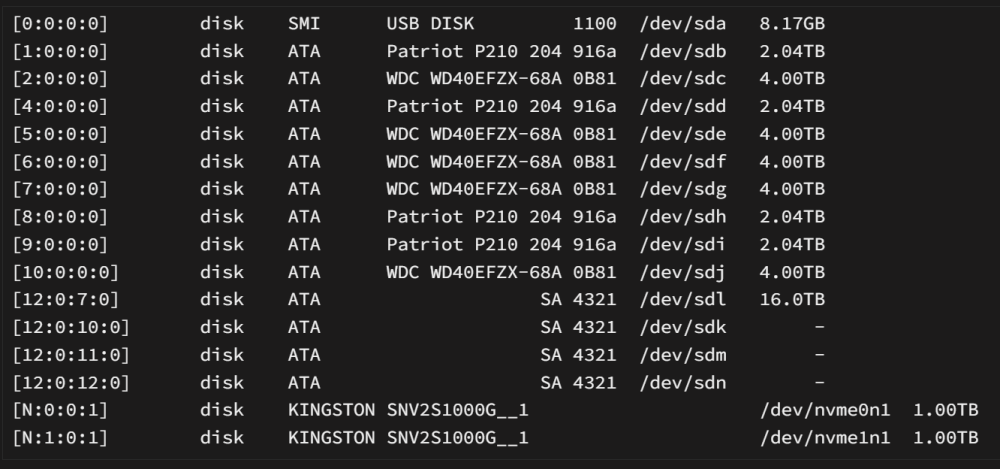
Edit: Here is a screentshot of the system devices tab.
-
Hello all, I have recently switched from 24x 1TB with SATA to SAS adapters in my NetApp DS4243 to 4x 16TB with SATA to SAS adapters. My issue is, that only one of the 4 Seagate Exos drives show up in the GUI. The other three are listed under system devices, but show "-" as size. When looking at the log, it displays "emhttpd: device /dev/sdk has size zero". What am I missing here? What is wrong? Sidenote: I previously had the diskshelf connected with two SAS-cables, but found out through another post, that multipathing is not supported in Unraid. Interestingly though, when I had the shelf filled up with 1TB disks, it did not through any errors regarding multipathing. There are other errors when Unraid is detecting the drives upon insertion as well. Log file is attached. If you need anything else. Please let me know. Thank you very much in advance. Regards, Niggo storinator-syslog-20231111-1701.zip

