snowspeeder
Members
-
Joined
-
Last visited
Everything posted by snowspeeder
-
The server became unresponsive yesterday, nothing on the attached monitor. I forced a reboot. I was unable to access webui, or ssh. I rebooted into safe mode, but have the same issue. I can ping the unraid server fine, I can login via local terminal fine, and ping outside (google). I ran diagnostics, pulled my USB and copied over here. I don't see anything that stands out to me. Any help would be appreciated. tower-diagnostics-20230625-0838.zip
-
Are you able to remote to Remote Desktop to the Windows VM when the screen is black? If yes, does device manager show the GPU is installed with working drivers? Is it the only display adapter shown in device manager (aside from the virtual display adapter that Remote Desktop created?)
-
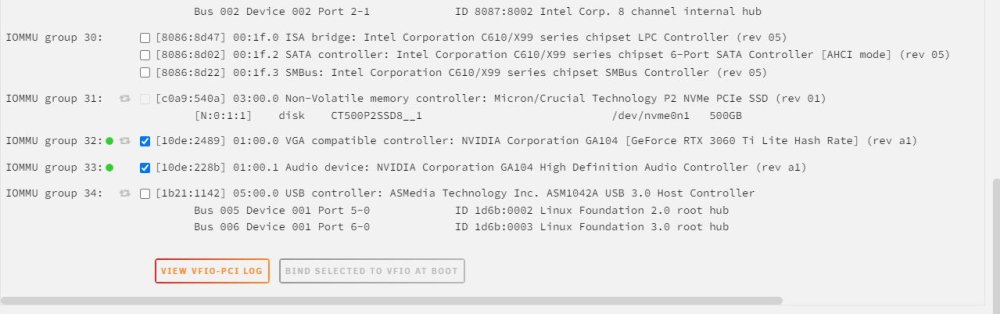
Did you go to the ‘Tools’ - System Devices’ section and reserve the IOMMU groups? If not, find your gpu in there and put checks next to them. Reboot Unraid. For that matter, did you enable VT-D in your Motherboard BIOS?
-
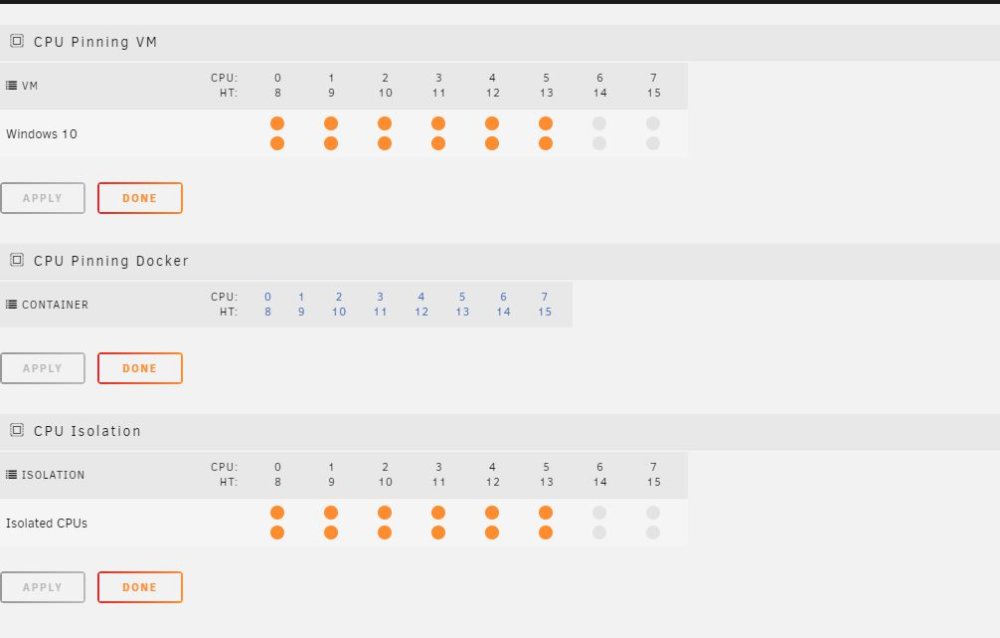
I have setup unraid as a dedicated VM server. I have created a single Windows 10 VM, with a Nvidia 3060TI LHR passthrough. It is mostly working. My issues are that the VM seems sluggish compared to Win10 on bare hardware. Several cores, and 16G RAM is allocated. Also, I am unable to set a 'Custom Resolution' via Nivida Control Panel. I have VT-D enabled in BIOS, and HDMI dongle plugged into the card, VM installed on NVME drive and all the following settings applied. Any help would be appreciated. VM Config: <?xml version='1.0' encoding='UTF-8'?> <domain type='kvm' id='1'> <name>Windows 10</name> <uuid>8894dd57-72bf-5f2a-bf56-694800cc1a6a</uuid> <metadata> <vmtemplate xmlns="unraid" name="Windows 10" icon="windows.png" os="windows10"/> </metadata> <memory unit='KiB'>17301504</memory> <currentMemory unit='KiB'>17301504</currentMemory> <memoryBacking> <nosharepages/> </memoryBacking> <vcpu placement='static'>12</vcpu> <cputune> <vcpupin vcpu='0' cpuset='0'/> <vcpupin vcpu='1' cpuset='8'/> <vcpupin vcpu='2' cpuset='1'/> <vcpupin vcpu='3' cpuset='9'/> <vcpupin vcpu='4' cpuset='2'/> <vcpupin vcpu='5' cpuset='10'/> <vcpupin vcpu='6' cpuset='3'/> <vcpupin vcpu='7' cpuset='11'/> <vcpupin vcpu='8' cpuset='4'/> <vcpupin vcpu='9' cpuset='12'/> <vcpupin vcpu='10' cpuset='5'/> <vcpupin vcpu='11' cpuset='13'/> </cputune> <resource> <partition>/machine</partition> </resource> <os> <type arch='x86_64' machine='pc-i440fx-4.2'>hvm</type> <loader readonly='yes' type='pflash'>/usr/share/qemu/ovmf-x64/OVMF_CODE-pure-efi.fd</loader> <nvram>/etc/libvirt/qemu/nvram/8894dd57-72bf-5f2a-bf56-694800cc1a6a_VARS-pure-efi.fd</nvram> </os> <features> <acpi/> <apic/> </features> <cpu mode='host-passthrough' check='none' migratable='on'> <topology sockets='1' dies='1' cores='6' threads='2'/> <cache mode='passthrough'/> </cpu> <clock offset='localtime'> <timer name='rtc' tickpolicy='catchup'/> <timer name='pit' tickpolicy='delay'/> <timer name='hpet' present='no'/> </clock> <on_poweroff>destroy</on_poweroff> <on_reboot>restart</on_reboot> <on_crash>restart</on_crash> <devices> <emulator>/usr/local/sbin/qemu</emulator> <disk type='file' device='disk'> <driver name='qemu' type='raw' cache='writeback'/> <source file='/mnt/user/domains/Windows 10/vdisk1.img' index='2'/> <backingStore/> <target dev='hdc' bus='virtio'/> <boot order='1'/> <alias name='virtio-disk2'/> <address type='pci' domain='0x0000' bus='0x00' slot='0x03' function='0x0'/> </disk> <disk type='file' device='disk'> <driver name='qemu' type='raw' cache='writeback'/> <source file='/mnt/user/domains/Windows 10/vdisk2.img' index='1'/> <backingStore/> <target dev='hdd' bus='virtio'/> <alias name='virtio-disk3'/> <address type='pci' domain='0x0000' bus='0x00' slot='0x06' function='0x0'/> </disk> <controller type='usb' index='0' model='qemu-xhci' ports='15'> <alias name='usb'/> <address type='pci' domain='0x0000' bus='0x00' slot='0x07' function='0x0'/> </controller> <controller type='sata' index='0'> <alias name='sata0'/> <address type='pci' domain='0x0000' bus='0x00' slot='0x04' function='0x0'/> </controller> <controller type='virtio-serial' index='0'> <alias name='virtio-serial0'/> <address type='pci' domain='0x0000' bus='0x00' slot='0x05' function='0x0'/> </controller> <controller type='pci' index='0' model='pci-root'> <alias name='pci.0'/> </controller> <interface type='bridge'> <mac address='52:54:00:a0:cd:ce'/> <source bridge='br0'/> <target dev='vnet0'/> <model type='virtio-net'/> <alias name='net0'/> <address type='pci' domain='0x0000' bus='0x00' slot='0x02' function='0x0'/> </interface> <serial type='pty'> <source path='/dev/pts/0'/> <target type='isa-serial' port='0'> <model name='isa-serial'/> </target> <alias name='serial0'/> </serial> <console type='pty' tty='/dev/pts/0'> <source path='/dev/pts/0'/> <target type='serial' port='0'/> <alias name='serial0'/> </console> <channel type='unix'> <source mode='bind' path='/var/lib/libvirt/qemu/channel/target/domain-1-Windows 10/org.qemu.guest_agent.0'/> <target type='virtio' name='org.qemu.guest_agent.0' state='connected'/> <alias name='channel0'/> <address type='virtio-serial' controller='0' bus='0' port='1'/> </channel> <input type='tablet' bus='usb'> <alias name='input0'/> <address type='usb' bus='0' port='2'/> </input> <input type='mouse' bus='ps2'> <alias name='input1'/> </input> <input type='keyboard' bus='ps2'> <alias name='input2'/> </input> <audio id='1' type='none'/> <hostdev mode='subsystem' type='pci' managed='yes'> <driver name='vfio'/> <source> <address domain='0x0000' bus='0x01' slot='0x00' function='0x0'/> </source> <alias name='hostdev0'/> <rom file='/mnt/user/xsrm/Zotac.RTX3060Ti.8192.210305_1.rom'/> <address type='pci' domain='0x0000' bus='0x00' slot='0x08' function='0x0' multifunction='on'/> </hostdev> <hostdev mode='subsystem' type='pci' managed='yes'> <driver name='vfio'/> <source> <address domain='0x0000' bus='0x01' slot='0x00' function='0x1'/> </source> <alias name='hostdev1'/> <address type='pci' domain='0x0000' bus='0x00' slot='0x08' function='0x1'/> </hostdev> <hostdev mode='subsystem' type='usb' managed='no'> <source> <vendor id='0x046d'/> <product id='0xc52b'/> <address bus='3' device='3'/> </source> <alias name='hostdev2'/> <address type='usb' bus='0' port='1'/> </hostdev> <memballoon model='none'/> </devices> <seclabel type='dynamic' model='dac' relabel='yes'> <label>+0:+100</label> <imagelabel>+0:+100</imagelabel> </seclabel> </domain> Syslinux: default menu.c32 menu title Lime Technology, Inc. prompt 0 timeout 50 label Unraid OS menu default kernel /bzimage append vfio-pci.ids=10de:2489,10de:228b initrd=/bzroot video=efifb:off acpi_enforce_resources=lax isolcpus=0-5,8-13 pcie_acs_override=downstream,multifunction label Unraid OS GUI Mode kernel /bzimage append pcie_acs_override=downstream,multifunction isolcpus=0-5,8-13 initrd=/bzroot,/bzroot-gui label Unraid OS Safe Mode (no plugins, no GUI) kernel /bzimage append initrd=/bzroot unraidsafemode label Unraid OS GUI Safe Mode (no plugins) kernel /bzimage append initrd=/bzroot,/bzroot-gui unraidsafemode label Memtest86+ kernel /memtest xvm-diagnostics-20230114-0853.zip
-
Following up here, the only thing I needed to do was switch off TPU, since then its been running steady for months.
-
Just updating here. The issue seemed to be the motherboard had its TPU switch enabled. Once I switched it off, the system stabilized and has been running for 2 days without fault.
-
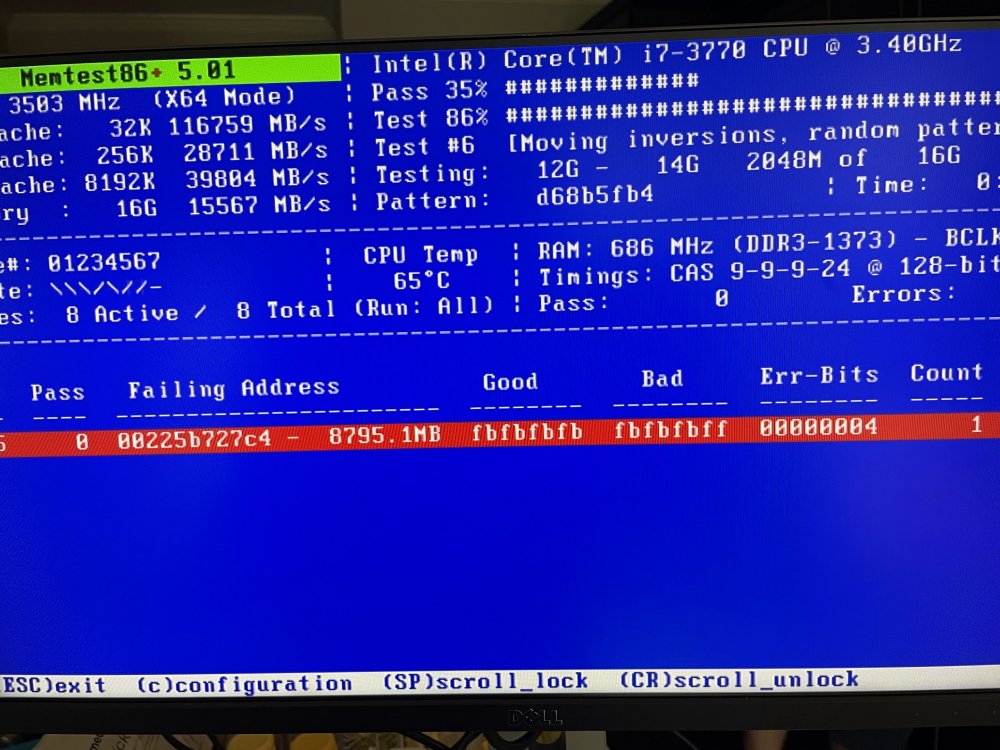
Yes, there are errors with he Bios settings defaulted. Is it typical for a long running machines memory to fail like this?
-
@trurl Yes, it does. It won't if I don't start the array, but even if I disable Docker, once I start the array it will barf after a few minutes. I started running the Memtest again, but this time with Hyperthreading enabled (option 2) and stated getting these errors after about 30 min, which I did not get with option one. So, I went to the BIOS and reset to defaults and am running again.
-
It ran overnight, but about 13 hours
-
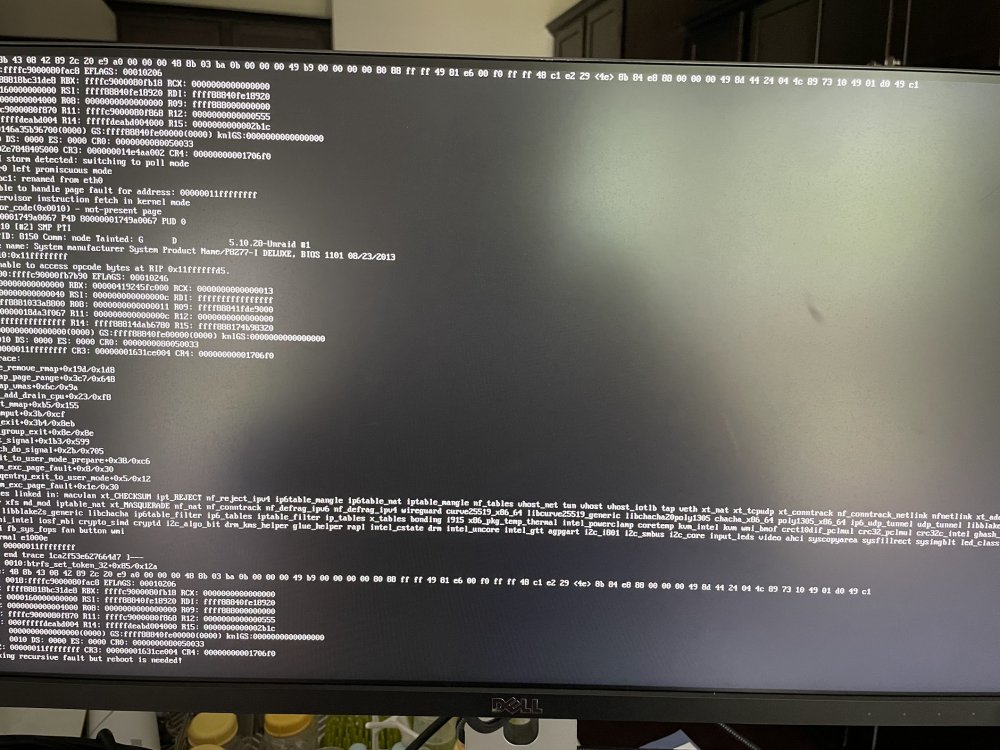
Nerdpack uninstalled. New Panic. New Syslog and Diagnostics attached. xnas-diagnostics-20220821-1325.zip syslog
-
Diagnostics attached xnas-diagnostics-20220821-1209.zip
-
My Unraid box has been running well for the past few months, as of last night, the machine constantly panics after being on for a short while (15 minutes?). I tried several post repeating to the Docker direct IP being an issue, upgraded to 6.10.RC3 and switch to ipvlan with no avail. Removed all dockers except for Plex. I tried just disabling Docker, but I still get hardware errors. I ran a meatiest and everything passed. Any ideas? I have attached my syslog. syslog