




Skip to content
View in the app

A better way to browse. Learn more.

Unraid

A full-screen app on your home screen with push notifications, badges and more.

To install this app on iOS and iPadOS
  1. Tap the Share icon in Safari
  2. Scroll the menu and tap Add to Home Screen.
  3. Tap Add in the top-right corner.
To install this app on Android
  1. Tap the 3-dot menu (⋮) in the top-right corner of the browser.
  2. Tap Add to Home screen or Install app.
  3. Confirm by tapping Install.

Ostracizado

Members
  • Joined

  • Last visited

Everything posted by Ostracizado

  1. *Facepalm* Thanks, Jorgen. Only now I noticed I was using the path (/volume1/video) in the Web Ui instead of /completed. Working fine now.
  2. Hey, I'm using delugevpn, with Docker, on a Synology. I'm wondering if there's a way to send the completed download to a folder outside the /data. For instance, my /data path is: /usbshare1-2/Torrent (external HDD) But I have another shared folder (/volume1/videos) where I have and send all my videos (NAS).
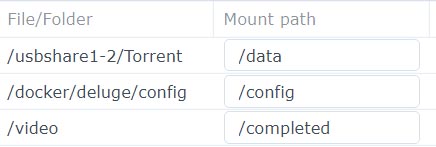
  3. Honestly, at this point I'm really grasping at straws... Synology's firewall, for some reason doesn't allow me to access the Web Gui (nas_ip:8112); no matter how I change the rules, or add TCP ports. On the other side, everything works fine when I disable the firewall. *sigh* Any ideas?
Account

Navigation

Search

Search

Configure browser push notifications

Chrome (Android)
  1. Tap the lock icon next to the address bar.
  2. Tap Permissions → Notifications.
  3. Adjust your preference.
Chrome (Desktop)
  1. Click the padlock icon in the address bar.
  2. Select Site settings.
  3. Find Notifications and adjust your preference.