





Aurora8orealis
Members
-
Joined
-
Last visited
-
After reading through many posts and trying multiple different things, i finally found a solution. Under Tools-> System Devices, I bound the NVME Controller of my SSD to VFIO After a restart of Unraid I then deleted my old VM and created a new one. This time I'm keeping the primary boot device as none, but under other PCIe Devices i then Pass through the entire NVMe Controller After this step I reinstalled windows as normal and installed the VirtIO Drivers, after this all issues have been fixed.

-
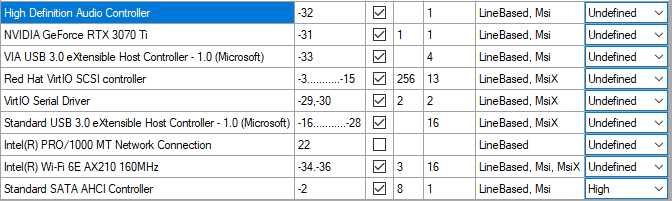
Box was Ticked, PC Restarted, Irq is now on 32, so seperate from the network card. I've done a speedtest again to check if it's fixed, but sadly PC still freezes completely for 3-4 Seconds
-
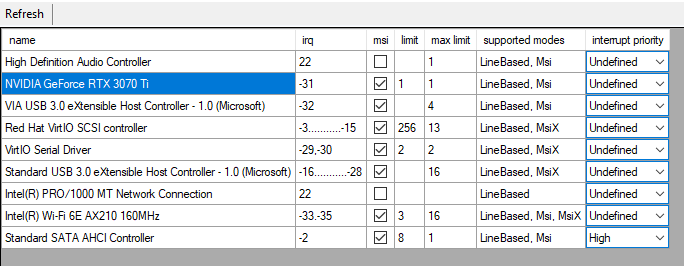
Hay, Thanks for your answer, but with looking into the tool the issue seems to be somewhere else. Im sending a Screenshot: As u can See 3070Ti is -31 and completly alone in its group, so the issue seems to be somewhere else But Thank you so far for your efforts
-
Hay, Thanks for your Answer I am Still a little bit unsure what is correctly meant with "IRQ" ? DO u mean the IOMMU Groups? I do have 2 Virtual Machines and a few Docker Containers. Could it be a bit more explained how i do what u suggested?
-
Thats not good to hear, but i dont really wanna switch, i would still try to stay with unraid. Any other possible solutions that could maybe fix this issue Also, i am using a Ryzen 9 5950x
-
Hello everyone, this is my first post and also a shoutout for help regarding my current issue with the Unraid System. I've been using Unraid now for the past 6 Month and was very happy so far, but sadly I am struggling with an issue what makes usage of my Windows VM very unusable. My Unraid Runs With 1 Ubuntu VM and a Windows VM The Windows VM has a 3070TI passed through, so I can use it like a normal Computer daily. So but now to the Problem, when using the Windows VM with heavy internet usage the VM starts to stutter, lags or even freeze completely for a couple of seconds. Best examples are: - Internet Speed test on any website: Windows VM freezes completely for 5 Seconds and then stabilizes slowly again till speed test is complete - Steam Game Downloads cause VM to heavily lagg, causing usage mostly impossible do to everything freezing and stuttering heavily. First i thought that the laggs would be regarding a new NVMe SSD i bought for this VM, but with Crystaldiskmark no issues have been noticed while testing read and write speeds. In the VM Settings i already tested br0 and T1000 and both seem to have same issues. The Windows VM is fine when downloading with about 200mbit, at about 300-400 Mbit/s I start to notice stutter, till vm completely freezes at about 600-800 Mbit/s I would appreciate any help and can when requested any more information if needed. VM XML: https://pastebin.com/sa72wdCv unraid-diagnostics-20221120-1802.zip
