





Zookeeper4094
Members
-
Joined
-
Last visited
-
Ahh I see, thank you. I just came across an old post from you where you recommended copying the files to an unassigned drive to avoid further writing to the array. I don't have enough space to do that but am tempted to delete unimportant stuff from the emulated drive and then copy the bits I want to keep to the unassigned drive. Then copy it back after doing a new config/parity resync. Does this sound like the best option for my case? tower-diagnostics-20220905-0952.zip
-
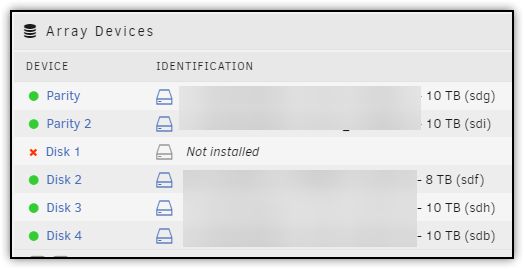
Hey trurl. I don't think it's mounted as it's showing as 'not installed' or am I missing something with that? How would I transfer data off of it to other disks as currently I can only browse data via the share?
-
Oof, I don't know what I was thinking. I naively thought that removing the disk, shrinking the array, it would then magically restore the content across the other disks. I can't lose the data that's on it. It is being emulated so assume it can't be copied/moved anymore. I'm thinking that replacing the drive is my only option unless there are any other tricks?
-
Dang. Just checked cables and such, rebooted, and it made some lovely clicking noises so I think the drive is gone. Array came back up with the drive showing as 'not installed' this time. Do you know if the best way to shrink the array by removing the drive is as I've outlined above? The new config bit scares me. I'm just thinking of stopping array, removing the drive, starting array and rebuilding parity.
-
Shoot, sorry. Knew I forgot something. tower-diagnostics-20220901-1318.zip
-
Hello, Looking for a bit of advice on how to deal with a disabled disk in Unraid. Disk has been disabled due to read/write errors and is showing as 'disabled'. I'm happy to remove the drive completely and just shrink the array as I feel this might be easiest and quickest but not sure how best to do this. I found several guides that suggest copying data off the drive and zeroing it and then shrinking the array to avoid parity rebuild. Obviously I can't copy the data off the drive as it's disabled in my case. Assuming the way I'd have to do it is to: Stop array Unassign the disabled disk (New config setting maybe? This part always seems scary as 'new config' sounds like it's going to mess with all data on array and start as a 'new' storage pool) Start array Parity rebuilding Is there a better way or am I missing something? Any help would be hugely appreciated.
