





gustsant
Members
-
Joined
-
Last visited
-
I am a bit skeptical Unraid will recognize this automatically but will give it a try once I do a backup. Thanks
-
Media is the name of the share that contains all disks in the array. Are you suggesting I delete the Media share? If so, when I delete the share will the files and folders in the disks remain where they are? If that is the case I could delete the share, move the folders one one level and then create new individual shares for movies and shows.
-
Jorge, Thanks for the reply but I am not sure I follow your suggestion. Also using XFS for reference. If I move everything to the top level then everything will be inside "Media" then, no? I will now still have a "Media" share that contains all movie files and shows folders on disks Disk1, Disk2, Disk3 and Disk4 but without the Movies and Shows subfolders. I would not have a "Movies" share containing Disk1 and Disk2 or a "Shows" share containing Disk3 and Disk4 . Did I miss something?
-
Using Unraid 7.0.1. Does anyone know if there is a simple or straight forward way to remove the top level of a share without losing or moving data? Not exactly my configuration but an example to illustrate what I am trying to find out: Unraid has 6 Disks (Disk1, Disk2, Disk3, Disk4, Disk 5, Disk6) with only one Share called "Media" . Media has 2 Folders (Movies, Shows) Media\Movies only exists in Disk1, Disk2 Media\Shows only exists in Disk3, Disk4 Parity on Disk5, Disk6 Is it possible to magically remove the top level Media from existence and keep everything in Disk1,Disk2 under a new share "Movies"? The same would apply to "Shows" on Disk3,Disk4. In other words, "\Media\Movies\" on Disk1-Disk2 would simply become just "\Movies\" on the same Disk1-Disk2. I regret creating the Media share structure instead of just having individual Shares for Movies, Shows etc . I think this just creates complexity and less flexibility with split level settings and now hoping to fix my mistake without having to move all this data elsewhere, resetting everything, moving it all back while stressing the drives in addition to rewriting all new parity for it. Any help or suggestions is appreciated. Thanks
-
I have 192GB of RAM and I am moving TBs of data across to Unraid. I tested with some different transfers and it takes several minutes after the file transfer ends before the array goes quiet, but it does seem to end eventually so this makes perfect sense.
-
I am transferring files between NAS and Unraid and it seems like after each batch completes, Unraid seems to keep writing to the array indefinitely as if the files were still being transferred although it is already done. I see this in the Main tab (read and write). There is disk activity seen in the HDD light in the case for the specific disk that was being used plus the 2 parity disks, though I don't see anything new being written to the disk. There is no cache and no mover for the array. Anyone else seeing this too or am I crazy? I wait for a while to see if it will stop but it does not seem to stop on its own, so I just stop the array and start again, no more activity. Using xfs for FS.
-
Thanks for the suggestion. I erased the pool and also changed the FS to zfs and formatted the drive which solved the problem.
-
Let me start with I am New to Unraid but unless I am screwing something up badly, this does not look right to me. Currently there is no array or any data of any kind on the server, just prepping and configuring things for now. I am trying to create a downloads cache with 1 drive, I select 1 slot, it shows 1 slot, I select one drive, it shows 1 drive, I start the array and apparently it shows a cache pool with 2 drives (cannot even change it to 1), it recognizes the 800GB drive but shows it as 600GB with 6MB used and 400GB free (I clearly cannot do Math either as this clearly does not add up either) . None of it makes any sense to me. Would anyone be able to help me figure out what I am missing or doing wrong here? Any help is appreciated. BTW, I created a system cache with 2 drives and that one is showing just fine.
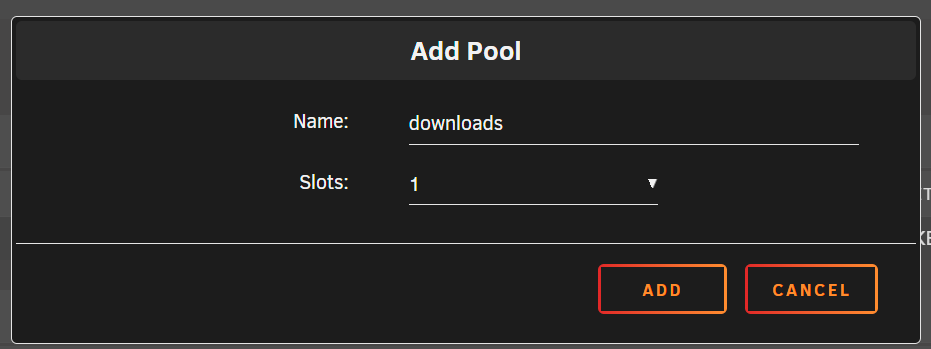

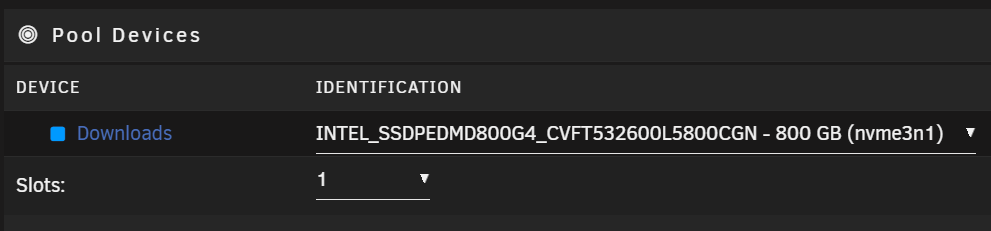

-
+1 on this.
-
Boot from SSD so I can have it in Raid1.
-
I just really wish they removed the requirement to boot from USB and allowed to boot from SSD so it could just be installed in a Raid 1. And yes, I have heard the speech about Unraid running from memory, how someone's cousin never had an issue with USB etc. I bought a license a long time ago and have been waiting all this time to install hoping this would be implemented in a newer version but still nothing. I guess I will have to suck it up now that I am running out of space in my current NAS.
-
gustsant joined the community
-
Hello, I would like to check to see if there are any plans to support installation on an SSD instead of USB. If so, would it be possible to subscribe to the enhancement so I could be notified when implemented? I don't mind at all paying for a license or two but I cannot bring myself to install a server on a USB driver, this is just not happening. Thanks in advance


