





mediarif
Members
-
Joined
-
Last visited
-
hmm .. I spoke too soon. It looks like I'm still having trouble with this, .. when I restarted my raspberry pi server, I failed to edit the /etc/fstab file for persistent drive mapping, ... and then it loaded the config files on the internal disk instead of the UNRAID server (so it gave me the impression it was working) I had some conversation withe a tech support person with Crafty and was asking him about it, ... he mentioned this: -- --- -- copy paste from my conversation with him - - - - - So there's a few possible sources of trouble. Some FUSE based filesystems, like unraid, have trouble with mmap calls to the filesystem. It may be that the sqlite db of Crafty cannot run on a shared unraid volume since it's "not a real fs" but a FUSE style fs. The other source of possible issue is the uid and gid that you set for the share. -- --- -- copy paste from my conversation with him - - - - - Wondering if there is any validity to this statement? ... (I'm confident it was not the UID/GUID setting)
-
I'm getting closer to a fix on this. It appears I am having to use NFS share instead of SMB. I wish there was a way to get it to work with SMB. But now I am having difficulty mounting the NFS share in windows 11. I've appropriately installed NFS client for windows 11. When I try the following command (in CMD): mount \\10.85.1.2\sharename Y: I'm getting the following error message: Network Error - 53 Type 'NET HELPMSG 53' for more information. some googling is suggesting something to do with the NFS server? (URAID)
-
I'm running CasaOS on a raspbery pi server trying to run docker apps (like crafty, or jellyfin). I'm wanting to store my data and config data off the server on my unraid server. I've successfully mounted unraid shares to my server and am changing the applicable docker app paths (to store the data) on my unraid server, but am getting permissions denied errors. I mounted the unraid shares using the same user that my docker apps run in (hoping it would access the shares using the appropriate username, etc) How can i get this to work?
-
Okay, ... thank you for this confirmation. My last question (related to this topic) is in perspective to appropriate process. When I terminal into my UNRAID server. I assume I navigate into the /mnt/ folder and then into each diskX folder to manually perform each action ... if I use the linux mv command, will it properly (safely) combine/merge the folders/files together (as I mv each root folder (and sub-directories) into its proper drive) ... or is there a different linux command I should be using to do this? (sorry about my noob'ish linux command line question there) ... or is there a different process I should be using altogether?
-
I am having difficulty describing my question (apologies if sounds disjointed). My file server is designed such that I have distinct buckets of root folders (that contain files and folders) that I would like to keep contained on specific drives only (and do not want portions of the files and folders to get spread across multiple drives. I like knowing that a specific drive only contains folders and files for that specific root folder. I assume this is what the [ included/excluded disks ] allow you to control.(?) The share names I defined are named the same as these root folders (so I can easily keep track) and I have gone through each share and defined the [ included/excluded disks ] for each. Each share only "includes" the 1 specific drive I would like it to only save against and have "excluded" all other drives. and have done that for each of the 8 disks I have included in my current raid setup. So I feel this is the feature that allows me to control this. My question is, .. I didn't have this explicitly defined this way for a while, and now I have folders and files that exist across multiple disks that I would ultimately like to clean up after I have since carefully defined the [ included/excluded disks ]. Is there an easy way to cause UNRAID to auto move folders/files (after the fact) so that they are now only physically located on the disks that I have carefully defined?
-
After doing this, it worked ... I just went ahead and rebuilt the raid as it was before (didn't take too long). I was also able to publish the flash drive out as a share just fine. So all issues now fixed. (thank you so much)
-
okay. here is what I just did: 1. I removed the USB drive. 2. Created a full backup of all the files. 3. Formatted the drive. 4. Downloaded, extracted and copied the latest purely clean UNRAID update (6.12.10) to the USB drive 5. Copied the [ config ] folder from the backup to the USB drive. 6. Ran "make_bootable.bat" as administrator (windows 10) 7. re-inserted the USB drive and booted the system. UNRAID seems to start up fine (I am able to see all my drives okay, etc) ... though, the flash drive is still not visible and the GUI is still not loading. Is the diagnostics.zip still missing key files? diagnostics.zip
-
Here is a photo of my monitor (showing my command line activity) ... perhaps I am performing the steps improperly?
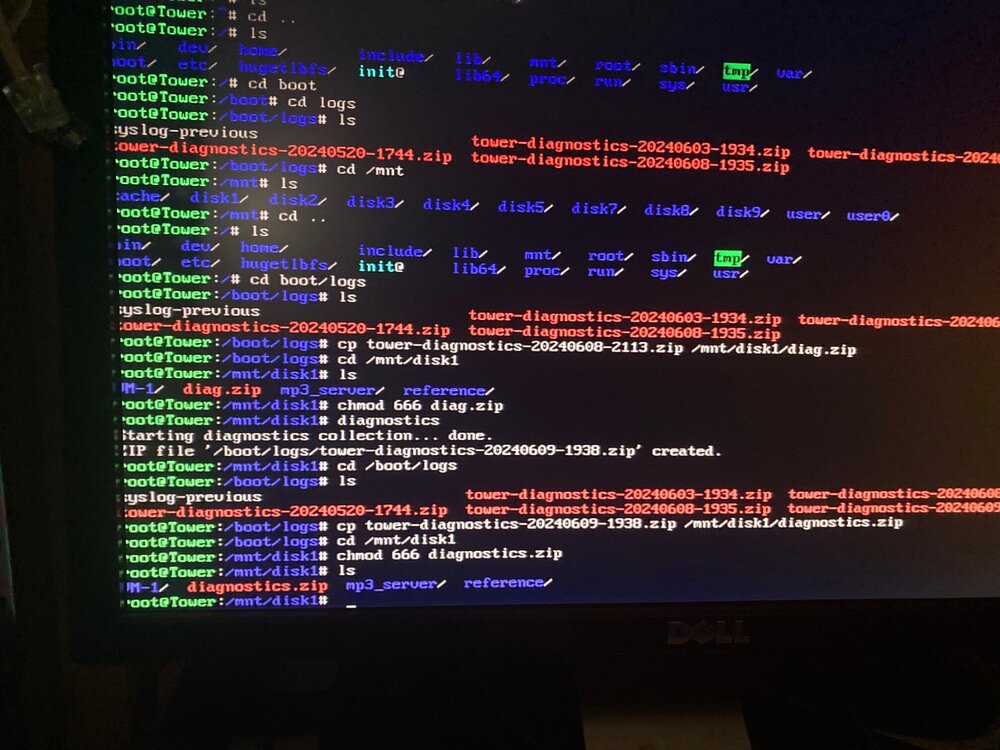
-
thank you for your response. I did another diagnostic export see uploaded diagnostics.zip
-
Thank you for your response, but I am unable to access the GUI (after the upgrade)
-
I upgraded to the newest version of UNRAID (6.12.9) ... I feel ridiculous that I didn't take exact note of which version It was before the upgrade, .. but I'm pretty certain it was something like version 6.6.x ... or 6.3.x (sorry for the bad memory) ... System boots up fine (and I see all my mapped drives okay) .. so UNRAID appears to have started okay (and all seems to work fine) ... [ Problem 1 ] When I navigate to the folder structure within windows file browser ( \\10.85.1.2 ) .. I see all my shared folders just fine, but the Flash drive is now not showing up here (It used to). I had read something about the flash drive maybe needing a repair. The flash drive is mounted inside the case (it's a big case and took me a while to remove from my rack, open up, remove and mount into windows 10) .. windows declared it was fine. I did a repair anyway (response declared that there were no issues). [ Problem 2 ] Web GUI will not load in browser Here is a copy of a syslog today syslog.zip diagnostics.zip

