





Corgex
Members
-
Joined
-
Last visited
Everything posted by Corgex
-
The first rebuild I tried on Wednesday night failed. Replaced the SATA data and power then everything went ok. Did some downloading and ran the mover without issue. Thanks for taking the time to confirm the SAS card wasn't causing all these new problems.
-
Those diagnostics were several days old. I haven't shut down or reboot yet. I am going to do another rebuild tonight and see how we look in the morning. Hopefully I can get a better idea if the problem continues again or if a different disk becomes disabled.
-
Yes
-
I have two of my SSD's plugged into the marvell controller on the motherboard. All the HDD are plugged into the SAS except for one disk is on Gigabyte controller on the motherboard.
-
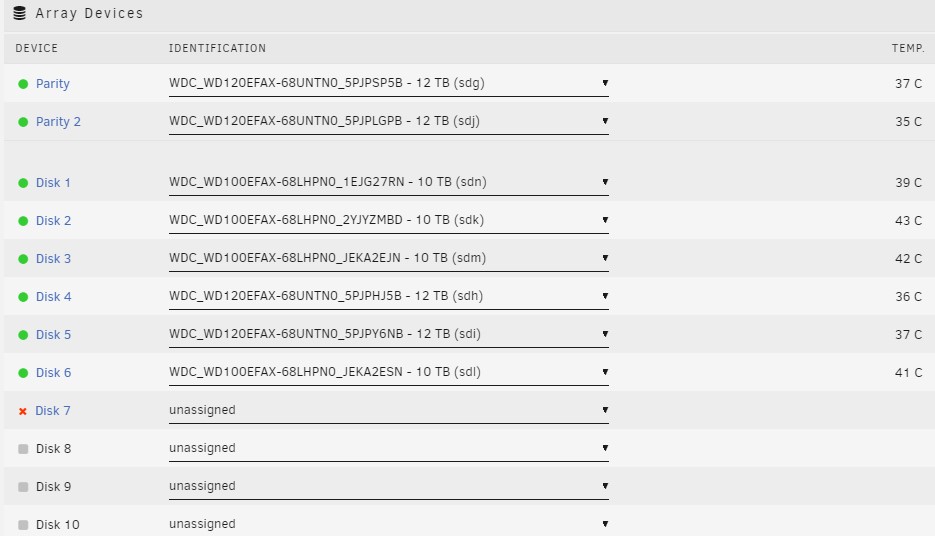
I don't think I have a disk8. Here is a screenshot of the array. Currently my disk 7 is the disabled one. Previously disk 6 (JEKA2ESN) also became disabled and need a rebuild. This is the second time for disk 7 All the disks are connected to power supply with sata power connectors. I'm running a Corsair 750i
-
Hello, I recently replaced my Sata controller with an LSI SAS 9211-8i that I flashed into IT mode. I have been having drives become disabled since. I am able to complete a rebuild only to have it become disabled again once I begin using the server. I am hoping someone can review the diagnostics from my most recent disabled drive and point me in the right direction. SPECS: Gigabyte z77x-ud5h, i5 3570k 3.5ghz, 16mb ram, LSI-9211-8i, Aquantia 10gb NIC, 6 samsung 860evo, 9 WD120 and WD100EFAX corgicloud-diagnostics-20220902-1818.zip


