





Fidelis
Members
-
Joined
-
Last visited
Everything posted by Fidelis
-
You all are not going to believe this... After not being able to access my Plex account for about a week, trying everything I could think of to fix it and then finally giving in and making a post here. I just jumped on to find 3 replies to my post, so I go open Plex to try the recommendations and low and behold plex is back to normal and working again. sigh Its like when you your have a problem repeatedly, but the moment you ask someone to watch you recreate the error, the damn thing works flawlessly. Regardless I want to give a big thank you to @bmartino1 for the massive amount of work they put into those 3 posts, although i didn't end up using any of what you suggested i none the less appreciate the help and generosity.
-
Hi All, My apologies if this is not in the correct area of the forum, but I couldn't find an appropriate area to post in. I am at my wits end, I can't figure out what has gone wrong. My Plex server has been up and running for some time (mostly without issue). But recently I logged onto plex, to find that I could no longer see any of my media libraries, I checked the setting within Plex, and most of the menu options which would normally be in the column on the left, have disappeared. The strange thing is it only seems to effect the "Home Admin" account, all the managed accounts are still able to access the server, libraries, and media. I've checked multiple Plex clients (WebUI, Win App, iOS app) and it is the same across the board. I initially tried rebooting the container (no change), the tried updating the container (no change), then rebooting the server (also no change). I have also tried replacing the db and blob.db with older versions with no luck. i have tried deleting the Plex Container and reinstalling, (thought i am not sure if i did this right, as I've never had to delete a container before and reinstall), i tried once deleting the container but leaving the image, then tried a second time and deleting the image the second time. I have tried editing the preferences.xml to delete the 4 PlexOnline entries, and alas that also did nothing. Help me Obi Wan, you're my only hope!
-
Hey All, I've been running a Win10 VM for a while now successfully passing through 2x Blu-Ray ODD (SATA to MB). However following a recent Win10 update on the VM, Win10 now only sees 1 of the 2 ODD Drives (Win10 finds Host8 but can't ever seem to find host7). I've double checked the VM XML and nothing has changed there. I have checked the lsscsi list on UNRAID and it still sees both ODD Drives. In case i've gone blind here is the lsscsi listing for the 2 ODD ... [7:0:0:0] cd/dvd PIONEER BD-RW BDR-S13JX 1.04 /dev/sr0 [8:0:0:0] cd/dvd PIONEER BD-RW BDR-209D 1.10 /dev/sr1 ... and here are the relevant sections of the the VM XML <controller type='scsi' index='0' model='virtio-scsi'> <alias name='scsi0'/> <address type='pci' domain='0x0000' bus='0x00' slot='0x09' function='0x0'/> </controller> <controller type='scsi' index='1' model='virtio-scsi'> <alias name='scsi1'/> <address type='pci' domain='0x0000' bus='0x00' slot='0x0c' function='0x0'/> </controller> ... <hostdev mode='subsystem' type='scsi' managed='no'> <source> <adapter name='scsi_host7'/> <address bus='0' target='0' unit='0'/> </source> <readonly/> <alias name='hostdev0'/> <address type='drive' controller='0' bus='0' target='0' unit='0'/> </hostdev> <hostdev mode='subsystem' type='scsi' managed='no'> <source> <adapter name='scsi_host8'/> <address bus='0' target='0' unit='0'/> </source> <readonly/> <alias name='hostdev1'/> <address type='drive' controller='1' bus='0' target='0' unit='0'/> </hostdev> Any thoughts or suggestions would be much appreciated. (Oh and some idiot didn't realise until too late that System Restore Points isn't turned on on the WIN10 VM.) EDIT: Other things I've tried/looked at... Checked Device Manager and no "unknown SCSI devices" found Checked Disk Manager, in case the ODD was there but had not been assigned a Drive Letter. Tried changing/creating new SCSI controllers for the missing ODD and no change. Tried an Alternative method for passing through the missing ODD by removing it from the controller/hostdev sections, and listing it as a (CDROM) disk in the Devices Section.
-
Thank you Jorge. Your Knowledge and advice is much appreciated.
-
Hey All, This may be a stupid question, but i'd rather look like an idiot and not screw stuff up, than be an actual idiot and stuff things up. So I'll be removing a single HDD (that actually never got used so has absolutely nothing on it) from my server and replacing it with 3 new drives. my question is, should i replace it with a single drive and rebuild the array and then add the other 2 new drives? Or is it fine to add all three at once and rebuild? Thanks in advance for the advice, and i hope you have a Merry Christmas, and Happy New Year, or whatever you do or don't celebrate.
-
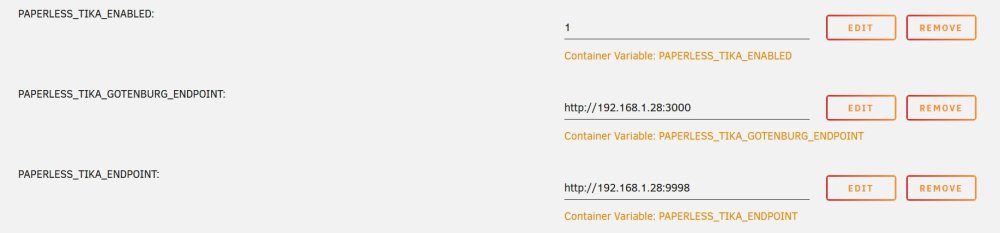
Hey All, I am in need of your wisdom and help. I am running Paperless-NGX along with Tika & Gutenburg on my UNRAID server. Now, I've got Paperless running fine, and I have no issues consuming pdf files into Paperless. However when it comes to consuming MS Office Documents I have a little bit more trouble. I have Tika and Gutenburg installed, but i am not 100% sure i have them installed correctly. When I try to consume a .doc file, it spits out the following error. [Errno 99] Cannot assign requested address When i set it all up i installed Redis, Paperless, Apche-Tika-server, and Gutenburg from the Apps Section of UNRAID, then i added the 3 Variables in the attached image to Paperless. So, what the hell have i done wrong? Any thoughts, idea, or help would be great. Oh i'm not an IT professional by any stretch of the imagination, i'm not a complete idiot, but i am not a professional either.
-
Thanks Jorge, This worked perfectly, with no undue side effects (yet) and was far simpler then what I was planning, glad I asked the question Gracias
-
Hey All, Hope you are all going well. I am a unraid newbie, i only setup my server a couple of weeks ago. Due to a hardware issue, I was unable to install my Cache SSDs at the time of setup, and thanks to my impatience i decided to setup and start using my server without a cache. Now I have got the hardware issue resolved i was able to install the SSDs for the cache drives. I have 2 SSDs installed, their intended purposes are SSD1: Appdata, system, and ISO etc; and SSD2: VM instances. Now i've been watching a bit of Space invader one, and i think i know what i need to do at this point, but i wanted to run it past everyone and make sure i am not missing/forgetting anything. The SSDs are installed, and formatted, and cache pools created. so now i need to: stop the Docker, and VM Service use rSync to move the existing files and folders, from the Array where they were originally created to their new locations on the SSD pools Point the Docker Service to the new location (I haven't set up any VMs yet so shouldn't need to move or point the VM service to the new location) Point Plex's (I only have Plex and Krusader installed at the moment) appdata directory to the new location, and then i can turn everything back on. I know the above is a very oversimplified description, but am i missing anything that is going to result in me regretting my impatience more then i already do? Cheers, and thanks for all the help in advance.



