



Skip to content
View in the app

A better way to browse. Learn more.

Unraid

A full-screen app on your home screen with push notifications, badges and more.

To install this app on iOS and iPadOS
  1. Tap the Share icon in Safari
  2. Scroll the menu and tap Add to Home Screen.
  3. Tap Add in the top-right corner.
To install this app on Android
  1. Tap the 3-dot menu (⋮) in the top-right corner of the browser.
  2. Tap Add to Home screen or Install app.
  3. Confirm by tapping Install.

9dc

Members
  • Joined

  • Last visited

Everything posted by 9dc

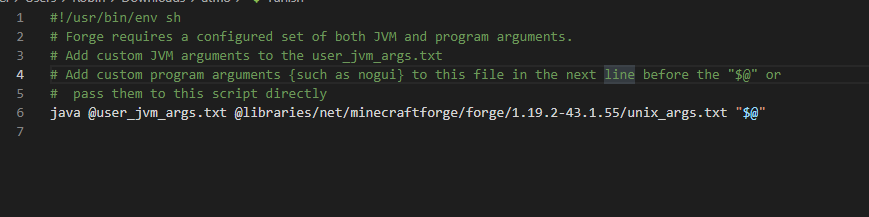
  1. @ich777 i use your MinecraftBasicServer and its running really flawless! now i wanted to use another container for another modpack and the newer version of modpacks use something like this to start: is it possible to use? because it isnt started with a server jar. thx!
  2. i dont have this problem with the exact same setup in truenas or proxmox. didnt change one thing after reinstall
  3. @JorgeB seems better but not perfect. i can guarantee that it is possible to push 1G over that line!
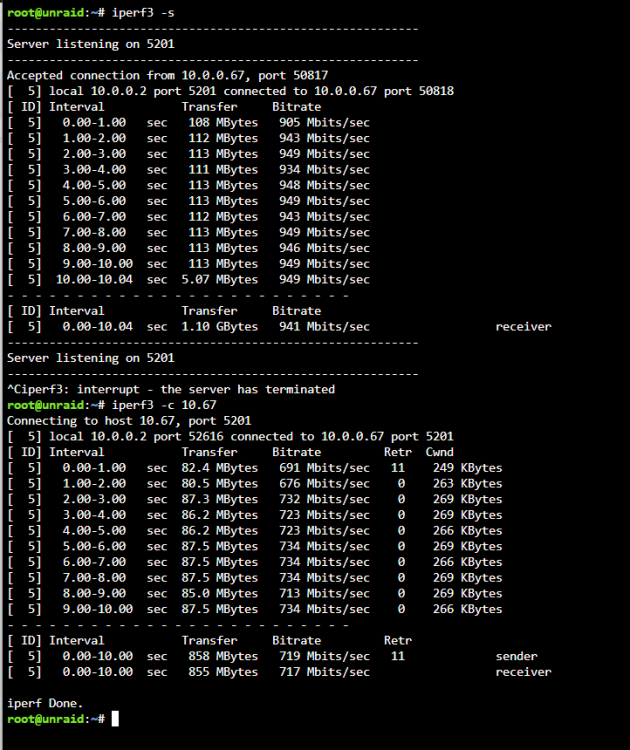
  4. Hello, im new to unraid and switched from proxmox to unraid yesterday. I only get 340 mbit when downloading via smb from the server to my desktop which is wired with LAN. Any idea why i cant get the full 1gbit? atm i only have an ssd attatched unraid-diagnostics-20220915-1554.zip
Account

Navigation

Search

Search

Configure browser push notifications

Chrome (Android)
  1. Tap the lock icon next to the address bar.
  2. Tap Permissions → Notifications.
  3. Adjust your preference.
Chrome (Desktop)
  1. Click the padlock icon in the address bar.
  2. Select Site settings.
  3. Find Notifications and adjust your preference.