Bartok27
Members
-
Joined
-
Last visited
Everything posted by Bartok27
-
I swapped the power connector. Still same error, so i tried the new power connector and the HBA cable connector and it looks better. I have started an extended smart test so far its just been sitting at 10%. Will let you know when it finishes.tower-diagnostics-20250404-1427.zip
-
I switched drive 3 to a new sata. It was connected to one an one of the connectors on an HBA card and is now connected directly to an onboard sata connector. It appears to still be failing. I have two more new sata cables and i new HBA cable I could try. I'm not sure how to best determine if its the cable, the connector, HBA card port or drive thats the issue. let me know what you would suggest next. Thank you for the help. tower-diagnostics-20250404-1320.zip
-
Thanks for the quick reply. I have reconnected the drives and the array came online with disk 5 disabled. tower-diagnostics-20250404-0959.zip Let me know what you think and what i should try next.
-
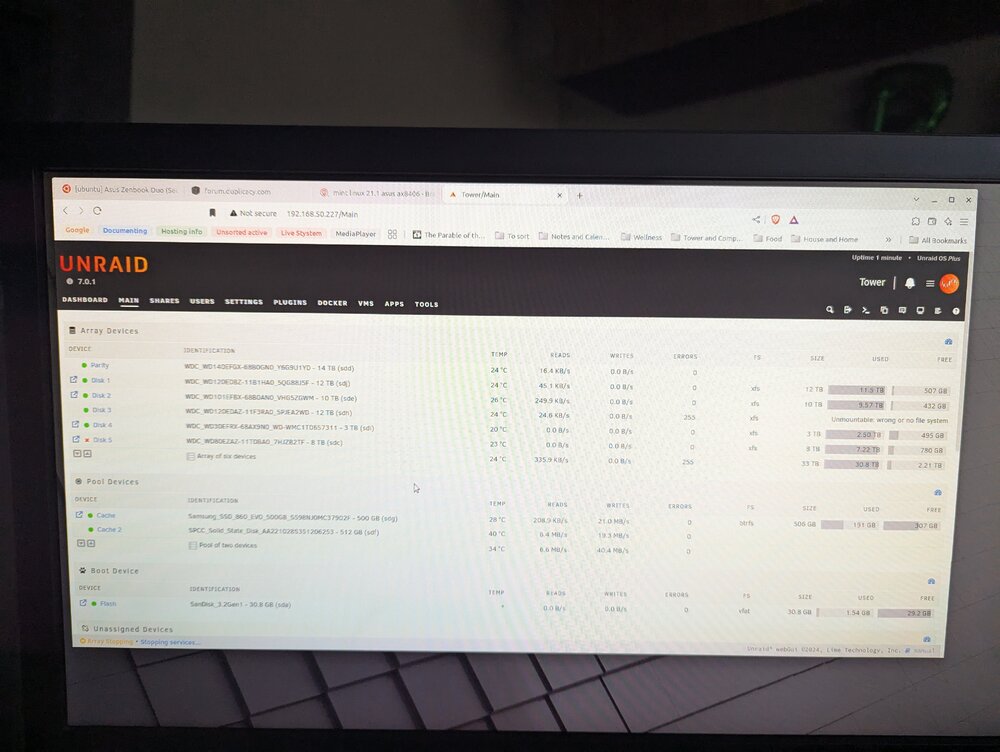
This is my first time posting so sorry for any missing info. I had one 12 TB drive showing read errors and went offline. I shutdown and changed the cable on the drive and was able to bring it back online. I ordered a replacement drive just in case. It lasted a day and continued to have read errors so I switched some other cables and best i can tell the one HBA cable was having issues. So i was able to move all drives off that cable. But in the process of switching those cables i messed up the power connector on a 8 TB drive that had the 3.3v line taped. Which gets me to the last state which was the 8 TB offline in emulation mode and the 12 TB listed as unmountable. I took a picture of the last array setting (to get the drive info) before i removed the drive 3 and 5. But did not take a final diagnostics at the time. I did take one a few days before when the first drives started giving errors. I have attached both. At this point i shutdown the system re-taped the power on the drive and connected the two drives with errors to an external dock and was able to copy off some files as an extra backup. I can access the drives fine in the external dock but copying is very slow with the 12TB so i assume it needs to be replaced. I'm hoping the 8 TB is ok but may be out of sync with parity as it was in emulation mode. I have a 14TB to replace the 12TB. This is my first time dealing with multiple failures and understand i have made the issue worse by trying to half fix it from what i could read online. At this point i was hoping to get some advise on the best route forward at this point. This is a primarily a media server so i would like to restore what i can but everything can be replaced. I assume the advise would be to bring it online and run a current diagnostic. Could you please suggest the best steps to get to that ie connect all drive, replace the 12 with tht 14, etc. Any advise would be greatly appreciate. Thanks. tower-diagnostics-20250320-1449.zip