azblurbit
Members
-
Joined
-
Last visited
-
Thanks for your help! Looks like there were files on Cache that weren't supposed to be there. I might have forgotten to deselect the cache when I was running unBALANCE if I had to guess. I marked everything as 'shareUseCache="yes"', ran mover, then put everything as I had it set previously and it appears to be working now.
-
unraid-diagnostics-20230116-1327.zip
-
unraid-diagnostics-20230116-1132.zip Thanks for reminding me.
-
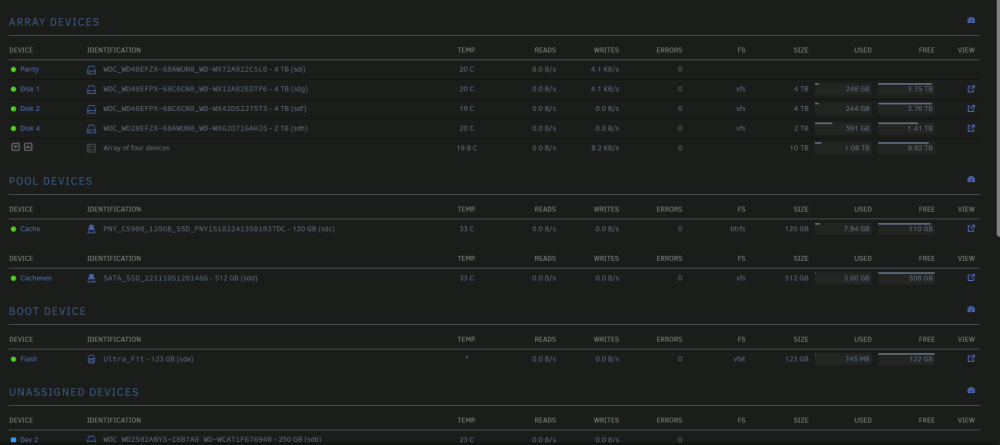
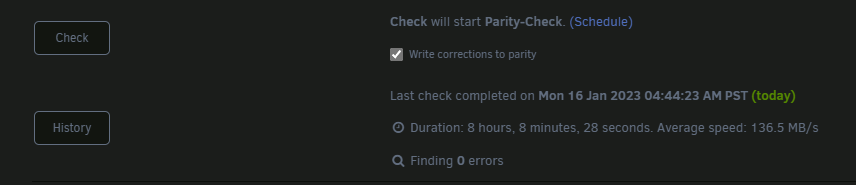
Yesterday, I ran Unbalance to move files over to new drives and remove old drives. Afterwards, it appears that almost all of my shares are showing as not protected by parity. This is even happening on the shares that don't use cache. However, my parity drive is still up and running: And I ran a successful parity check with 0 errors: