Mr. Savage
Members
-
Joined
-
Last visited
-
I was about to post the same issue, but I figured it out while typing this. Turn off adblock, turn down Brave shields if you are using brave and disable anything that can block the settings from loading/saving. If that doesn't work, use a different browser.
-
I figured it out. Stupid me had set "Minimum free space" to 6TB on all or most of the shares, probably misunderstood it's behaviour and consequences. Set new limit to 50GB. Everything is peachy now.
-
root@StorinaThor:~# ls -la /mnt/user total 20972176 drwxrwxrwx 1 nobody users 154 Sep 24 08:47 ./ drwxr-xr-x 13 root root 260 Sep 24 10:21 ../ drwx------ 1 nobody users 43 Aug 6 18:39 .Trash-99/ drwxrwxrwx 1 nobody users 102 Aug 8 16:25 Downloads/ drwxrwxrwx 1 nobody users 6 Aug 6 18:06 Home/ drwxr-xr-x 1 nobody users 6 Aug 17 20:30 Share/ drwxrwxrwx 1 nobody users 19 Aug 14 09:44 Temp/ drwxrwxrwx 1 nobody users 4096 Sep 24 08:46 appdata/ drwxrwxrwx 1 nobody users 133 Sep 22 20:04 data/ -rw-r--r-- 1 nobody users 64424509440 Sep 24 16:17 docker.img drwxrwxrwx 1 nobody users 6 Aug 6 17:46 domains/ drwxrwxrwx 1 nobody users 6 Aug 12 15:55 isos/ drwxrwxrwx 1 nobody users 6 Aug 11 06:13 photo/ drwxrwxrwx 1 nobody users 35 Aug 6 17:46 system/ I also noticed the log button in the upper right of Unraid when I was going for the terminal button. In this log the following are shown:
-
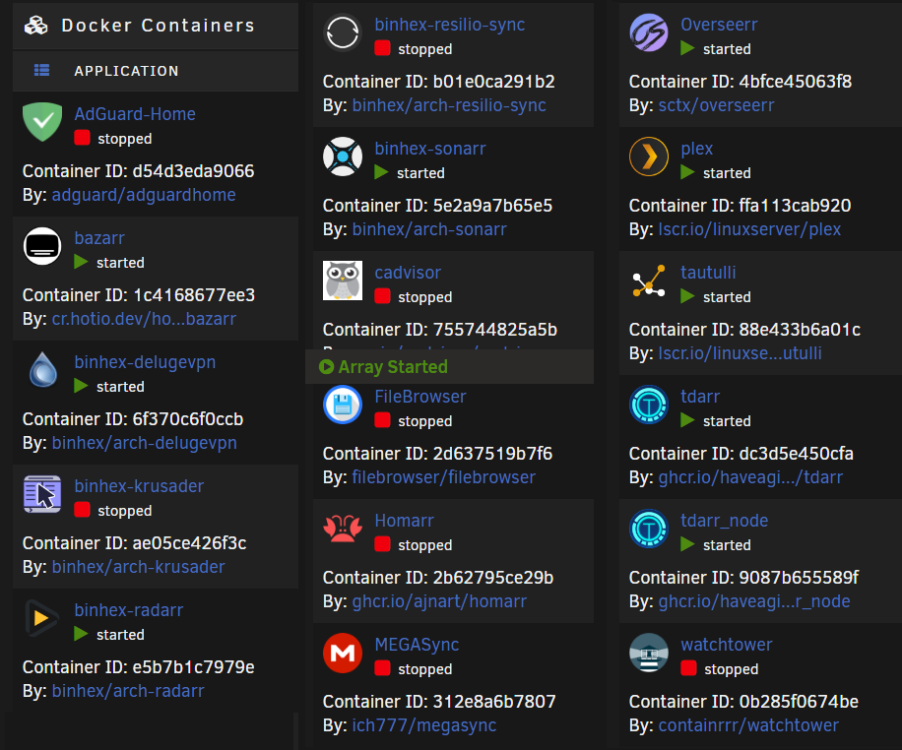
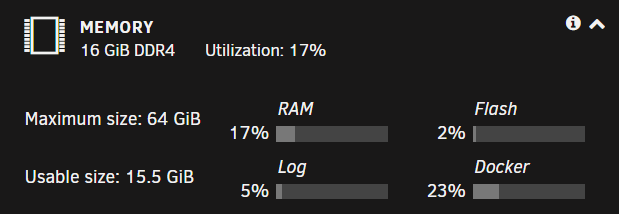
Started using Unraid this summer, so I'm pretty new to most of it. Diagniostics log: storinathor-diagnostics-20220924-0940.zip Problems started earlier this week while Unraid ran as version 6.10.3. I updated Unraid today to 6.11.0 hoping it would fix things, it clearly didn't. All problems were present during 6.10.3 so it's not an issue with newest version. In hindsight, I should probably not update Unraid while having an ongoing issue, but I hope that didn't make things worse for me. It began with Deluge not responding. Opening the UI throws a "refused to connect" error in my browser. Deluge shows as started in Docker-tab of Unraid. Below are the log of Deluge: Other dockers not functioning properly: AdGuard-Home: Throws "Execution error Server error" Log is empty Binhex-Radarr: Same as Deluge: "refused to connect" in browser Log: Binhex-Sonarr: Similar to Rararr Log: [Trace] DiskProviderBase: Directory '/config' isn't writable. Disk full. Path /config/sonarr_write_test.txt Full log: I was trying to install Mariadb today, and after setting database name, password etc.. and clicking Install, it throws a mkdir error. I have in the example below not changed anything in the "add container" setup. ERROR: docker: Error response from daemon: error while creating mount source path '/mnt/user/appdata/mariadb': mkdir /mnt/user/appdata/mariadb: no space left on device. From my understanding. This is either a "cannot write data" because something is full (or think something is full), or some permission error. I have scrubbed the docker image, no errors. Shares shows all shares have several TB of available space. All drives in array have atleast 3TB of space available. Cache drive has 384 GB free. Docker space usage: Name Container Writable Log tdarr 3.38 GB 1.16 GB 7.93 MB tdarr_node 1.97 GB 410 MB 11.6 MB binhex-krusader 1.92 GB 35.6 MB 27.3 kB MEGASync 1.28 GB 1.64 MB 2.71 kB binhex-sonarr 1.18 GB 54.9 MB 9.77 MB binhex-delugevpn 1.14 GB 2.99 MB 33.7 kB binhex-radarr 968 MB 154 MB 13.5 MB binhex-resilio-sync 686 MB 1.83 MB 53.2 kB Overseerr 685 MB 2.19 MB 276 kB plex 649 MB 318 kB 14.1 MB bazarr 337 MB 16.5 kB 4.86 MB tautulli 170 MB 36.9 MB 816 kB cadvisor 163 MB 0 B 296 kB Homarr 154 MB 0 B 30.8 MB AdGuard-Home 80.0 MB 0 B 0 B FileBrowser 31.3 MB 0 B 1.45 kB watchtower 16.9 MB 0 B 2.05 kB Total size 14.8 GB 1.86 GB 94.1 MB Ram+docker usage: List of docker containers and running status. I don't know how to grab version numbers, but I don't think that's crucial information for my problem. All dockers are updated as of posting this.