





Mark12
Members
-
Joined
-
Last visited
Everything posted by Mark12
-
No one else is having issues with the postfix-relay container? I just turned it off for now, PeerTube works fine, just no mails...
-
It is attached in the post above yours?
-
What I get is this: Filesystem Size Used Avail Use% Mounted on rootfs 16G 222M 16G 2% / If I do ls -lah /mnt/user the command prompt freezes. No output. I have included the output from right after the restart after it froze. It crapped out within an our of starting the Postfix-Relay docker container... tower-diagnostics-20250505-0827.zip
-
I will get back to this once it locks up again. Really can't let it cr*p out right now or the WAF (wife acceptance factor) will be below 0.
-
Most of them are to /mnt/user/appdata .
-
Nothing. It just locks up. Same if I do cd /mnt/user . Nothing happens and the command prompt is frozen.
-
This is exactly what I did. I enabled syslog, mirrored to flash and ran diagnostics immediately after the reboot. I cannot run the diagnostics once the system locks up, it never finishes.
-
Ok, this is my last attempt for Unraid. If we cannot get this fixed I am going back to OMV, it is just costing to much time. After upgrading to Unraid 7 my system has not once been stable. What have I done so far: Set all power options to performance in the BIOS. Disabled UASP for the USB-C drive. Checked the drives via SMART Re-installed the docker containers. Switched from a mini-pc with a USB-C drive to a fully integrated nas <<--- this cost me a lot of money and did not change anything. Checked the disks again. Enabled UASP Set all power options to performance My Unraid server still craps out on me. But this time I am able to reproduce it within minutes! As soon as I start my PeerTube containers (PeerTube, PostfixRelay, PostgreSQL17 and Redis) my user shares dissapear and everything stops working. I cannot collect logs, when I go to the docker page the webpage times out, I cannot reboot the machine from the GUI. I have attached the diagnostics logs from right after the restart. Hopefully you can find something in them so we can fix this issue. tower-diagnostics-20250413-0849.zip
-
Got it fixed! What I did: Moved the disks back to the old hardware (pc with usb-c storages). Made an extra backup... Moved ALL data from my array to the pool (pool is as large and is my main storage as it is all SSD). Removed all directories from the array and cache. Removed the disks from the array and cache. Put the disks in the new PC (all sata). Create new config, under tools. Assign the previous disks (except for cache, that was a different one). Start the array. This time it works as I hoped!
-
Well, I have transferred the files back to the USB-C enclosure and tried to see what happened: exact same issue. This is a brand new machine, what kind of hardware issue could I be looking at? Is it possible this is because I just plugged in the USB drive in the new machine, not do a fresh install?
-
Now that would really suck big time... But it actually sounds like a probability, so I will try.
-
Sorry: you may ignore the above 2 posts. I just moved to a different setup to solve this issue. I had a different thread open for issues with that and posted in this thread by accident:
-
Posted this in the wrong thread: tower-diagnostics-20250405-1433.zip
-
It is already enabled. How do I post those logs? Do you mean the diagnostics? Attached those. tower-diagnostics-20250405-1433.zip
-
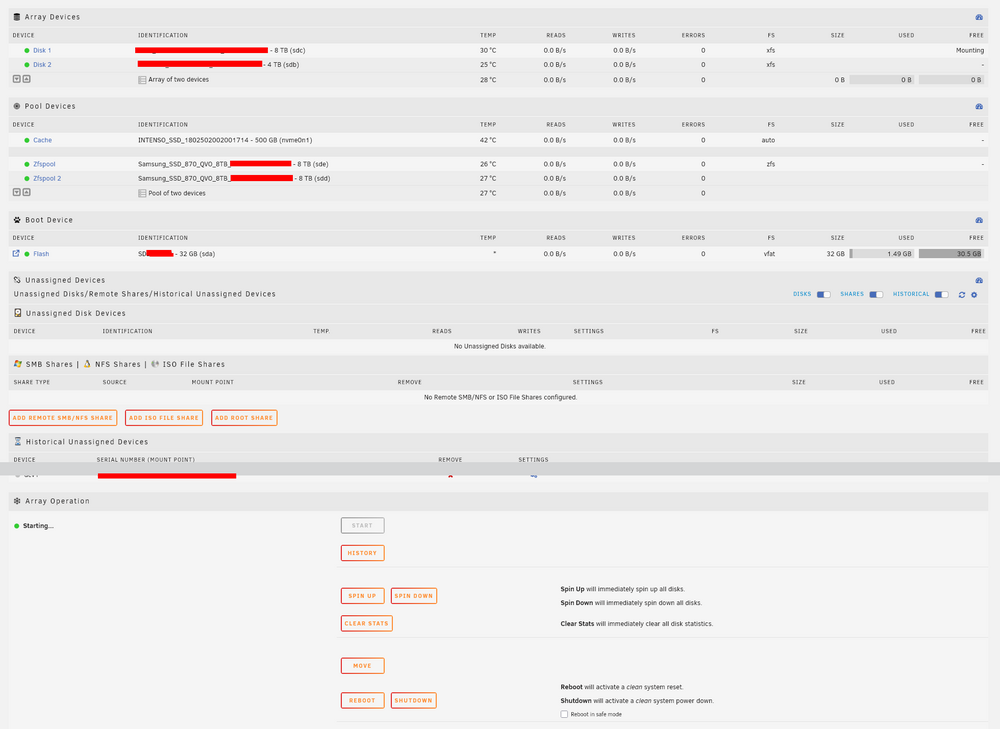
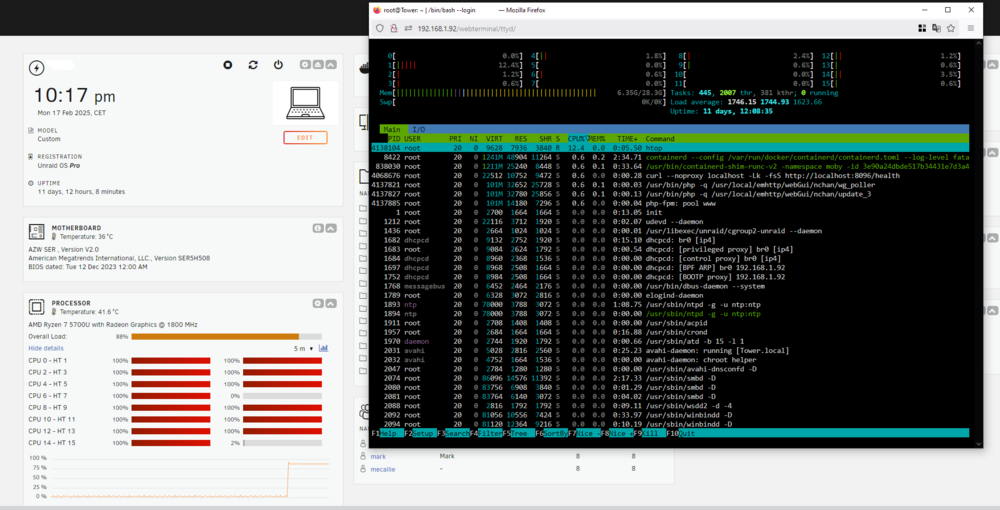
Since I was having trouble with Unraid being unstable and loosing the /mnt/user share I decided to ditch the USB enclosure and go for a PC NAS. I took the USB drives, placed them in the NAS and started Unraid. My 2 pool SSD's where recognized. The Array was not, nor was the cache disk. I used these instructions: All the drives are in the right place. Note: I do NOT have a parity drive, since I just have a pool with two 8TB SSD's and an Array with an 8 and a 4tb drive just for backup purposes. After following the instructions all my drives went to "green". But after starting the array it just seems to sit there. I have been waiting for over an hour now, but all it says at the bottom of the screen is Array Starting•Mounting disks... Can this take a very long time, or is something wrong?Well, I gave up and re-installed Nextcloud-AIO and restored a backup. That worked. Strange thing: after that I added Jellyfin and that DID take all the previous settings and was up and running in seconds! Thanks for the help!It is though. I did not move appdata, that was already fine. Docker is also pointing to that appdata: /mnt/user/appdata/ I did not change that setting... Can there be anything else wrong with the docker config?This does not work though. When I recreate Nextcloud-AIO from the template for instance it starts from scratch. All my settings and such are gone? Is there some way just to have it use the correct directory?I do not understand: I cannot move the actual docker files? I moved the entire directory to the new location, pointed Docker to it. Why does that not work? Note: I did not delete the docker.img file, I was already working with normal directories. I moved those over to the pool instead of the cache.I am trying to move to a different system. Since I won't be moving the cache drive I decided to remove everything from that drive. I stopped all Docker images. Then I disabled docker (no) in settings. After that I moved all docker files from /mnt/cache/docker to /mnt/user/Dockershare/, pointed the docker settings to that location and restarted docker. But none of my dockers show up?Ever since my upgrade to 7 my Unraid has been unusable. Max uptime has been 4 days. I have done a lot of troubleshooting. Thinking it might be the USB-C enclosure (I know, not supported), I disabled UASP. I upped the max. open file handles. I set all performance options to max in the bios: nothing works. I cannot capture diagnostics information because it always just stops working, at the appdata part usually. I also tried via SSL: no luck either. I also do not see any errors in the logs usually, However: I have now noticed that every time Unraid locks up my /mnt/user/ is gone. And I can actually expedite it locking up if I start dockers that are more disk intensive. At that time I can look at the actual directories on the disks just fine, I can browse them and look at files. But as soon as I try accessing them via the "Shares" tab it's end of story and I need to hard reset my server for it to be accessible again. Is there anyone that can help me solve this issue?I am just going to continue here. Since the upgrade to 7 (and now 7.1) Unraid has been in effect useless to me. Uptime varies between one and 5 days max. It is always docker that stops responding first. Sometimes I can still use the GUI, but as soon as I hit the docker tab it's end of story. The only thing I am running now is Nextcloud AIO docker, this is what I 100% need. I have already turned off UASP for my external enclosure for the kernel, otherwise it would not even remain up for one day. I turned on diagnostic logging, hopefully you can help solve this persistent problem. When I try to collect logs it seems to stop at the appdata part en simply does not continue. Tried the gui and via ssl: no log is made/downloaded. I do see this in the Syslog: Mar 22 05:02:31 Tower kernel: br-5e11601cd858: port 2(vethf588ddb) entered disabled state Mar 22 05:02:31 Tower kernel: vethf588ddb (unregistering): left allmulticast mode Mar 22 05:02:31 Tower kernel: vethf588ddb (unregistering): left promiscuous mode Mar 22 05:02:31 Tower kernel: br-5e11601cd858: port 2(vethf588ddb) entered disabled state Mar 22 05:02:41 Tower kernel: br-5e11601cd858: port 10(vethb5af300) entered disabled state Mar 22 05:02:41 Tower kernel: veth74fb0b9: renamed from eth0 Mar 22 05:02:41 Tower kernel: br-5e11601cd858: port 10(vethb5af300) entered disabled state Mar 22 05:02:41 Tower kernel: vethb5af300 (unregistering): left allmulticast mode Mar 22 05:02:41 Tower kernel: vethb5af300 (unregistering): left promiscuous mode Mar 22 05:02:41 Tower kernel: br-5e11601cd858: port 10(vethb5af300) entered disabled state Mar 22 05:02:43 Tower kernel: br-5e11601cd858: port 2(veth3bc8150) entered blocking state Mar 22 05:02:43 Tower kernel: br-5e11601cd858: port 2(veth3bc8150) entered disabled state Mar 22 05:02:43 Tower kernel: veth3bc8150: entered allmulticast mode Mar 22 05:02:43 Tower kernel: veth3bc8150: entered promiscuous mode Mar 22 06:12:04 Tower webgui: Jellyfin: Could not download icon https://raw.githubusercontent.com/SmartPhoneLover/unraid-docker-templates/main/templates/icons/jellyfin_200x200.png Mar 22 07:33:02 Tower kernel: cgroup: fork rejected by pids controller in /docker/60eb014042accab0fdf16a93b68d78c08275f4d671f4dcd87a46a0fb37db13f3 Mar 22 07:33:02 Tower kernel: traps: .NET TP Gate[837222] general protection fault ip:14e708d4650f sp:14a5d4aace60 error:0 in libc.so.6[14e708d46000+155000] Mar 22 09:25:40 Tower webgui: Successful login user root from 192.168.1.217 Mar 22 09:28:19 Tower kernel: block nvme0n1: the capability attribute has been deprecated. Mar 22 10:54:33 Tower sshd-session[1881719]: Connection from 192.168.1.217 port 54593 on 192.168.1.92 port 22 rdomain "" Mar 22 10:54:36 Tower sshd-session[1881719]: Postponed keyboard-interactive for root from 192.168.1.217 port 54593 ssh2 [preauth] Mar 22 10:54:46 Tower sshd-session[1881719]: Postponed keyboard-interactive/pam for root from 192.168.1.217 port 54593 ssh2 [preauth] Mar 22 10:54:46 Tower sshd-session[1881719]: Accepted keyboard-interactive/pam for root from 192.168.1.217 port 54593 ssh2 Mar 22 10:54:46 Tower sshd-session[1881719]: pam_unix(sshd:session): session opened for user root(uid=0) by (uid=0) Mar 22 10:54:46 Tower sshd-session[1881719]: User child is on pid 1881991 Mar 22 10:54:47 Tower sshd-session[1881991]: Starting session: shell on pts/0 for root from 192.168.1.217 port 54593 id 0Alright, now my CPU went to almost 100% and stayed there. It did not completely freeze yet. And the weird part: I just turned off all my docker containers. I could not see what process was using the CPU that much, see the screenshot. I did see this error in the logs: Feb 17 21:36:15 Tower kernel: cgroup: fork rejected by pids controller in /docker/3e90a24dbde517b34431e7d3a42ff057e1583e34280f14cec81c2371ca3792c9 Feb 17 21:36:15 Tower kernel: traps: .NET TP Gate[838131] general protection fault ip:148510f6650f sp:1443dccd9e60 error:0 in libc.so.6[148510f66000+155000]
 Just chiming in: I have the same issue. Unraid 7 stops responding after some time. Right now it seems to be about 4 days for me. Only thing I can do is physically keep the shutdown button pushed in and then restart it. I have enabled syslog and will post here the next time it locks up. I do think this should have more attention from the developers. There are already to many cases to shove this of as anything else than version 7 related. I really do not like that being implied. Hardware does not "respond" to kernels. Some HW might not be supported, the kernel might send different instructions causing the issue: fine. But that is not a HW problem but an Unraid problem that needs to be fixed. My HW is fine, been running fine for years on 6 and in the first 2 days after upgrading to 7 my whole system froze.



