





Mark12
Members
-
Joined
-
Last visited
Everything posted by Mark12
-
Ok, for anyone who's wondering: it wasn't the mappings. I deleted ALL my docker volumes using docker system prune. After downloading only the Nextcloud AIO image I got a message stating docker.img was ful. After some more research I found that the btrfs subvolumes are not cleaned up under ls /var/lib/docker/btrfs/subvolumes the command "ls /var/lib/docker/btrfs/subvolumes | xargs btrfs subvolume delete" fixed it for me!
-
Can you explain this to me? If I map it to the wrong directory, meaning it will fill up the docker .img why would that not show up in the docker image size button? Doesn't make any sence. How would it even know if the mapping is wrong or if it is delibirate?
-
No one here that can help with this issue? There must be some way to find out what is eating all the space in the docker.img?
-
Anyone that can help me solve this issue? I am now unable to use my Nextcloud, it's not starting up. The container size button still says I have plenty of space available...
-
I am using Unraid 6.12.10. My docker.img file is on the cache drive. I have already increased its size from 20-->30-->50GB and it is now again filling up. I am using Nextcloud AIO, and some *arr apps, that's about it. When I look at the docker sizes via the built-in "container size" button it says only ~8GB is used. This is confusing: I am getting alerts that my docker.img is full and I know this to be true since I am getting errors with my containers. How do I find out what is taking up this much space in my Docker image? I have found several threads about this on the forums but none that go further then "check your mappings" and "use the container size button". My idea is: if the mappings where wrong I should see a large container when using "check container size" right? tower-diagnostics-20240605-1148.zip
-
Hmm, did not read that. I was focussed on the BTRFS errors. Doesn't seem related. This does explain why my pool devices showed up like that. I know it is not recommended, but I have been running off USB storage for over 2 years without any issues with Unraid and on USB storage some years before that. I guess the new enclosure might not be up to the job. I was planning on doing a gradual migrate, but my previous system actually died on the exact same day I received my new hardware... Thanks for the help, I'll try and see if I can get rid of the disconnects...
-
I recently installed a new machine with Unraid, after previous machine died on me. I am in the middle of moving my files from the, now, parity less 8TB drive in the main array to a newly created zfs pool with 2 8TB SSD's. I did not change my cache settings from my previous setup (as I said: the machine died on me). But I now set a 512GB nvme drive as cache. I think the policies that where still in place started using it, since they where still set on the shares... Now however it seems the nvme on the new machine is doa, it is giving btrfs errors in the log. I also noticed that my new zfs pool drives seemed to give no more capacity info at all: 0B used, 0B available. The system load was constantly above 7, using 3 cpu cores for 100% all there time. Three questions: can I disable the cache drive entirely (there is only 4MB left on there after I noticed my error and started moving everything off)? Do you agree that this is a hardware defect on the nvme drive? And: would this fix the zfs pool not showing capacity anymore? tower-diagnostics-20240226-1328.zip
-
I am using the "troubleshoot" option on the registration page. Should I get an e-mail confirmation on that? Just tried again: no confirmation.
-
What happened: I made a backup of my flashdrive a few hours before upgrading to the latest version. After upgrading to the latest Unraid my drive did not want to boot, bios does not even see it. No problem: I copied my backup to a new drive and booted from that (including the license file). But when I want to get a new license on this drive I get an error now "Error: {"message":"Request failed with status code 406","data":{"error":"Missing field in request"}}" I did manage to register it once the first time I tried, but it gave me 1 checkmark then and one red cross (importing key failed or something?). Now all I am getting is this. I already sent a support mail, but it's been over a day now and I am starting to miss all my apps and storage... Any ideas on how to fix this?
-
Disk two: is it possible there is no report from it because it is not used yet and spinned down? (It is part of the storage array)
-
I have attached the diags tower-diagnostics-20240104-1536.zip
-
I'm sorry, why do I need to attach diagnostics? I have no issues? I want to know if there is a migration path to a new laptop without losing data/starting over.
-
Hmm, did not know the SSD's would not be trimmed in a parity array. That is a pretty big issue. As for the USB: I have been running it for about a year now, had no issues with disconnects. I do not think it will be recognized, but will I be able to import the disk(s) to the array? I am assuming that there is some way Unraid can see the disk belonged to an Unraid array?
-
I am running Unraid on a laptop with one m2 ssd for cache, one sata ssd for parity and two external disks for storage. I want to migrate to another, faster, laptop. This laptop has no sata drive available so I will be putting the parity disk and the two data disks in a USB enclosure. But have some questions first: Will I be able to plug in the USB drive and simply import the disks? Will I need to rebuild parity? Are there any preparations I should do first (disable caching, etc.) except for making a backup? Thanks for your help
-
Thank you for your replies. The cache prefer option is a bit clearer now. I have to say: neither is an actual answer to the whole list of questions. Anyone else? Surely someone knows exactly how this works?
-
Hi folks, I just finished configuring my Unraid server. I included a 256GB nvme cache drive. That gives me the error that it is "unprotected". My first thought was: of course, why would I need to protect a cache/buffer. But after some reading it seems "tier 1" storage is a better word for cache and "tier 2" for the normal data disks. Am I correct in understanding that the cache disk is used for the actual storage of all kinds of data when set and that this data is not replicated to the array unless the mover moves it? Can anyone tell my if I understand its function correctly: A share with no cache: written to array, period. A share with cache set to "Yes": initial data is written to the cache for fast WRITING and then transferred to the array for reading. Data is vulnerable between writing and the mover action. A share with cache set to "Prefer": initial data is written to they array and then transferred to cache for fast READING. I am not sure of this one: is it read from cache, but all edits are written to the array? Meaning the data is protected by the parity in the array? Or can there be data loss in between mover schedules still? A share with cache set to "Only": data is only written to cache and never synced to the array. If the cache drive breaks down or gets corrupted your data is lost. My array is an 8TB SSD, an 8TB HDD and a 4TB HDD. Would the cache even make sense in this scenario? Is the data written/read from the parity disk first? Or does it wait untill it is on either one of the HDD's also? Thank you for your answers!
-
This worked. I tried it a couple of times before, but it kept saying missing to many disks. This time it worked exactly as you said!
-
Ok, I had a drive failure on my unraid setup. A 3TB drive failed, leaving only the 4TB parity drive. Since I wanted to upgrade anyway (I like unraid) I decided to add an 8TB SSD for my parity drive. That is now done syncing. I now have two parity drives: the old 4TB spindle and the 8TB SSD. I now want to add an 8TB spindle drive as a disk. But it will not let me, stating the parity drive must be biggest. So I tried removing the 4TB parity drive: that gives me a "to many disks missing or failing" error. When I try adding the 4TB parity drive as a normal drive it gave me the same error. See the screenshot for my current config. Is there any way to restore my information, use the 8TB SSD for parity and the other drives as normal disks?
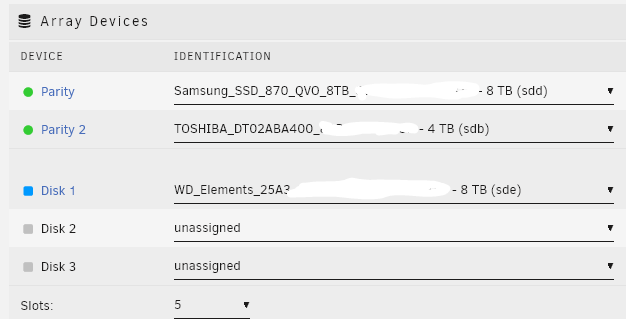
-
I have actually. I don't really now how to use this with this plugin. This just looks like a normal command-line option to me. I am just going to try and get a USB disk attached. Tired of always messing around with WebDAV and stuff. It just never works as it should, it breaks, it's not supported and you have to jump through hoops to get it to work in the first place. It's to bad Nextcloud does not offer an SMB or NFS share. That would just save a lot of hassle.
-
Hi folks, is there some kind of tutorial for mounting a WebDAV share using this plugin? I looked through the initial post, but that info seems out of date and the links are referring to GDrive. What I want to do: mount my Nextcloud WebDAV folders as writeable for Sonarr/Radarr/rrrrr containers. My Nextcloud already contains all my files and I want to keep it that way. I installed the user scripts plugin but am totally at a loss as what to enter/do there?
-
But if I log off from my servers, there is still an actual connection to my unraid server correct? I just can't use it. But if someone finds my credentials, uses them to log on to unraid.net he can still manage my server? Or can you disable "MyServers" on the unraid server itself?
-
Hi, I was about to install unraid when I noticed I need to have an unraid.net account for registration. Ok, fine. But it also states that I can manage my unraid server from home by logging in to that account. Is it possible to switch this feature off? I do not want unraid to be able to access my server in any way. Nor do I want anyone else to be able to access it from the internet. What I am looking for is a solution that just downloads updates and such via the internet but does not "phone home" to check other stuff and it must not be reachable by the internet. Thanks. Greets, Mark
