Ravi Parmar
Members
-
Joined
-
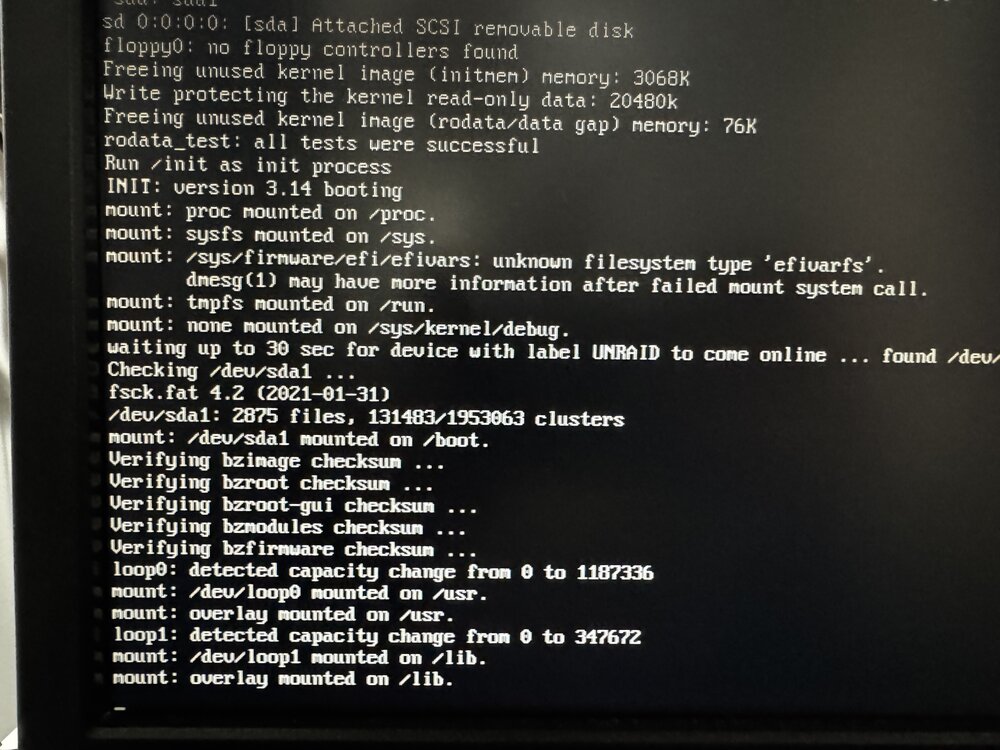
ASRock Z690 Taichi 12th Gen Intel® Core™ i9-12900KF @ 3200 MHz - Memory 128GB GDDR5 So I had read about severe problems plaguing the 7.1.3 release, and decided to hold of for fix. So they released 7.1.4 and got a Notification that is available for an update for my server. So proceeded to do the upgrade as I typically do. Backup the flash and begin the upgrade and wait for it to do its thing. Waited for notification to let me know it was ready to reboot. So clicked on the reboot and upgrade. Well, this is where things went sideways, wait for about 3 hours for the system to boot back up, but never did. I usually access WebGUI UI from the my laptop and server is running in a server closet. The counter on the WebGUI kept counting up, but never present me back to my login page to login to UnRaid server. Go to the server physically, and I noticed that the boot was stuck on the last message on the screen: "mount: overlay mounted on /lib" I guess that was stuck there for a very long time, so I naturally hit the power button on the server to force reboot. UnRaid starts to reboot, goes through typical checks and balance, and finally come to the same message above. Then, stuck. But then I try to access the webGUI from the laptop using the IP as I typically do, to my surprise, unraid server login comes up! So I login and it I am in! So, thought, why not see what the unraid connect shows us! So that's what I did, I take a look at the unraid connect, and it tells me that my docker containers were all existed with some error. So I go back to my server from laptop webgui and start the docker containers, they all came up just fine! So then I reviewed the troubleshooting section on the Unraid website to see if there something weird about this version. There were a few instance where folks reported some weird issue, but majority was all said they were able to upgrade without any issues! So now it's bugging me as if my unraid is becoming unhealthy. Looking at the troubleshooting it tells me that when executing the df on the /boot the output should have something like following mount points: /dev/sdb1 15413232 826976 14586256 6% /boot /dev/loop0 9344 9344 0 100% /lib/modules /dev/loop1 7424 7424 0 100% /lib/firmware mine shows following: /dev/sda1 31249008 2104240 29144768 7% /boot /dev/loop2 31457280 11673224 19058872 38% /var/lib/docker /dev/loop3 1048576 8908 923540 1% /etc/libvirt overlay 65853928 1934360 63919568 3% /usr overlay 65853928 1934360 63919568 3% /lib other than than, I don't see any fielsystems mounted on /lib. Can someone please tell me how their systems looks for the output? In addition, the monitor that is attached to physical unraid server still show the same message: "mount: overlay mounted on /lib" It never seems to go to the unraid GUI like it used to prior to upgrade! (See Attached screenshot) But from remote machine like my laptop on the same network I am able to access the server. Am I worrying about not having the filesystem mounted on /lib... unnecessarily? or do I need to fix something? If I need to fix something where I begin? are these two related or something is screwed up? diagnostics zip attached TIA. rp. milkyway-diagnostics-20250623-2103.zip
-
Hi all. I am on Unraid 6.12.13. I have two NICs on the server. I am have been thinking of segregating the management traffic (the traffic that would be considered as used by managing the Unraid server and its UI and administering the server) and the application traffic (the traffic that would be anything that is not related management of the Unraid. Simply application traffic such as VM and docker any other application related traffic). I have assigned the static IPs to both NICs and they work pretty well so far. However, I cannot figure out how to separate mgmt traffic and app traffic. Here is one use case I am working on for the application traffic: Plex running in its plex official docker (unraid > apps > plex official). Network settings: eth0 - Management Interface - 192.168.4.5 eth1 - App Interface - 192.168.4.6 NICs are not bonded or bridged Plex Docker Network type: Host When the container starts up, it take the ip address of what I have setup and call mgmt interface (192.168.4.5) and then create ports through which different services are available as typical. Plex Docker Network type: Custom: eth1 -- App Interface Selecting this option allows me to provide a custom ip address (192.168.4.7) that is available (not in use) in the subnet 192.168.4.0/24. And upon giving that available IP address, the container startsup. If I use the "192.168.4.7" then of course the container, of course everything is working fine as far as unraid, plex and docker is concerned. Docker is running and I get following Network setup: 192.168.4.7:1900/UDP192.168.4.7:1900 192.168.4.7:32400/TCP192.168.4.7:32400 192.168.4.7:32410/UDP192.168.4.7:32410 192.168.4.7:32412/UDP192.168.4.7:32412 192.168.4.7:32413/UDP192.168.4.7:32413 192.168.4.7:32414/UDP192.168.4.7:32414 192.168.4.7:32469/TCP192.168.4.7:32469 192.168.4.7:8324/TCP192.168.4.7:8324 But, that is not quite what I want. I'd like this to be something like this: 192.168.4.6:1900/UDP192.168.4.6:1900 192.168.4.6:32400/TCP192.168.4.6:32400 192.168.4.6:32410/UDP192.168.4.6:32410 192.168.4.6:32412/UDP192.168.4.6:32412 192.168.4.6:32413/UDP192.168.4.6:32413 192.168.4.6:32414/UDP192.168.4.6:32414 192.168.4.6:32469/TCP192.168.4.6:32469 192.168.4.6:8324/TCP192.168.4.6:8324 Caveat, of course, is that I cannot use the "192.168.4.6" for the custom IP because it will cause ip duplication issue and container won't come up. I read in one of the threads that I can use "Network Extra" feature to do this, but I am not sure what specifically I can do there which would then require me to change another setting in the plex docker. Thanks in advance!
-
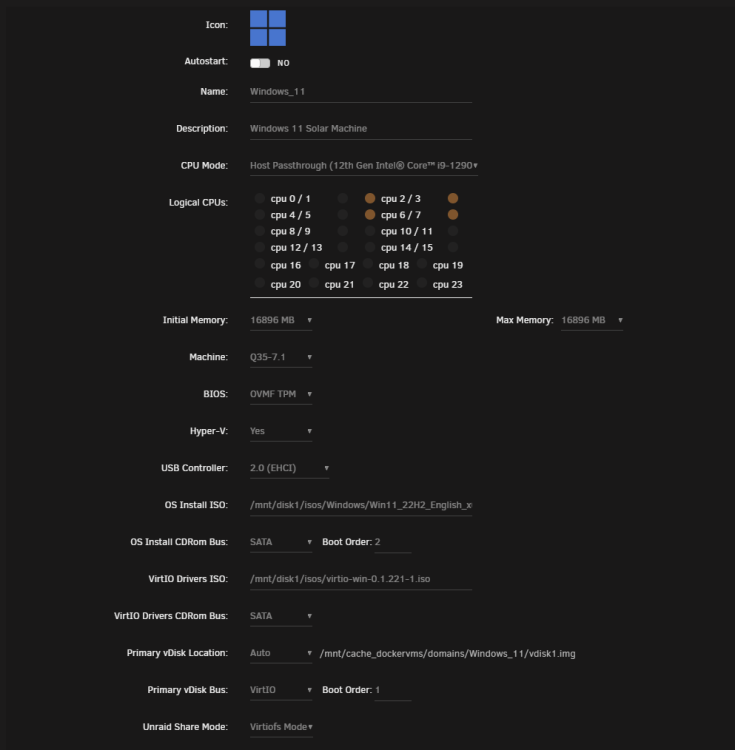
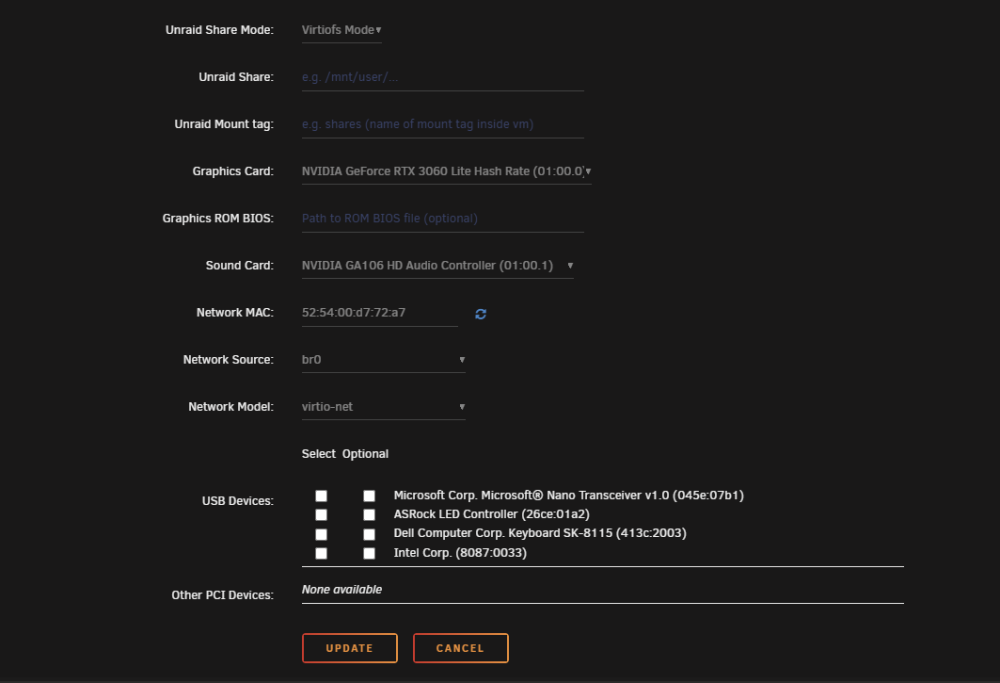
Thank you for the response. I went back and redone all the advice your mentioned, the good news is that the VM logs no longer show the error like it used to. But, the VM itself still does not recognize the GPU. In the VM, the display still only shows the typical virtual display, rather than nvidia gpu!how do you do this?Hi Guys, I am running into exact same issue that chis34 has reported. I have tried different combination of bios and drivers but no avail. I have the exact same GPU as well. For the life of me I can't seem to figure this out! I thought I was the only guy who has this issue... but Thank you chis34 posting this. I am having same exact problem. Please someone help!Hey Guys, I am new to unraid, and drinking from the fire-hose for last couple of months on this. But I love what it stands for and what it allows us to do. I must have watched almost all video tutorials from @Spaceinvaderone and many other folks. It picked on lot of my interests and been trying to get the unraid setup done. I have gone through his video on how to unlock the nvidia gpu to allow more than 3 sessions at a time. seems like it's working. Plex seems to be doing well in docker container (seems to crash the servers in middle of the night though, but that another topic!!). I have installed the nvidia app from the community as well which installs the drivers for the docker containers. Interestingly, I think it says that it can only work with docker only and if you had docker and VM running at the same time trying to use the same gpu, it won't work. However, I see all these videos out on you tube where everyone has some sort of a heck going on that seems to work for them. 100% of them are older version of unraid like 6.8 or 6.9. Lucky if you find anything even on 6.10! anyway, back to my issue. I think I am running into I think 1 issue with 3 flavors! So I am trying to setup a windows 11 vm in 6.11.1, downloaded the latest iso from MS and of course latest VM template as well (virtio-win-01.221-1.iso) I can go through the setup fine like @spaceinvaderone does (first pass through vnc and then shutdown the VM, change the GPU to my nvidia and audio to nvidia). At this point, If the vm boots up, the I can get in through RDP to that VM, but the VM doesn't know anything about the GPU, (if you go in vm and try to install nvidia drivers in the VM itself, it will tell you it can't find the nvidia device). Interestingly, following is noted in the VM log in Unraid: 2022-10-19T17:38:14.494279Z qemu-system-x86_64: -device {"driver":"vfio-pci","host":"0000:01:00.0","id":"hostdev0","bus":"pci.4","addr":"0x0"}: Failed to mmap 0000:01:00.0 BAR 1. Performance may be slow Attached the screenshot of the vm template setup. So that's the flavor 1 of the issue. Next flavor 2 of the issue: If I select to add optional gpu bios rom file in the vm template, I get the error: qemu-system-x86_64: -device {"driver":"vfio-pci","host":"0000:01:00.0","id":"hostdev0","bus":"pci.4","addr":"0x0","romfile":"/mnt/disk1/Download/RandomStuff/nvidia_ventus_2x_oc_3060_12gb_ddr6_pcie4/vbios/MSI.RTX3060.12288.210118_2.rom"}: Failed to mmap 0000:01:00.0 BAR 1. Performance may be slow. and the VM wouldn't boot. Flavor #3: Depending on a bios I think, if I select the GPU as my nvidia rtx 3060, the vm would boot up, I can RDP, but then I would see following in the log file: qemu-system-x86_64: vfio_region_write(0000:01:00.0:region1+0x4552b, 0x0,1) failed: Device or resource busy This msg would be repeated contently as long as the VM is online and running, to the point it fills up the entire /var/log to it's default 128MB (syslog is what fills up the entire disk with above message being repeated constantly). my apology in advance if the same case has been reported in other forums, any help is appreciate it in figuring this out. I need ability to run multiple dockers, and VMs at the same time while utilizing the nvidia GPU as passthrough to them. or is that just a pipedream?