




-
I was reading this and I was not able to solve it with the indications in the forum, however somehow I managed, the threat is a bit old, but just in case it helps someone. The linuxserver template has already a WebUI and a WEBUI_PORT. Those two needs to have the new port, HOWEVER of you click on Edit for the WebUI, you will see that 8080, the container port is greyed out, so you cannot change it. What worked for me was to delete the variable WebUI and then create it again with the Container port that I wanted to have. Another thing that I changed was in Advace view, once more change the PORT manually to the one I wanted to have. I hope this helps if someone faces the same issue
-
Thank you, it did solve the issue!
-
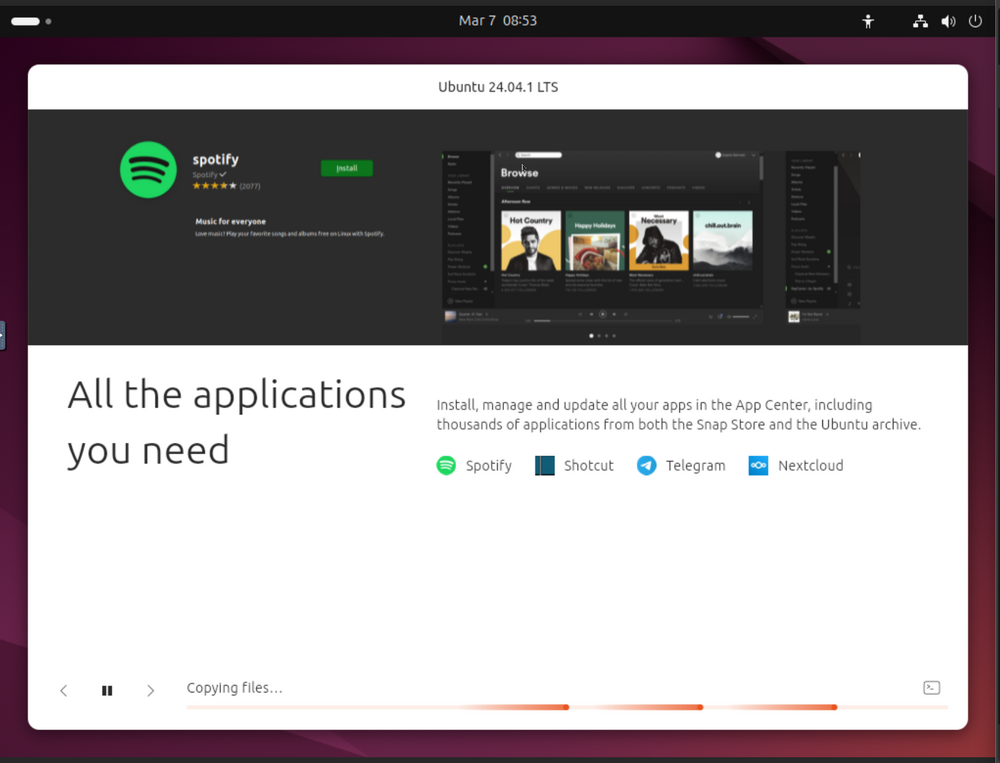
Hello. Already with 6.12 I tried to create and install Ubuntu in a virtual machine, but never managed to do it as it gets stuck and not sure why. The config is: <?xml version='1.0' encoding='UTF-8'?> <domain type='kvm'> <name>Ubuntu</name> <uuid>cd9b2251-d11e-0488-22ff-b94036ff40b3</uuid> <metadata> <vmtemplate xmlns="unraid" name="Linux" icon="linux.png" os="linux" webui="" storage="default"/> </metadata> <memory unit='KiB'>4194304</memory> <currentMemory unit='KiB'>2097152</currentMemory> <memoryBacking> <nosharepages/> </memoryBacking> <vcpu placement='static'>1</vcpu> <cputune> <vcpupin vcpu='0' cpuset='0'/> </cputune> <os> <type arch='x86_64' machine='pc-i440fx-9.0'>hvm</type> <loader readonly='yes' type='pflash'>/usr/share/qemu/ovmf-x64/OVMF_CODE-pure-efi.fd</loader> <nvram>/etc/libvirt/qemu/nvram/cd9b2251-d11e-0488-22ff-b94036ff40b3_VARS-pure-efi.fd</nvram> </os> <features> <acpi/> <apic/> </features> <cpu mode='host-passthrough' check='none' migratable='on'> <topology sockets='1' dies='1' clusters='1' cores='1' threads='1'/> <cache mode='passthrough'/> <feature policy='require' name='topoext'/> </cpu> <clock offset='utc'> <timer name='hpet' present='no'/> <timer name='hypervclock' present='no'/> <timer name='pit' tickpolicy='delay'/> <timer name='rtc' tickpolicy='catchup'/> </clock> <on_poweroff>destroy</on_poweroff> <on_reboot>restart</on_reboot> <on_crash>restart</on_crash> <devices> <emulator>/usr/local/sbin/qemu</emulator> <disk type='file' device='disk'> <driver name='qemu' type='raw' cache='writeback' discard='unmap'/> <source file='/mnt/user/domains/Ubuntu/vdisk1.img'/> <target dev='hdc' bus='virtio'/> <serial>vdisk1</serial> <boot order='1'/> <address type='pci' domain='0x0000' bus='0x00' slot='0x06' function='0x0'/> </disk> <disk type='file' device='cdrom'> <driver name='qemu' type='raw'/> <source file='/mnt/user/isos/ubuntu-24.04.1-desktop-amd64.iso'/> <target dev='hda' bus='ide'/> <readonly/> <boot order='2'/> <address type='drive' controller='0' bus='0' target='0' unit='0'/> </disk> <controller type='usb' index='0' model='ich9-ehci1'> <address type='pci' domain='0x0000' bus='0x00' slot='0x07' function='0x7'/> </controller> <controller type='usb' index='0' model='ich9-uhci1'> <master startport='0'/> <address type='pci' domain='0x0000' bus='0x00' slot='0x07' function='0x0' multifunction='on'/> </controller> <controller type='usb' index='0' model='ich9-uhci2'> <master startport='2'/> <address type='pci' domain='0x0000' bus='0x00' slot='0x07' function='0x1'/> </controller> <controller type='usb' index='0' model='ich9-uhci3'> <master startport='4'/> <address type='pci' domain='0x0000' bus='0x00' slot='0x07' function='0x2'/> </controller> <controller type='pci' index='0' model='pci-root'/> <controller type='ide' index='0'> <address type='pci' domain='0x0000' bus='0x00' slot='0x01' function='0x1'/> </controller> <controller type='virtio-serial' index='0'> <address type='pci' domain='0x0000' bus='0x00' slot='0x04' function='0x0'/> </controller> <filesystem type='mount' accessmode='passthrough'> <source dir='/mnt/user/VM/'/> <target dir='/mnt/unraid'/> <address type='pci' domain='0x0000' bus='0x00' slot='0x02' function='0x0'/> </filesystem> <interface type='bridge'> <mac address='52:54:00:71:34:5f'/> <source bridge='br0'/> <model type='virtio-net'/> <address type='pci' domain='0x0000' bus='0x00' slot='0x03' function='0x0'/> </interface> <serial type='pty'> <target type='isa-serial' port='0'> <model name='isa-serial'/> </target> </serial> <console type='pty'> <target type='serial' port='0'/> </console> <channel type='unix'> <target type='virtio' name='org.qemu.guest_agent.0'/> <address type='virtio-serial' controller='0' bus='0' port='1'/> </channel> <input type='tablet' bus='usb'> <address type='usb' bus='0' port='1'/> </input> <input type='mouse' bus='ps2'/> <input type='keyboard' bus='ps2'/> <graphics type='vnc' port='-1' autoport='yes' websocket='-1' listen='0.0.0.0' sharePolicy='ignore'> <listen type='address' address='0.0.0.0'/> </graphics> <audio id='1' type='none'/> <video> <model type='qxl' ram='65536' vram='65536' vgamem='16384' heads='1' primary='yes'/> <address type='pci' domain='0x0000' bus='0x00' slot='0x1e' function='0x0'/> </video> <memballoon model='virtio'> <address type='pci' domain='0x0000' bus='0x00' slot='0x05' function='0x0'/> </memballoon> </devices> </domain> When I start the machine, I select "Try or Install Ubuntu" (tried as well with safe Graphics, same results), then it starts I select some options to do the installation. Stucks here, but does not really says much.. it just keeps there Any idea? Thanks in advance.
-
Thank you, it worked!

-
ok, corrupted file is now deleted. unraid-diagnostics-20250306-1913.zip
-
ok, it just finished (but with errors) full diagnostics attached Mar 6 15:23:28 unraid kernel: BTRFS info (device sdb1): relocating block group 232059305984 flags data|raid1 Mar 6 15:23:33 unraid kernel: BTRFS warning (device sdb1): csum failed root -9 ino 495 off 719138816 logical 232778444800 csum 0xa85f6673 expected csum 0x908ad908 mirror 1 Mar 6 15:23:33 unraid kernel: BTRFS warning (device sdb1): checksum error at logical 232778444800 mirror 1 root 5 inode 20555644 offset 1011712 length 4096 links 1 (path: appdata/Plex-Media-Server/Library/Application Support/Plex Media Server/Metadata/TV Shows/0/c4f04a5efc1d85df7a2d53942b0385b2652d18c.bundle/Contents/_combined/art/tv.plex.agents.series_488a79589fc5f3e99157ee8e1cbb19b6f80490ac) Mar 6 15:23:33 unraid kernel: BTRFS error (device sdb1): bdev /dev/sdb1 errs: wr 0, rd 0, flush 0, corrupt 43, gen 0 Mar 6 15:23:33 unraid kernel: BTRFS warning (device sdb1): csum failed root -9 ino 495 off 719142912 logical 232778448896 csum 0x82f5e12d expected csum 0x8188ffff mirror 1 Mar 6 15:23:33 unraid kernel: BTRFS warning (device sdb1): checksum error at logical 232778448896 mirror 1 root 5 inode 20555644 offset 1015808 length 4096 links 1 (path: appdata/Plex-Media-Server/Library/Application Support/Plex Media Server/Metadata/TV Shows/0/c4f04a5efc1d85df7a2d53942b0385b2652d18c.bundle/Contents/_combined/art/tv.plex.agents.series_488a79589fc5f3e99157ee8e1cbb19b6f80490ac) Mar 6 15:23:33 unraid kernel: BTRFS error (device sdb1): bdev /dev/sdb1 errs: wr 0, rd 0, flush 0, corrupt 44, gen 0 Mar 6 15:23:33 unraid kernel: BTRFS warning (device sdb1): csum failed root -9 ino 495 off 719138816 logical 232778444800 csum 0xa85f6673 expected csum 0x908ad908 mirror 1 Mar 6 15:23:33 unraid kernel: BTRFS warning (device sdb1): checksum error at logical 232778444800 mirror 1 root 5 inode 20555644 offset 1011712 length 4096 links 1 (path: appdata/Plex-Media-Server/Library/Application Support/Plex Media Server/Metadata/TV Shows/0/c4f04a5efc1d85df7a2d53942b0385b2652d18c.bundle/Contents/_combined/art/tv.plex.agents.series_488a79589fc5f3e99157ee8e1cbb19b6f80490ac) Mar 6 15:23:33 unraid kernel: BTRFS error (device sdb1): bdev /dev/sdb1 errs: wr 0, rd 0, flush 0, corrupt 45, gen 0 Mar 6 15:23:41 unraid kernel: BTRFS info (device sdb1): balance: ended with status: -5 unraid-diagnostics-20250306-1637.zip
-
Thanks JorgeB done, there you are unraid-diagnostics-20250306-1358.zip
-
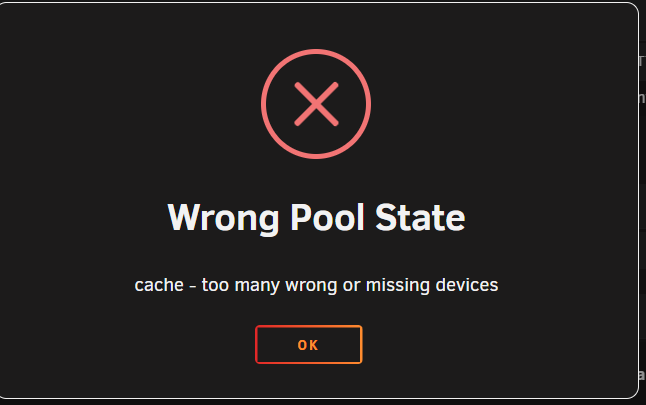
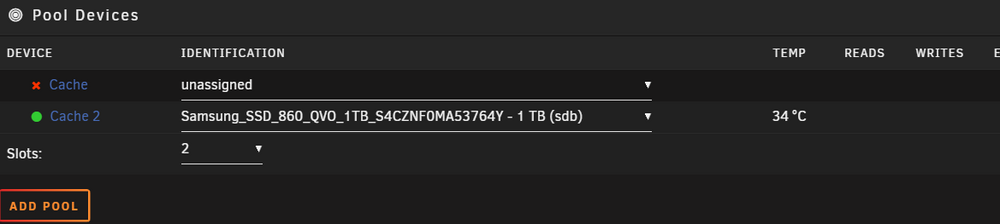
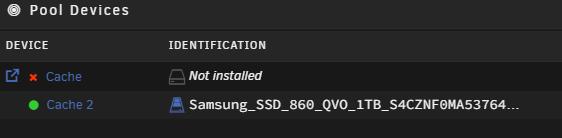
Hello Unraiders At the version 7.0.0 I removed one problematic drive from the cache pool. I now have only one drive for the cache pool. Everytime I restart the server, I cannot start the array without deleting first the cache pool and then creating it again. Before removing the pool after removing the pool After starting it again Diagnostics attached as well Thanks in advance for the support! unraid-diagnostics-20250306-1146.zip

-
Thank you for the solution and the link to the documentation.
-
Hello, I had some items to update in my dockers apps and I click on update as usual. Since then this logs started to appear Nov 14 06:53:33 unraid kernel: BTRFS error (device loop2): parent transid verify failed on logical 39150845952 mirror 1 wanted 18446612686566157968 found 932435 Nov 14 06:53:33 unraid kernel: BTRFS error (device loop2): parent transid verify failed on logical 39150845952 mirror 2 wanted 18446612686566157968 found 932435 Nov 14 06:53:44 unraid kernel: BTRFS error (device loop2): parent transid verify failed on logical 39150845952 mirror 1 wanted 18446612686566157968 found 932435 I restarted the whole unraid and tried again. The apps did not start (disable autostart) and still the same logs showed. I tried to remove one image and install it again. Wihich gives me an error as well. Pulling image: lscr.io/linuxserver/plex:latest TOTAL DATA PULLED: 0 B Command execution docker run -d --name='plex' --net='host' -e TZ="Europe/London" -e HOST_OS="Unraid" -e HOST_HOSTNAME="unraid" -e HOST_CONTAINERNAME="plex" -e 'VERSION'='docker' -e 'PLEX_CLAIM'='claim-JAxXooLW5R79iyhSZfrd' -e 'PUID'='99' -e 'PGID'='100' -e 'UMASK'='022' -l net.unraid.docker.managed=dockerman -l net.unraid.docker.webui='http://[IP]:[PORT:32400]/web/index.html' -l net.unraid.docker.icon='https://raw.githubusercontent.com/linuxserver/docker-templates/master/linuxserver.io/img/plex-logo.png' -v '/mnt/user/videos/':'/tv':'rw' -v '/mnt/user/videos/':'/movies':'rw' -v '/mnt/user/appdata/plex':'/config':'rw' 'lscr.io/linuxserver/plex' Unable to find image 'lscr.io/linuxserver/plex:latest' locally docker: Error response from daemon: error creating temporary lease: connection error: desc = "transport: Error while dialing dial unix /var/run/docker/containerd/containerd.sock: connect: connection refused": unavailable. See 'docker run --help'. The command failed. Any suggestion? Thanks! unraid-diagnostics-20231114-1124.zip
-
I started the array normally and like magic, all the things seems to be back. Thanks you so much @itimpi !! For any other person having a similar issue. 1) Calm down 2) Read the documentation from here; https://wiki.unraid.net/Manual/Storage_Management#Drive_shows_as_unmountable Start with the tests for the disks, 3) Ask the forum if something is not clear.
-
Should I now stop the array and start it once more in normal mode, as the next step from the documentation suggest. It finished successfully as far as I understand it, but worth to ask. Thank you itimpi for your help!
-
Thanks. I did it, it asked me for the -L option Results below. The drive still shows as unmountable Version: 6.11.5 Dashboard Main Shares Users Settings Plugins Apps Tools Disk 1 Settings Name: Disk 1 Identification: ST8000DM004-2CX188_ZR12SWSV (sdg) Comments: Partition size: 7,814,026,532 KB (K=1024) Partition format: GPT: 4KiB-aligned Spin down delay: File system status: Unmountable: Wrong or no file system File system type: Warning disk utilization threshold (%): Critical disk utilization threshold (%): Check Filesystem Status xfs_repair status: Phase 1 - find and verify superblock... - reporting progress in intervals of 15 minutes Phase 2 - using internal log - zero log... ALERT: The filesystem has valuable metadata changes in a log which is being destroyed because the -L option was used. - 13:22:06: zeroing log - 30524 of 30524 blocks done - scan filesystem freespace and inode maps... clearing needsrepair flag and regenerating metadata agi unlinked bucket 23 is 12586199 in ag 6 (inode=817892567) sb_icount 406656, counted 406528 sb_ifree 32887, counted 32851 sb_fdblocks 896025097, counted 928275006 - 13:22:06: scanning filesystem freespace - 125 of 125 allocation groups done - found root inode chunk Phase 3 - for each AG... - scan and clear agi unlinked lists... - 13:22:06: scanning agi unlinked lists - 125 of 125 allocation groups done - process known inodes and perform inode discovery... - agno = 15 - agno = 0 - agno = 105 - agno = 60 - agno = 120 - agno = 30 - agno = 90 - agno = 75 - agno = 45 - agno = 31 - agno = 46 - agno = 76 - agno = 47 - agno = 91 - agno = 92 - agno = 61 - agno = 121 - agno = 122 - agno = 106 - agno = 93 - agno = 77 - agno = 123 - agno = 62 - agno = 48 - agno = 32 - agno = 94 - agno = 49 - agno = 107 - agno = 1 - agno = 2 - agno = 50 - agno = 63 - agno = 78 - agno = 33 - agno = 16 - agno = 79 - agno = 95 - agno = 51 - agno = 108 - agno = 124 - agno = 64 - agno = 80 - agno = 3 - agno = 34 - agno = 52 - agno = 65 - agno = 17 - agno = 96 - agno = 97 - agno = 109 - agno = 35 - agno = 53 - agno = 81 - agno = 18 - agno = 4 - agno = 19 - agno = 66 - agno = 67 - agno = 36 - agno = 54 - agno = 82 - agno = 98 - agno = 83 - agno = 110 - agno = 68 - agno = 69 - agno = 55 - agno = 37 - agno = 84 - agno = 99 - agno = 111 - agno = 20 - agno = 21 - agno = 38 - agno = 5 - agno = 56 - agno = 70 - agno = 100 - agno = 112 - agno = 113 - agno = 85 - agno = 6 - agno = 22 - agno = 114 - agno = 115 - agno = 116 - agno = 57 - agno = 71 - agno = 101 - agno = 86 - agno = 87 - agno = 23 - agno = 39 - agno = 58 - agno = 102 - agno = 40 - agno = 72 - agno = 24 - agno = 117 - agno = 88 - agno = 41 - agno = 59 bad fwd (right) sibling pointer (saw 102164487 parent block says 102642459) in inode 817892567 (data fork) bmap btree block 102236580 bad data fork in inode 817892567 cleared inode 817892567 - agno = 7 - agno = 42 - agno = 25 - agno = 73 - agno = 89 - agno = 118 - agno = 103 - agno = 74 - agno = 43 - agno = 119 - agno = 104 - agno = 26 - agno = 44 - agno = 27 - agno = 8 - agno = 28 - agno = 29 - agno = 9 - agno = 10 - agno = 11 - agno = 12 - agno = 13 - agno = 14 - 13:22:42: process known inodes and inode discovery - 406656 of 406656 inodes done - process newly discovered inodes... - 13:22:42: process newly discovered inodes - 125 of 125 allocation groups done Phase 4 - check for duplicate blocks... - setting up duplicate extent list... - 13:22:42: setting up duplicate extent list - 125 of 125 allocation groups done - check for inodes claiming duplicate blocks... - agno = 0 - agno = 1 - agno = 2 - agno = 3 - agno = 4 - agno = 5 - agno = 6 - agno = 7 - agno = 8 - agno = 9 - agno = 10 - agno = 11 - agno = 12 - agno = 13 - agno = 14 - agno = 15 - agno = 16 - agno = 17 - agno = 18 - agno = 19 - agno = 20 - agno = 21 - agno = 22 - agno = 23 - agno = 24 - agno = 25 - agno = 26 - agno = 27 - agno = 28 - agno = 29 - agno = 30 - agno = 31 - agno = 32 - agno = 33 - agno = 34 - agno = 35 - agno = 36 - agno = 37 - agno = 38 - agno = 39 - agno = 40 - agno = 41 - agno = 42 - agno = 43 - agno = 44 - agno = 45 - agno = 46 - agno = 47 - agno = 48 - agno = 49 - agno = 50 - agno = 51 - agno = 52 - agno = 53 - agno = 54 - agno = 55 - agno = 56 - agno = 57 - agno = 58 - agno = 59 - agno = 60 - agno = 61 - agno = 62 - agno = 63 - agno = 64 - agno = 65 - agno = 66 - agno = 67 - agno = 68 - agno = 69 - agno = 70 - agno = 71 - agno = 72 - agno = 73 - agno = 74 - agno = 75 - agno = 76 - agno = 77 - agno = 78 - agno = 79 - agno = 80 - agno = 81 - agno = 82 - agno = 83 - agno = 84 - agno = 85 - agno = 86 - agno = 87 - agno = 88 - agno = 89 - agno = 90 - agno = 91 - agno = 92 - agno = 93 - agno = 94 - agno = 95 - agno = 96 - agno = 97 - agno = 98 - agno = 99 - agno = 100 - agno = 101 - agno = 102 - agno = 103 - agno = 104 - agno = 105 - agno = 106 - agno = 107 - agno = 108 - agno = 109 - agno = 110 - agno = 111 - agno = 112 - agno = 113 - agno = 114 - agno = 115 - agno = 116 - agno = 117 - agno = 118 - agno = 119 - agno = 120 - agno = 121 - agno = 122 - agno = 123 - agno = 124 - 13:22:43: check for inodes claiming duplicate blocks - 406656 of 406656 inodes done Phase 5 - rebuild AG headers and trees... - 13:22:49: rebuild AG headers and trees - 125 of 125 allocation groups done - reset superblock... Phase 6 - check inode connectivity... - resetting contents of realtime bitmap and summary inodes - traversing filesystem ... - traversal finished ... - moving disconnected inodes to lost+found ... Phase 7 - verify and correct link counts... - 13:23:24: verify and correct link counts - 125 of 125 allocation groups done Maximum metadata LSN (82:180369) is ahead of log (1:2). Format log to cycle 85. done
-
should I run it again with the with no options so it does the repair?

-
I stopped the array, started in Maintenance mode and started the test as the documentation suggests. I selected to not modify data. Phase 1 - find and verify superblock... - reporting progress in intervals of 15 minutes Phase 2 - using internal log - zero log... ALERT: The filesystem has valuable metadata changes in a log which is being ignored because the -n option was used. Expect spurious inconsistencies which may be resolved by first mounting the filesystem to replay the log. - 11:51:27: zeroing log - 30524 of 30524 blocks done - scan filesystem freespace and inode maps... agi unlinked bucket 23 is 12586199 in ag 6 (inode=817892567) sb_icount 406656, counted 406528 sb_ifree 32887, counted 32851 sb_fdblocks 896025097, counted 928275006 - 11:51:27: scanning filesystem freespace - 125 of 125 allocation groups done - found root inode chunk Phase 3 - for each AG... - scan (but don't clear) agi unlinked lists... - 11:51:27: scanning agi unlinked lists - 125 of 125 allocation groups done - process known inodes and perform inode discovery... - agno = 0 - agno = 15 - agno = 90 - agno = 30 - agno = 60 - agno = 45 - agno = 75 - agno = 105 - agno = 120 - agno = 91 - agno = 61 - agno = 31 - agno = 46 - agno = 76 - agno = 1 - agno = 32 - agno = 62 - agno = 77 - agno = 121 - agno = 92 - agno = 2 - agno = 47 - agno = 93 - agno = 106 - agno = 63 - agno = 33 - agno = 16 - agno = 78 - agno = 122 - agno = 48 - agno = 107 - agno = 123 - agno = 64 - agno = 3 - agno = 34 - agno = 124 - agno = 79 - agno = 49 - agno = 94 - agno = 17 - agno = 18 - agno = 19 - agno = 35 - agno = 65 - agno = 36 - agno = 80 - agno = 37 - agno = 38 - agno = 20 - agno = 4 - agno = 95 - agno = 66 - agno = 81 - agno = 67 - agno = 96 - agno = 97 - agno = 50 - agno = 68 - agno = 108 - agno = 51 - agno = 82 - agno = 39 - agno = 40 - agno = 21 - agno = 69 - agno = 41 - agno = 52 - agno = 98 - agno = 53 - agno = 83 - agno = 70 - agno = 42 - agno = 54 - agno = 109 - agno = 99 - agno = 43 - agno = 5 - agno = 22 - agno = 84 - agno = 55 - agno = 110 - agno = 100 - agno = 71 - agno = 44 - agno = 72 - agno = 56 - agno = 85 - agno = 57 - agno = 86 - agno = 101 - agno = 111 - agno = 58 - agno = 73 - agno = 23 - agno = 112 - agno = 113 - agno = 87 - agno = 74 - agno = 59 - agno = 88 - agno = 89 - agno = 6 - agno = 102 - agno = 24 - agno = 114 - agno = 103 - agno = 25 - agno = 115 bad fwd (right) sibling pointer (saw 102164487 parent block says 102642459) in inode 817892567 (data fork) bmap btree block 102236580 bad data fork in inode 817892567 would have cleared inode 817892567 - agno = 7 - agno = 26 - agno = 104 - agno = 27 - agno = 28 - agno = 8 - agno = 116 - agno = 117 - agno = 29 - agno = 9 - agno = 118 - agno = 10 - agno = 11 - agno = 119 - agno = 12 - agno = 13 - agno = 14 - 11:52:04: process known inodes and inode discovery - 406656 of 406656 inodes done - process newly discovered inodes... - 11:52:04: process newly discovered inodes - 125 of 125 allocation groups done Phase 4 - check for duplicate blocks... - setting up duplicate extent list... - 11:52:04: setting up duplicate extent list - 125 of 125 allocation groups done - check for inodes claiming duplicate blocks... - agno = 0 - agno = 3 - agno = 2 - agno = 1 - agno = 4 - agno = 5 - agno = 6 - agno = 7 - agno = 8 - agno = 9 - agno = 10 - agno = 11 - agno = 12 - agno = 13 - agno = 14 - agno = 15 - agno = 16 - agno = 17 - agno = 18 - agno = 19 - agno = 20 - agno = 21 - agno = 22 - agno = 23 - agno = 24 - agno = 25 - agno = 26 - agno = 27 - agno = 28 - agno = 29 - agno = 30 - agno = 31 - agno = 32 - agno = 33 - agno = 34 - agno = 35 - agno = 36 - agno = 37 - agno = 38 - agno = 39 - agno = 40 - agno = 41 - agno = 42 - agno = 43 - agno = 44 - agno = 45 - agno = 46 - agno = 47 - agno = 48 - agno = 49 - agno = 50 - agno = 51 - agno = 52 - agno = 53 - agno = 54 - agno = 55 - agno = 56 - agno = 57 - agno = 58 - agno = 59 - agno = 60 - agno = 61 - agno = 62 - agno = 63 - agno = 64 - agno = 65 - agno = 66 - agno = 67 - agno = 68 - agno = 69 - agno = 70 - agno = 71 - agno = 72 - agno = 73 - agno = 74 - agno = 75 - agno = 76 - agno = 77 - agno = 78 - agno = 79 - agno = 80 - agno = 81 - agno = 82 - agno = 83 - agno = 84 - agno = 85 - agno = 86 - agno = 87 - agno = 88 - agno = 89 - agno = 90 - agno = 91 - agno = 92 - agno = 93 - agno = 94 - agno = 95 - agno = 96 - agno = 97 - agno = 98 - agno = 99 - agno = 100 - agno = 101 - agno = 102 - agno = 103 - agno = 104 Metadata CRC error detected at 0x451d6d, xfs_bmbt block 0x2da858f0/0x1000 btree block 6/1979162 is suspect, error -74 bad magic # 0x94b8bcbe in inode 817892567 (data fork) bmbt block 102642458 bad data fork in inode 817892567 would have cleared inode 817892567 - agno = 105 - agno = 106 - agno = 107 - agno = 108 - agno = 109 - agno = 110 - agno = 111 - agno = 112 - agno = 113 - agno = 114 - agno = 115 - agno = 116 - agno = 117 - agno = 118 - agno = 119 - agno = 120 - agno = 121 - agno = 122 - agno = 123 - agno = 124 - 11:52:04: check for inodes claiming duplicate blocks - 406656 of 406656 inodes done No modify flag set, skipping phase 5 Phase 6 - check inode connectivity... - traversing filesystem ... - traversal finished ... - moving disconnected inodes to lost+found ... Phase 7 - verify link counts... - 11:52:37: verify and correct link counts - 125 of 125 allocation groups done Maximum metadata LSN (426063857:1465603830) is ahead of log (82:180372). Would format log to cycle 426063860. No modify flag set, skipping filesystem flush and exiting. unraid-diagnostics-20230212-1253.zip

View in the app
A better way to browse. Learn more.



