





Top Gun
Members
-
Joined
-
Last visited
Everything posted by Top Gun
-
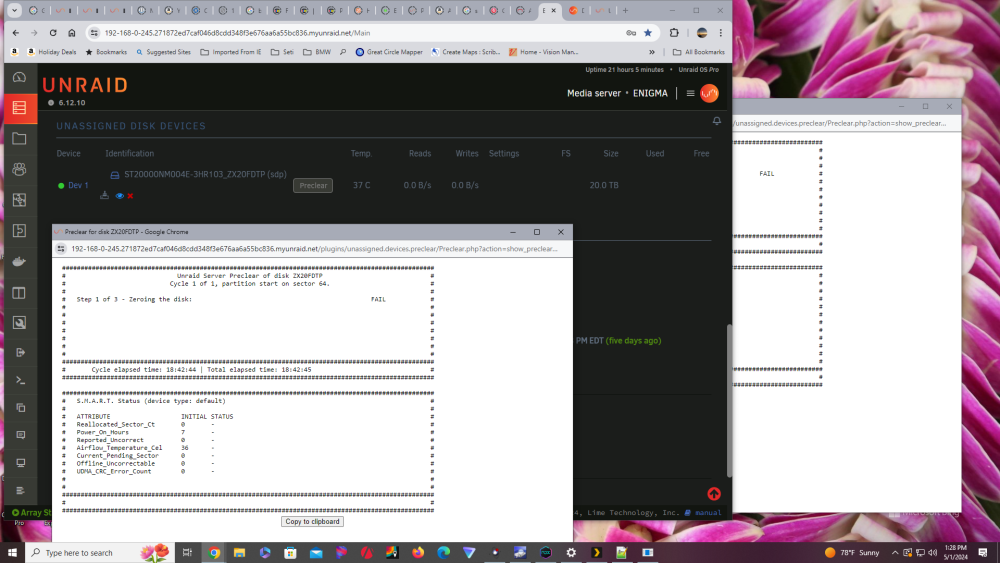
Latest update. New disk 2 has failed at something over 75% @ 18:42:45 Disk 3 failed (12TB) and is being emulated. It has been physically removed. New 20TB drive was physically added to the array. It appears on the preclear page and has the option to preclear. Preclear initiated here. On this second drive I skipped the pre and post reads. Status did NOT show on the main page under UD. There I had the dancing logo. After the preclear started, I had no information unless I used the eye icon. The footer on the main page rarely appeared. But when it did I could find info there. It seems that I had more information as to the progress of the process while it was ongoing. Just looked at the syslog. It looks like the sean of a crime. I think I may need an ambulance. Can you help? IS IT ANOTHER BAD DRIVE OR NOT ? Thank you. enigma-diagnostics-20240501-1433.zip
-
OK Here is my latest diagnostics. Right now preclear IS running on the second drive (75%). But things are different. Compared to 2 months ago. Then everything was very transparent as to what was going on. Now it is not. The current status is hidden and is only available by bringing up the log. That WAS NOT the case 2 months ago. enigma-diagnostics-20240501-0956.zip
-
I've got a similar problem. I'm trying to preclear an EXOS 20TB drive. First one failed after somewhere between 1 and 6 hours. Less than 25% of the way through. So I'm on the next new 20TB drive. Fails in less than an 20 minutes. It tells me to go to UD and clear the drive. UD has had the dancing vertical lines for the past hour. I've cleared drives before. Never had this kind of problem. Now this drive is 2TB larger than my 2 parity drives. ( I have a 12TB failed drive ) I"M NOT GOING TO SLAP THIS INTO A PARITY SLOT WITHOUT A PRECLEAR. WTF HELP UNRAID 6.12.10 TODAY UD.
-
Version 6.12.3 I have NO mover. I've been a user for a little over three years. I've never had to reach out for help, but there's always a first time. Over the last few weeks I've been adding HDs and NVMEs. This also involved some moves. Things seemed to be going well up until the time that I was planning to retire Disk 1 and 2. I still had mover at that point. I moved the share populations, but was left with about 50gb left on both drives. Well I can't remove them yet. While I've tried to figure out what is still living on drives 1 and 2, over a few days, mover quit. Actually I'm surprised it had hung in this long. The adding of NVMEs involved the replacement of my cache drive and the move and replacement of my cache system drive (where that important stuff lives on my system). Well that move was bogging down. It was estimating several days to complete. I jumped in and started moving things manually. Things seemed to survive and mover actually was still working, but not normally. From the main page, the button would depress, it would say it was moving, you couldn't stop the server, but nothing was moving. I was able to get things to move off cache by using the move now button in "Mover Tuning". The next day the move button was still depressed on the main page. At this point rebooted. The last thing I saw on the running startup script said something about missing mover directory and file. Since then no mover at all. I'm a gui only user. I thought about a roll back, but I don't know that would help. Any ideas? I have diagnostic. enigma-diagnostics-20230830-1634.zip
