Lacni
Members
-
Joined
-
Last visited
Everything posted by Lacni
-
Well that's a bummer... I hope this gets fixed soon. I know this problem is mostly visible since I'm currently very low on storage (time to buy an extra drive). Do you perhaps know if XFS has a repo/bug reports/something to keep track of dev? Or if you have any idea of the volume of fixes the XFS teams puts out for every kernel (a lot of fixes per kernel or 1-2 fixes)? Probably the latter.. In the meantime I'll check if future versions of Unraid (kernel upgrades primarily) fixes the problem and report back here if the problem seems to be solved! Thanks a lot for your time on this little investigation!
-
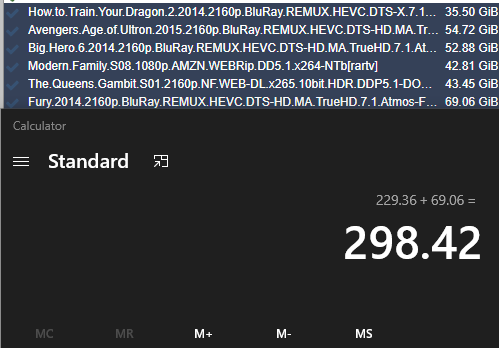
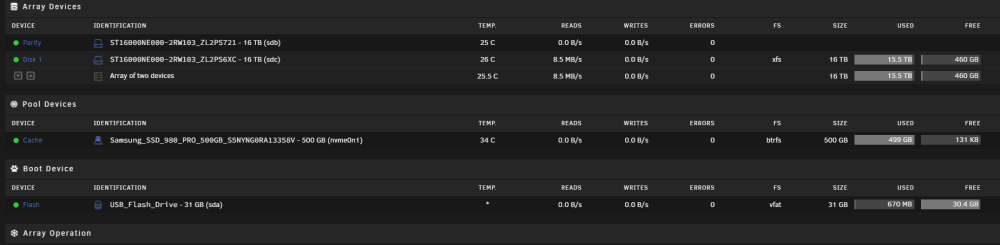
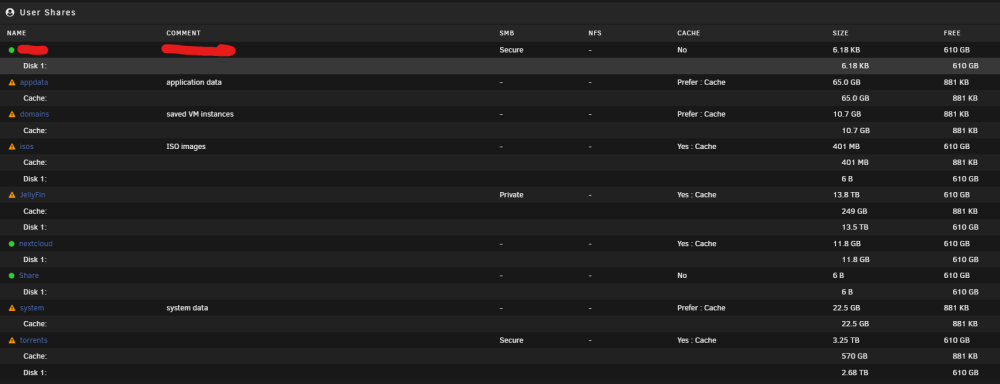
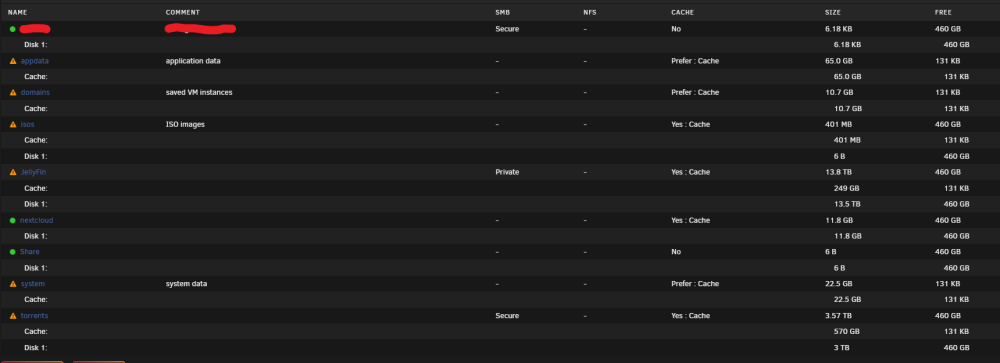
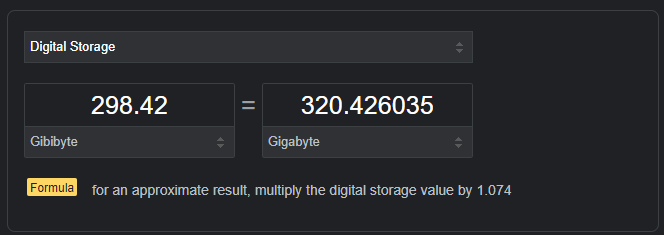
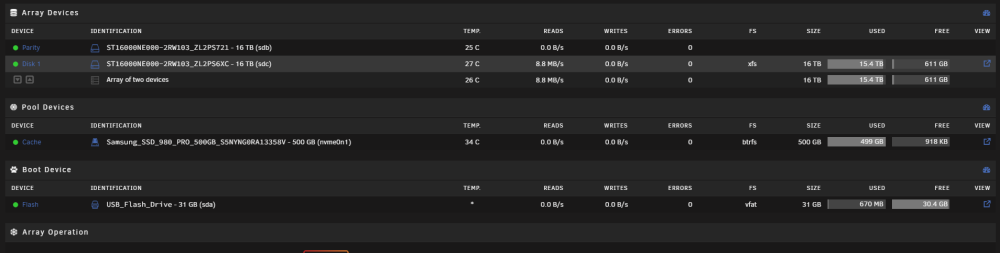
Hi again, just did the test again with, what I think, is every proof I can have. So first off here are the files that I am deleting. I am deleting them straight from the application (qbittorent) Note: I also tried deleting them directly using "rm" inside the console to the same effect so I don't think qbittorent is the culprit/hanging on to ghost files since restarting the should in theory clean them. Note this is in Gibibyte (GiB) Now, here is the before space available (note the FREE space for disk1) Also With the Shares just to be sure (Note the SIZE for the torrents share) (I included everything here just to be sure that I am not overlooking something) Then I deleted the file, and went and watch the FREE size inside the MAIN tab increase. But, the increase fell short of what I expected to gain (~320GB) So now here are the after pictures Only an increase of ~151GB reported from the Main Tab But what I find interesting is that the Share "torrents" SIZE decreased by ~320GB (the expected value) Normally I wouldn't really mind but the mover seems to use the value from the Main Tab and that leaves me with less space than I actually have. Also to reiterate, the FREE space in the Main tab sometimes doesn't increase and sometimes it does (so i'm guessing it calculated the new free space for some files but not all of them). Sorry for the VERY LONG post... I just want to be as thorough and clear as possible to prevent any confusion. Am I crazy? Is there something I'm missing? Something i'm overlooking? I greatly appreciate your help on this Also here are the diagnostic for BEFORE and AFTER the deletion. xandu-diagnostics-20221019-0035_BEFORE.zip xandu-diagnostics-20221019-0036_AFTER.zip
-
I didn't get a before for this (sorry i didn't read you reply before deleting a file) but here is the after. xandu-diagnostics-20221017-1846.zip For the files I deleted I expected a gain of ~350GB but the value of the Free space reported in the "Main" tab only changed by ~30GB
-
Just tried it out again... Had 484GB Free in the Main Tab, deleted a torrent after the seeding was done (60GiB) and checked backed in the Main Tab but still had 484GB of free space. After a reboot just to make sure, still 484GB. The space was never reclaimed from the UI (which affects the mover since when it gets low on free space, it can't move files). But again, to be clear, the space DOES go down when I check from the terminal using the "du" command. It is just never updated inside de UI (but this does affect the space Unraid thinks it has).
-
No the plugin is not installed Yes I tried refreshing, even rebooting the whole machine but the "free space" shown from the "Main" Tab doesn't change.
-
Well i stand corrected. Can you explain why when I delete some files the free space reported by the GUI is never corrected? Does Unraid not update the GUI directly? For exemple, if I delete a 50GB file, sometime the free space reported is updated directly and sometime its never updated.
-
I don't know if Unraid shows the size in TiB but (i think) "du" shows it in TB. And even that when i delete something, the "du" given size changes appropriately but the size reported by the GUI doesn't change at all.
-
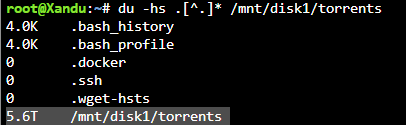
There is a strange disparity between the space occupied by a Share reported from the GUI ("Share tab") and the one reported from using the command "du -hs" on the share folder using the terminal GUI: 6.11 TB Terminal (du): 5.6 TB I know the correct size should be 5.6 TB and I don't know how Unraid is calculating the size. I encountered the problem while deleting some torrents that were done seeding and seeing that the disk space was not reclaimed (from the UI). I tried restarting the Array, restarting Unraid, checking hidden folder/files (none exists) but nothing seems to be willing to reclaim the affected space. There is also a weird issue that might be related to this. When I try to shutdown the array, the GUI is stuck with "UNMOUNTING DISKS...RETRY UNMOUNTING DISK SHARE(S)...". I checked with the terminal using "lsof /mnt/disk1" and their is a process stuck on the particular folder of the share "/mnt/disk1/torrents". I don't know what this process is or what it's trying to do but after waiting for a while, the process never finishes. The process "bash 15604 root cwd DIR 9,1 16384 8852952887 /mnt/disk1/torrents" My drives configuration is: 1X 500GB cache drive 2X 16TB HDD (1 for parity and 1 for storage) Inside the syslog we can see the umount failing and finally succeeding when I manually killed the hanging process. Thank you for your time. xandu-syslog-20221015-2030.zip